
Introduction
Contentsquare is an experience intelligence platform that helps you understand what customers do, where they struggle, what they say, and how digital experience problems affect conversion, revenue, engagement, and retention.
This breadth is Contentsquare’s main advantage. You can discover an unexpected journey, isolate a high-friction segment, watch relevant sessions, quantify the commercial impact, review customer feedback, and share evidence with product or engineering teams without rebuilding the investigation across several disconnected tools.
This Contentsquare review examines behavioral analytics, Smart Capture, session replay, heatmaps, product analytics, monitoring, Voice of Customer, Sense AI, pricing, implementation, integrations, security, customer feedback, and the strongest alternatives.
How We Evaluated Contentsquare
The evaluation follows a practical digital optimization workflow. It begins with data collection and setup, then assesses journey discovery, page and element analysis, qualitative evidence, product behavior, technical monitoring, customer feedback, AI assistance, collaboration, governance, pricing, and scalability.
Quick Assessment
Contentsquare Review Summary
Contentsquare is one of the strongest platforms for connecting digital behavior with business impact. Its visual journey tools, advanced heatmaps, session replay, automatic capture, frustration analysis, product analytics, monitoring, and feedback capabilities can serve product, UX, ecommerce, marketing, data, engineering, and customer-experience teams from one shared environment.
Contentsquare at a Glance
| Category | Contentsquare Assessment |
| Best For | Mid-size and enterprise teams optimizing complex web, product, mobile, and ecommerce experiences |
| Overall Score | 9.1/10 |
| Ease of Use | 8.2/10 |
| Experience Analytics | 9.7/10 |
| Product Analytics | 9.0/10 |
| Session Replay | 9.5/10 |
| AI Capabilities | 9.3/10 |
| Experience Monitoring | 9.2/10 |
| Starting Price | Free plan; Growth starts at $49 monthly or $39 per month with annual billing |
| Main Strength | Connects behavior, feedback, technical friction, and business impact |
| Main Limitation | Advanced packaging, pricing, and implementation can be complex |
Recommendation: Contentsquare is easy to recommend when you need more than a dashboard that reports what changed. It is designed to help you explain why performance changed, estimate what the issue costs, and decide what to fix first. Smaller teams should test the Free or Growth plan, while enterprise buyers should evaluate modules and usage allowances against a defined set of optimization workflows.
Platform Overview
What Is Contentsquare?
Contentsquare is an AI-powered experience intelligence platform for analyzing customer behavior across websites, digital products, mobile applications, support conversations, surveys, and other experience signals.
How Contentsquare Fits in Your Analytics Stack
Contentsquare usually complements rather than replaces every analytics system. Google Analytics 4 or Adobe Analytics can remain the source for traffic acquisition, attribution, and standard digital reporting. A warehouse can continue to serve finance, operations, CRM, and executive BI.
Contentsquare adds the experience layer. It helps you see how visitors navigate, how they interact with individual elements, what errors they encounter, why they abandon a flow, and which problems create the greatest business impact.
Who Should Use Contentsquare?
- Ecommerce teams: Improve navigation, merchandising, product discovery, checkout, and conversion.
- Product teams: Analyze onboarding, adoption, engagement, retention, and cross-session journeys.
- UX teams: Validate designs through heatmaps, replay, journeys, interviews, and surveys.
- Technical teams: Investigate errors, performance issues, crashes, and user-reported problems.
- Enterprise organizations: Give several teams a shared view of digital experience and business impact.
Who May Prefer a Simpler Tool?
Smaller websites may receive enough insight from GA4, Microsoft Clarity, or a basic heatmap product. Product-led SaaS teams that mainly need event segmentation, cohorts, and experimentation may prefer Amplitude or Mixpanel.
Key Features
Experience Analytics, Product Insights, Monitoring, and AI
Contentsquare’s feature set is designed around a complete investigation. You begin with an outcome or anomaly, isolate the affected journey, examine visual evidence, estimate impact, and route the finding to the team that can act.
Smart Capture and Retroactive Analysis
Smart Capture automatically records supported interactions such as clicks, taps, swipes, scrolls, screen views, and form activity across web and mobile environments. This reduces the need to predict every future question and manually tag every interface element.
The practical advantage is retroactive analysis. When a product manager asks about a behavior that was not defined as an event months earlier, the underlying interaction data may already exist. You can define the event or funnel later and analyze historical behavior.
Journey Analysis and Funnels
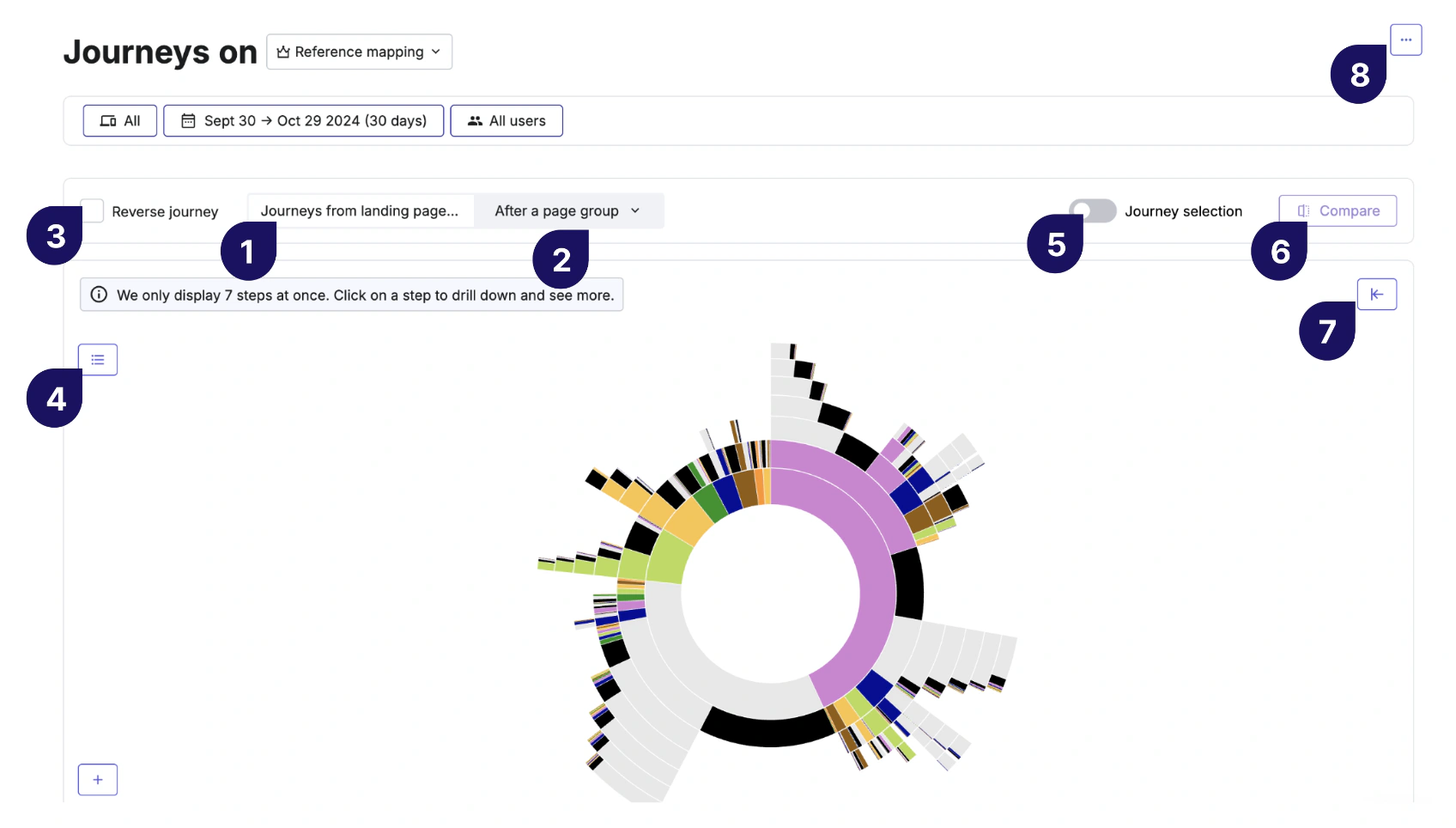
Journey Analysis visualizes how users move through a site or application from entry to exit. The sunburst-style view makes unexpected paths, loops, exits, and alternate routes easier to see than a conventional table.
Funnels provide a more structured view of progress through steps such as landing, product discovery, cart, checkout, registration, onboarding, or subscription activation. You can segment the journey by device, traffic source, user type, page group, or other available criteria.
Heatmaps, Zoning, and CS Live

Contentsquare provides standard heatmaps for clicks, taps, hover activity, scrolling, and attention. Zone-based heatmaps go further by connecting page elements with behavioral and commercial outcomes.
You can compare zones based on exposure, attractiveness, interaction, conversion, revenue contribution, or other relevant metrics. This helps you evaluate whether a hero banner, navigation item, product card, call to action, or promotional placement creates value rather than merely receiving clicks.
Session Replay and AI Summaries
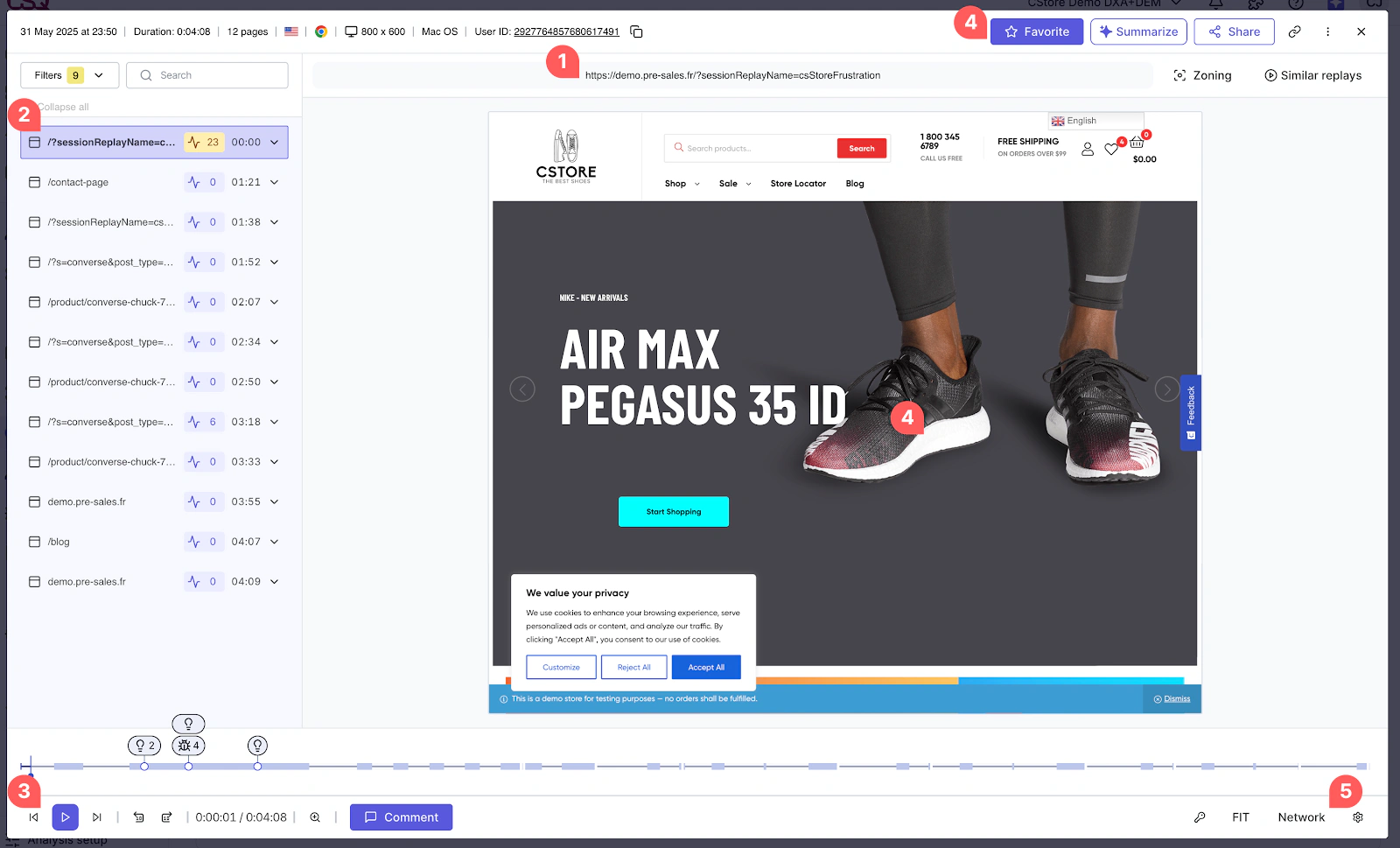
Session Replay reconstructs individual web and mobile experiences, including navigation, clicks, scrolling, interactions, errors, and frustration signals. Filters help you focus on sessions connected to a particular page, funnel step, segment, error, survey response, or business outcome.
AI-powered replay summaries reduce the need to watch every recording from beginning to end. The system can highlight notable behavior and potential issues, with links to relevant moments in a session.
Impact Quantification and Frustration Score
Impact Quantification is one of Contentsquare’s strongest enterprise capabilities. It estimates how an issue, behavior, page, or segment relates to conversion, goal completion, bounce rate, revenue, and other business outcomes.
Frustration Score identifies journeys where users encounter signals such as repeated clicks, ineffective interactions, errors, slow responses, or confusing navigation. You can then move into session evidence and determine whether the problem is widespread, commercially important, and actionable.
Product Analytics and Cross-Session Behavior
Contentsquare Product Analytics builds on Heap’s automatic capture and event analysis. It supports feature adoption, funnels, retention, activation, engagement, cross-session journeys, segmentation, and mobile product behavior.
Experience Monitoring
Experience Monitoring helps technical and digital teams identify JavaScript errors, API problems, app crashes, slow pages, poor web performance, and other sources of user friction.
It does not replace full application performance monitoring for infrastructure, servers, databases, and backend traces. It adds the customer-facing experience context that traditional APM tools may not provide.
Voice of Customer
Voice of Customer includes surveys, feedback collection, NPS-style programs, exit-intent questions, concept testing, interviews, and unmoderated research workflows.
Conversation Intelligence
Conversation Intelligence, powered by technology from Loris, analyzes customer interactions across chat, email, voice, and human or AI-handled support experiences.
It can surface contact drivers, sentiment, resolution patterns, quality issues, agent performance, escalation risk, and opportunities for automation. For product and digital teams, support conversations can reveal emerging bugs, confusing policies, feature gaps, and churn signals before they become visible in aggregate analytics.
Sense AI, Sense Analyst, and MCP
Sense is the AI layer across Contentsquare. It supports natural-language questions, automated mapping assistance, replay and heatmap summaries, anomaly discovery, performance explanations, and recommended next steps.
Contentsquare also provides an MCP connection for supported AI tools such as ChatGPT, Claude, Microsoft Copilot, Cursor, and other compatible environments. This lets teams query Contentsquare context inside existing AI workflows, subject to setup, permissions, and tool-call limits.
Contentsquare Feature Overview
| Feature Area | What Contentsquare Provides | Best For |
| Experience Analytics | Journeys, funnels, heatmaps, zoning, replay, page comparison, and web analytics | Conversion and UX optimization |
| Product Analytics | Smart Capture, events, feature adoption, funnels, retention, and cross-session journeys | Product and growth teams |
| Experience Monitoring | Error analysis, speed analysis, alerts, frustration signals, and technical replay context | Engineering, support, and digital operations |
| Voice of Customer | Surveys, feedback, interviews, testing, AI summaries, and sentiment analysis | Research and customer insight |
| Conversation Intelligence | Conversation drivers, sentiment, QA, agent analytics, and support trends | Customer service and retention teams |
| AI and Agents | Sense, Sense Analyst, automated summaries, mapping assistance, newsroom, and MCP | Faster self-service investigation |
| Data and Activation | Integrations, APIs, Data Connect, warehouse export, segments, and collaboration tools | Connected analytics workflows |
Pros and Cons
Benefits and Limitations
Positive
✅ Excellent journey and visual analytics
✅ Strong business-impact prioritization
✅ Broad connected platform
✅ Generous free plan
Negative
❌ Advanced packaging is complex
❌ Enterprise pricing lacks transparency
❌ Broad interface needs training
❌ Privacy setup requires care
✅ Contentsquare Pros
- Journey Analysis, Zoning, heatmaps, and replay provide excellent visual context.
- Impact Quantification helps prioritize issues by conversion and revenue consequences.
- Smart Capture reduces dependence on perfect upfront event instrumentation.
- Experience Monitoring connects technical problems with affected users and outcomes.
- Behavior, feedback, product usage, conversations, and AI share one platform direction.
❌ Contentsquare Cons
- Different products, plans, allowances, and add-ons make commercial evaluation difficult.
- Pro and Enterprise pricing requires a sales process and contract review.
- New users can feel overwhelmed by mappings, objectives, filters, and analysis options.
- Session replay, text capture, and cross-session identity require careful privacy controls.
- Smaller teams may not use enough of the platform to justify advanced costs.
Getting Started
Implementation, Mapping, and Team Adoption
Basic web deployment begins with the Contentsquare tag, commonly added directly, through a tag manager, or through a supported integration. Mobile implementations use SDKs and require release planning, testing, privacy review, and application-specific configuration.
Recommended Contentsquare Implementation Process
- Choose two or three high-value journeys, such as checkout, registration, or onboarding.
- Define success metrics, commercial outcomes, and the teams responsible for changes.
- Implement the tag or SDK in a testing environment before broad production rollout.
- Configure consent, masking, blocking, text capture, user identification, and IP rules.
- Create page groups, goals, events, and segments with consistent naming standards.
- Validate Journey Analysis, heatmaps, replays, funnels, and error data against reality.
- Build a recurring workflow for finding, quantifying, assigning, and reviewing issues.
- Expand into Product Analytics, monitoring, VoC, or Conversation Intelligence only when needed.
Ease of Use by Role
UX, ecommerce, product, and marketing users can receive quick value from heatmaps, replay, CS Live, journeys, and AI summaries. The visual interface is easier to interpret than raw event tables, particularly when page structure and revenue are central.
Support and Education
Contentsquare provides documentation, product tours, training resources, community content, and support options. Enterprise onboarding and customer-success services depend on the selected contract.
Performance and Scalability
Data Volume, Governance, and Operational Scale
Session Allowances and Sampling
Experience Analytics pricing is influenced by captured sessions. When an allowance is exhausted, new data may stop collecting until the billing cycle resets or the plan is upgraded.
Mappings and Analytics Governance
Page groups and mappings turn dynamic URLs and screens into stable analytical categories. Poor mapping creates fragmented journeys, while overly broad groups can hide meaningful differences.
Data Connect and Warehouse Workflows
Data Connect can stream Contentsquare behavioral data into a warehouse for broader modeling, governance, and reporting. This is useful when you need to combine digital experience signals with CRM, transaction, support, inventory, subscription, or financial data.
Practical Scalability Checklist
- Model session volume using peak traffic, not only monthly averages.
- Separate production, staging, regional, and brand environments appropriately.
- Standardize page groups, goals, segments, and naming conventions.
- Review replay sampling, data retention, and AI limits before signing.
- Track whether identified issues are assigned, fixed, and measured after release.
- Remove outdated dashboards, mappings, segments, and duplicate investigations.
Real-World Use Cases
Where Contentsquare Creates the Most Value
Ecommerce Conversion and Checkout Optimization
You can analyze how visitors move from landing pages to categories, products, carts, checkout steps, and completed orders. Zoning shows which page elements contribute to engagement or revenue, while replay and error analysis reveal problems behind abandonment.
Product Onboarding and Feature Adoption
Product teams can evaluate activation paths, time to value, feature discovery, repeated engagement, and retention across segments or devices. Smart Capture helps answer new questions without waiting for a fresh instrumentation cycle.
UX Research and Design Validation
Design teams can combine heatmaps, Journey Analysis, replays, surveys, interviews, and concept testing. This creates a useful balance between broad behavioral patterns and direct customer explanation.
Technical Issue Prioritization
Support and engineering teams can search for a reported user, inspect the session, review associated errors, determine how many other users were affected, and estimate the impact on conversion.
Digital Marketing and Landing Pages
Marketing teams can compare acquisition segments after the click. Instead of stopping at campaign conversions, you can see how paid, organic, email, affiliate, or social visitors navigate, interact with page content, and encounter friction.
What Users Say About Contentsquare
Verified users commonly praise the depth of Journey Analysis, heatmaps, session replay, visual reporting, and the ability to investigate customer problems without waiting for a specialist analyst.
Pricing and Plans
How Much Does Contentsquare Cost?
Contentsquare offers Free, Growth, Pro, and Enterprise plans across products such as Experience Analytics, Product Analytics, and Voice of Customer. This structure gives you flexibility, but it also means the total price depends on the products, traffic allowances, advanced capabilities, retention, services, and add-ons you select.
Contentsquare Pricing Plans
| Plan | Current Price Reference | Best For |
| Free | $0; Experience Analytics includes up to 200,000 monthly sessions and 10,000 replays | Individuals, startups, smaller websites, and evaluation |
| Growth | Starts at $49 monthly or $39 per month billed annually | Growing teams needing advanced journeys, zoning, comparisons, and longer analysis |
| Pro | Custom pricing | Organizations needing advanced impact, integrations, monitoring, controls, and scale |
| Enterprise | Custom pricing | Large, regulated, global, or multi-team deployments |
| Add-ons and Products | Custom or product-specific pricing | Sense Analyst, advanced monitoring, Conversation Intelligence, and broader suites |
Contentsquare Free
The Free plan offers a meaningful way to evaluate experience analytics with live traffic. It includes heatmaps, session replay, surveys, basic funnels, selected monitoring, standard filters, dashboards, core integrations, and AI-supported capabilities.
Contentsquare Growth
Growth is the self-service paid tier for teams that need more advanced analysis. Current positioning includes capabilities such as Journeys, zone-based heatmaps, CS Live, Page Comparator, side-by-side comparisons, AI summaries, higher limits, and longer access to data.
Contentsquare Pro
Pro targets larger teams that need advanced impact analysis, integrations, monitoring, alerts, and organizational controls. Pricing is custom.
Contentsquare Enterprise
Enterprise supports the most demanding deployments, including large traffic volumes, several brands or regions, stronger governance, security requirements, mobile analytics, and enterprise support.
Hidden and Indirect Costs
Total cost may include implementation, mobile SDK work, privacy review, mapping design, training, consulting, data exports, warehouse processing, integrations, ongoing administration, and the internal effort required to act on findings.
Connected Workflows
Integrations, APIs, and Data Connections
Analytics and Experimentation Integrations
Contentsquare connects with analytics and testing platforms such as Google Analytics, Adobe Analytics, Mixpanel, Optimizely, AB Tasty, and other ecosystem partners. These integrations help you segment experience data by campaign, audience, experiment, or digital outcome.
Collaboration and Issue Management
Integrations with Jira, Slack, Microsoft Teams, and related work tools help teams share replays, errors, findings, and evidence where decisions and engineering work already happen.
Customer Experience and Support Systems
Voice of Customer and Conversation Intelligence can connect with survey, customer-service, chat, CRM, and experience-management environments. Relevant categories include Qualtrics, Medallia, Zendesk, Intercom, Salesforce, and other service platforms.
APIs, Data Connect, and MCP
APIs and Data Connect support inbound context, outbound experience data, custom workflows, and warehouse exports. MCP provides a newer route for accessing governed Contentsquare insights through compatible AI agents and development environments.
Data Protection
Security, Privacy, and Enterprise Controls
Contentsquare maintains a public trust portal and documents ISO 27001, ISO 27017, ISO 27018, and ISO 27701 certifications, along with a SOC 2 Type II report. The company also provides privacy, data-processing, subprocessor, and regional compliance resources.
Privacy and Session Replay Controls
Session replay requires deliberate configuration. You should review masking, text capture, input blocking, page exclusions, consent requirements, sampling, user identification, retention, and access permissions before production deployment.
Access and Governance
- Role and subscription permissions for controlling product access.
- Project-level organization for brands, applications, regions, or environments.
- Enterprise authentication and governance features based on the selected agreement.
- Data masking, IP blocking, consent management, and privacy-request processes.
- Trust documentation for certifications, subprocessors, and security review.
AI Data Considerations
Contentsquare says customer data is not used to train the third-party models powering its AI features. Buyers should still review model providers, retention, permissions, and MCP access.
Comparison
Contentsquare Alternatives
The best Contentsquare alternative depends on whether you prioritize session replay, enterprise journey intelligence, product analytics, in-app adoption, or lower-cost behavioral analysis.
Contentsquare Alternatives Compared
| Platform | Main Strength | Best Fit |
| Contentsquare | Experience intelligence connected with impact, monitoring, feedback, and AI | Complex digital businesses and enterprise teams |
| Fullstory | High-fidelity replay and digital experience diagnosis | Product, support, UX, and engineering teams |
| Glassbox | Enterprise journey analytics and digital experience monitoring | Large regulated and customer-service-heavy organizations |
| Amplitude | Deep product analytics connected with experimentation | Product-led and data-mature digital businesses |
| Pendo | Product adoption, guides, feedback, and roadmaps | B2B SaaS and digital adoption programs |
| Mixpanel | Fast event, funnel, retention, and cohort analysis | SaaS, mobile, and growth teams |
Contentsquare vs Fullstory
Fullstory is a close alternative when session replay, frustration signals, debugging context, and rapid qualitative investigation are the main requirements.
Contentsquare provides stronger journey visualizations, business-impact quantification, merchandising, Voice of Customer, and broader enterprise experience intelligence. Fullstory may feel more focused for teams that want replay-led diagnosis without adopting as many adjacent products. Read our Fullstory review.
Contentsquare vs Glassbox
Glassbox competes directly in enterprise digital experience analytics, journey analysis, replay, mobile experience, technical monitoring, and customer-service investigation.
Both products suit large organizations. Contentsquare stands out for visual zoning, impact quantification, integrated product analytics, and the breadth created by Hotjar, Heap, and Loris capabilities. Glassbox deserves consideration when enterprise session intelligence, compliance requirements, and contact-center workflows are central.
Contentsquare vs Amplitude
Amplitude is usually the stronger choice for event-based product analytics, behavioral cohorts, retention, feature experimentation, feature flags, and product-growth workflows.
Contentsquare is stronger for page-level experience, visual journeys, merchandising, frustration, technical impact, feedback, and enterprise website optimization. Read our Amplitude Analytics review.
Contentsquare vs Pendo
Pendo connects product analytics with in-app guides, onboarding, announcements, NPS, discovery, and roadmapping.
Choose Pendo when the primary goal is changing behavior inside a B2B software product. Choose Contentsquare when you need broader experience intelligence across marketing sites, ecommerce, products, mobile apps, errors, customer feedback, and commercial impact. See our Pendo review.
Contentsquare vs Mixpanel
Mixpanel provides a focused self-service workflow for event trends, funnels, paths, retention, cohorts, and user behavior.
Mixpanel may be easier to implement and justify for a product team with clearly defined events. Contentsquare offers a wider experience platform and stronger visual analysis for customer journeys and page elements. Read our Mixpanel review.
For a wider comparison of web, product, and customer analytics categories, review the best analytics tools.
Final Thoughts
Is Contentsquare Worth It?
Contentsquare is worth considering when digital experience quality has a measurable effect on conversion, revenue, retention, service demand, or customer loyalty.
Its strongest advantage is the connection between discovery and prioritization. You can find an unexpected path, isolate a frustrated segment, review the experience, identify a technical or design cause, estimate the impact, and send evidence to the responsible team.
The platform is particularly strong for enterprise ecommerce, retail, travel, financial services, telecommunications, marketplaces, and mature digital products. Smart Capture, Journey Analysis, Zoning, replay, impact quantification, monitoring, VoC, Conversation Intelligence, Sense AI, and warehouse connections create a comprehensive optimization environment.
Choose Contentsquare when you need a shared experience intelligence platform with strong visual analytics and commercial prioritization. Consider Fullstory for replay-led diagnosis, Glassbox for an enterprise alternative, Amplitude or Mixpanel for focused product analytics, and Pendo for product adoption and in-app guidance.
Frequently Asked Questions
Have More Questions?
What is Contentsquare?
Contentsquare is an experience intelligence platform that combines journey analytics, heatmaps, session replay, product analytics, experience monitoring, customer feedback, conversation intelligence, and AI-assisted analysis.
Is Contentsquare free?
Yes. Contentsquare offers a free plan. Its Experience Analytics allowance currently includes up to 200,000 monthly sessions and 10,000 session replay captures.
How much does Contentsquare cost?
The Free plan costs $0. Growth starts at $49 monthly or $39 per month with annual billing. Pro, Enterprise, advanced products, and add-ons use custom pricing.
What is Contentsquare best used for?
Contentsquare is best used for optimizing customer journeys, conversion, ecommerce experiences, product adoption, UX, technical performance, and digital customer satisfaction.
Does Contentsquare include session replay?
Yes. Session Replay lets you inspect individual web and mobile experiences and connect them with journeys, funnels, errors, frustration, feedback, and business outcomes.
What is Contentsquare Smart Capture?
Smart Capture automatically collects supported user interactions across web and mobile, reducing manual tagging and enabling teams to define and analyze behaviors retroactively.
Does Contentsquare include product analytics?
Yes. Contentsquare Product Analytics includes automatic capture, funnels, feature adoption, retention, segmentation, and cross-session journey analysis based partly on Heap technology.
How does Contentsquare use AI?
Sense AI supports natural-language analysis, automated summaries, journey and mapping assistance, anomaly discovery, recommendations, scheduled insights, and connections through MCP.
Is Contentsquare secure?
Contentsquare documents ISO 27001, ISO 27017, ISO 27018, and ISO 27701 certifications and a SOC 2 Type II report. Security also depends on your privacy and access configuration.
What are the best Contentsquare alternatives?
Leading alternatives include Fullstory for replay-led diagnosis, Glassbox for enterprise experience analytics, Amplitude and Mixpanel for product analytics, and Pendo for product adoption.