
Introduction
Adobe Analytics is an enterprise digital analytics platform for organizations that need more control over website and mobile-app measurement than standard reporting tools provide.
Its main strengths are advanced segmentation, flexible attribution, customizable analysis, high-volume collection, raw-data exports, and integration with the Adobe ecosystem. You can investigate conversion paths, campaigns, content, products, and audience behavior without relying on fixed dashboards.
The tradeoff is complexity. A dependable implementation needs a measurement architecture, technical tagging expertise, governed variables and report suites, trained analysts, and an enterprise budget.
Adobe Analytics also differs from Customer Journey Analytics. The former remains Adobe’s established web and mobile analytics product, while the latter is the newer Experience Platform-based option for combining online and offline data across channels.
This Adobe Analytics review covers Analysis Workspace, segmentation, attribution, journeys, AI, exports, implementation, pricing, security, integrations, 2026 updates, and alternatives.
How We Evaluated Adobe Analytics
The evaluation follows the enterprise analytics lifecycle, from collection and data modeling to exploration, attribution, reporting, export, governance, privacy, and administration.
It draws on current Adobe documentation, release notes, legal product descriptions, security materials, pricing guidance, and recurring themes in verified customer feedback.
Quick Assessment
Adobe Analytics Review Summary
Adobe Analytics remains one of the most capable platforms for enterprise web and mobile analysis. It is especially strong when you need to build custom reporting logic around complex marketing channels, persistent conversion variables, multiple brands, large data volumes, and strict governance requirements.
Analysis Workspace is the center of the experience. It gives analysts a flexible canvas for combining freeform tables, segments, calculated metrics, attribution models, fallout reports, flow analysis, cohort tables, and visualizations. Recent additions such as Journey canvas, sub-hit analysis, and production MCP servers have also modernized the platform.
Adobe Analytics is best suited to large retailers, financial services companies, travel brands, media businesses, telecommunications providers, and global enterprises with dedicated analytics and implementation resources.
It is difficult to recommend for startups, small businesses, or teams that mainly need simple traffic reports. It is also less complete than experience-analytics platforms when you need session replay, heatmaps, or visual frustration analysis without another product.
Adobe Analytics at a Glance
| Category | Adobe Analytics Assessment |
| Best For | Large organizations with complex web, mobile, marketing, and governance requirements |
| Overall Score | 8.8/10 |
| Ease of Use | 6.9/10 |
| Analysis and Segmentation | 9.7/10 |
| Attribution | 9.4/10 |
| AI and Automation | 8.4/10 |
| Data Governance | 9.3/10 |
| Value for Money | 7.3/10 |
| Starting Price | Custom quote |
| Main Strength | Highly flexible enterprise analysis, attribution, and data control |
| Main Limitation | Implementation complexity, specialist skills, and opaque pricing |
Recommendation: Adobe Analytics is a strong choice when your organization has a mature measurement program and needs more customization than free or product-led analytics tools can provide. Before purchasing, compare the classic platform with Adobe Customer Journey Analytics and model the full cost of implementation, training, server calls, reporting capacity, and add-ons.
Platform Overview
What Is Adobe Analytics?
Adobe Analytics collects and processes behavioral data from websites, mobile applications, servers, and supported integrations. Analysts explore that data in Analysis Workspace using dimensions, metrics, segments, calculated metrics, date ranges, panels, and visualizations.
The platform uses a mature variable model. Conversion variables, traffic variables, success events, products, classifications, processing rules, marketing channels, and report suites give enterprises extensive control over how interactions are recorded and interpreted.
Adobe Analytics vs Customer Journey Analytics
Adobe Analytics focuses primarily on owned web and mobile experiences. Customer Journey Analytics uses Adobe Experience Platform datasets to analyze broader customer journeys across digital and offline sources.
Customer Journey Analytics is usually the more strategic option when you need identity stitching, warehouse-style data preparation, cross-channel analysis, or Adobe’s broader AI Assistant experience. Adobe Analytics remains relevant when you have a substantial existing implementation, need its mature reporting model, or mainly optimize websites and apps.
Where Adobe Analytics Fits in Your Data Stack
Adobe Analytics usually acts as the governed behavioral measurement layer. Data arrives through Web SDK, Adobe Tags, mobile SDKs, APIs, server-side collection, or integrated Adobe products.
Teams can analyze data in Workspace, export hit-level records through Data Feeds, schedule reports through Data Warehouse, use APIs for automated reporting, and connect audiences or insights with other Experience Cloud products.
Who Should Use Adobe Analytics?
- Large digital businesses: Complex sites, apps, brands, regions, and conversion journeys.
- Enterprise analytics teams: Analysts needing granular segments, attribution, and custom reporting.
- Adobe customers: Organizations already using Target, Campaign, Audience Manager, or Experience Platform.
- Regulated organizations: Teams that need formal governance, access controls, and established compliance programs.
Who May Prefer Another Platform?
Smaller teams may find Adobe Analytics expensive and difficult to administer. A product analytics platform may also be better for event-first SaaS analysis, while a BI tool is better for finance and operational reporting.
For broader comparisons, review the best analytics tools and best business intelligence software.
Key Features
Analysis Workspace, Attribution, Journeys, and AI
Adobe Analytics delivers its value through flexible analysis rather than fixed dashboards. Analysts control how data is segmented, attributed, visualized, exported, and governed.
Analysis Workspace and Freeform Reporting
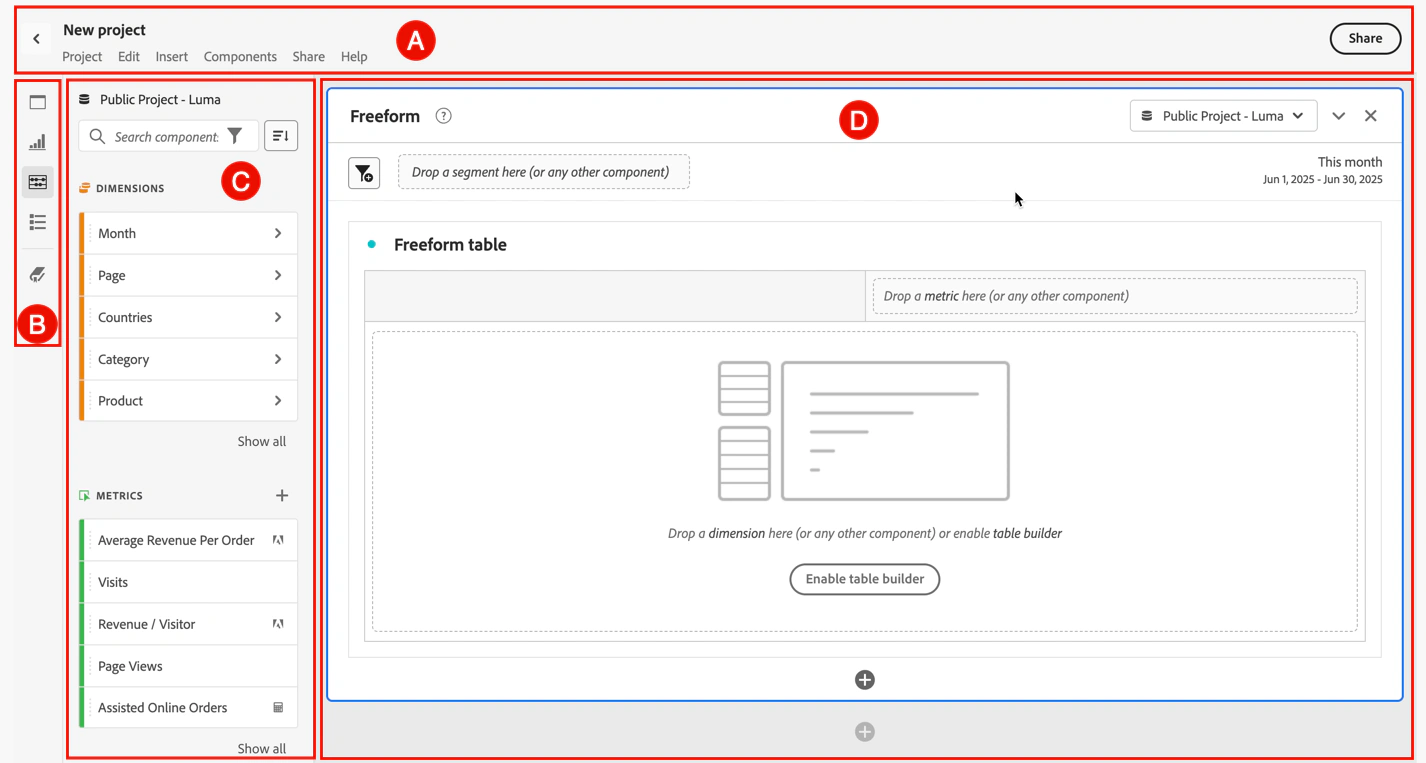
Analysis Workspace is the main reporting environment. You can combine dimensions, metrics, segments, and date ranges in freeform tables, then add trends, bars, maps, scatterplots, cohort tables, and summary visualizations.
Panels help separate markets, report suites, periods, or business questions in one project. Templates and Quick Insights help beginners, but the platform rewards analysts who understand the underlying data model.
Advanced Segmentation and Calculated Metrics
Segments can filter at visitor, visit, or hit level. You can compare first-time purchasers, returning subscribers, campaign audiences, or users who completed one action but missed another.
Calculated metrics create reusable KPIs such as conversion rates, average values, indexed scores, and segmented measures without changing the implementation.
Funnels, Flow, Cohorts, and Journey Canvas
Fallout shows progress through defined steps, Flow reveals paths before or after an interaction, and cohort tables compare repeated behavior among groups with a shared starting condition.
Journey canvas, added to Adobe Analytics in 2026, offers a flexible node-based view for arranging events, segments, and dimension items while examining progression and abandonment.
Sub-Hit Product Analysis
A 2026 ecommerce enhancement allows segmentation of individual products within a hit. This helps isolate purchased, discounted, returned, or viewed products without including unrelated items from the same transaction.
Attribution IQ and Marketing Channels
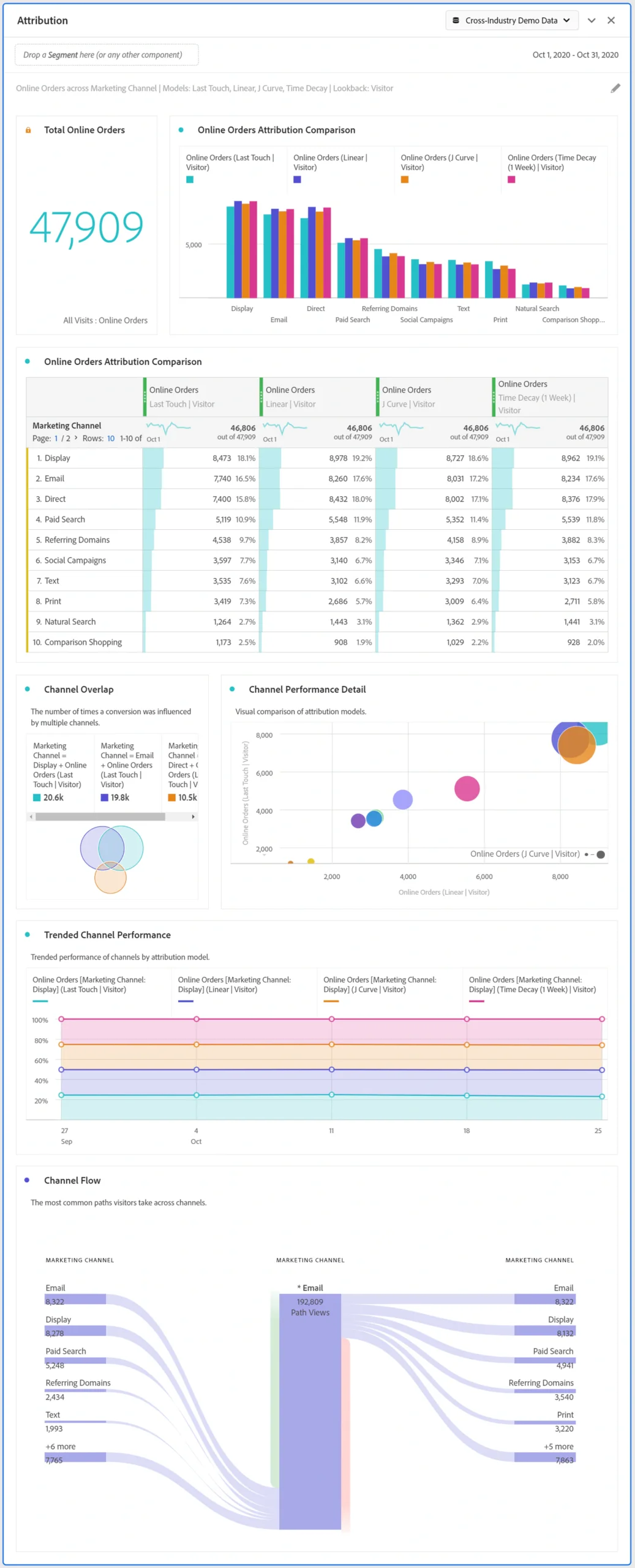
Attribution IQ applies supported models at report time, including first touch, last touch, linear, participation, time-decay, and algorithmic approaches. Configurable lookback windows let you test how channel credit changes.
Marketing Channels classifies traffic into paid search, organic search, email, affiliates, social, direct, referrals, and custom groups. The flexibility is valuable, but poorly designed processing rules can distort reports.
Anomaly Detection, Contribution Analysis, and Alerts
Anomaly detection flags metrics that move beyond expected ranges, while intelligent alerts notify teams about defined conditions. Contribution Analysis helps identify dimension items associated with a change, subject to package entitlements and token limits.
Activity Map and On-Page Interaction Analysis
Activity Map overlays link engagement on supported webpages. It helps content and merchandising teams compare interactions by page or audience, although it does not replace full session replay.
MCP Servers and Agentic Analytics
Adobe introduced production MCP servers for Adobe Analytics in 2026. Supported clients can retrieve governed data, run queries, and use results in LLM or agentic workflows.
This should not be confused with the broader AI Assistant experience in Customer Journey Analytics. Permissions, definitions, and human validation remain essential.
Report Builder and Scheduled Reporting
The current Report Builder add-in sends Adobe Analytics data to Microsoft Excel for recurring reports. Adobe retired the legacy add-in in June 2026, so older workbooks should be migrated. Workspace projects can also be shared, downloaded, or scheduled.
Data Warehouse, Data Feeds, and APIs
Data Warehouse creates filtered scheduled reports, while Data Feeds exports raw hit-level data to supported cloud destinations. Analytics 2.0 APIs support programmatic reporting and administration.
Organizations still using API 1.4 or WSSE authentication must migrate because those services reach end of life on August 12, 2026.
Adobe Analytics Feature Overview
| Feature Area | What Adobe Analytics Provides | Best For |
| Analysis | Freeform tables, panels, visualizations, segments, and calculated metrics | Custom enterprise reporting |
| Journey Analysis | Fallout, Flow, cohorts, next or previous analysis, and Journey canvas | Conversion and path investigation |
| Attribution | Attribution IQ, marketing channels, lookback windows, and model comparison | Campaign and conversion credit |
| Automation | Anomaly detection, intelligent alerts, and Contribution Analysis | Finding unexpected changes |
| On-Page Analysis | Activity Map link overlays and page-level interaction context | Content and navigation optimization |
| AI Connectivity | MCP servers for supported LLM and agentic workflows | Conversational and automated queries |
| Data Access | Report Builder, Data Warehouse, Data Feeds, dashboards, and APIs | Exports and downstream reporting |
| Governance | Report suites, virtual report suites, component curation, roles, and permissions | Enterprise control |
Pros and Cons
Adobe Analytics Benefits and Limitations
Positive
✅ Exceptional segmentation depth
✅ Flexible enterprise reporting
✅ Strong attribution and exports
✅ Mature Adobe ecosystem
Negative
❌ Custom enterprise pricing
❌ Steep implementation curve
❌ Specialist skills are required
❌ Product portfolio is complex
✅ Adobe Analytics Pros
- Visitor, visit, hit, and product-level segmentation supports highly specific business questions.
- Analysis Workspace is more flexible than the fixed reporting interfaces found in many analytics tools.
- Attribution models can be compared at report time instead of requiring one permanent answer.
- Data Feeds, Data Warehouse, Report Builder, and APIs provide several paths for exporting data.
- The Adobe ecosystem supports deeper workflows with Target, Campaign, Audience Manager, and Experience Platform.
❌ Adobe Analytics Cons
- Implementation requires experienced analysts, developers, tag-management specialists, and governance owners.
- Adobe does not publish standard prices, making early cost comparison difficult.
- The interface and variable model can overwhelm occasional users.
- Session replay, heatmaps, surveys, and product experimentation are not native core capabilities.
- The distinction between Adobe Analytics and Customer Journey Analytics complicates long-term architecture decisions.
Adobe Analytics delivers excellent depth, but that depth creates administrative responsibility. Without documentation and ownership, report suites accumulate duplicate variables, inconsistent metrics, unused components, and dashboards that disagree.
Getting Started
Implementation, Taxonomy, and User Adoption
Adobe Analytics can be implemented through Experience Platform Web SDK, Adobe Tags, the Analytics extension, Mobile SDK, Edge Network APIs, or server-side collection. Adobe increasingly recommends Web SDK for new web deployments because it can consolidate collection and support a future move to Customer Journey Analytics.
Recommended Implementation Process
- Define the business decisions, journeys, and KPIs the implementation must support.
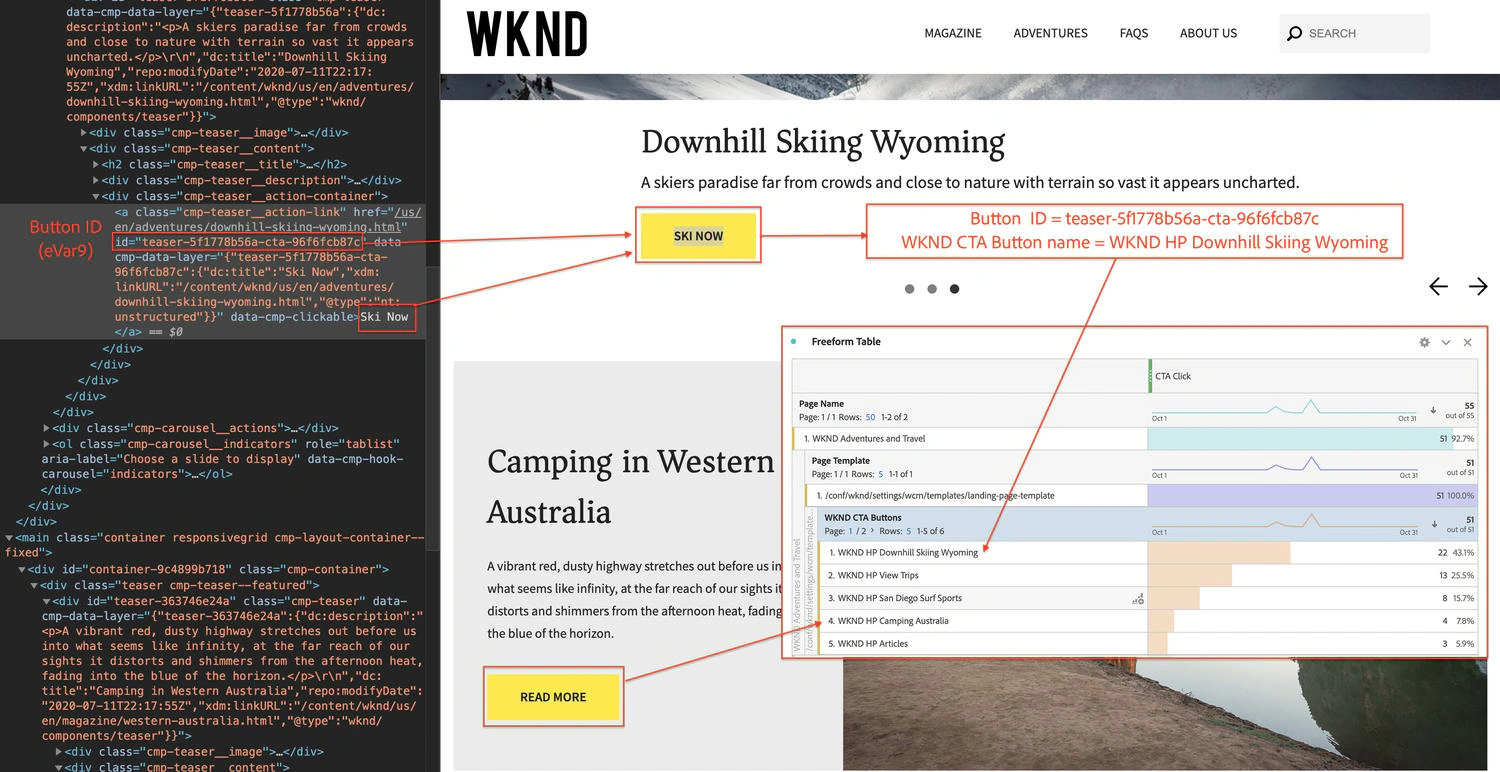
- Document events, eVars, props, identities, products, channels, and ownership.
- Choose the report-suite and virtual-report-suite architecture.
- Implement through Web SDK, Tags, Mobile SDK, or server-side APIs.
- Validate persistence, expiration, currency, products, and channel rules.
- Create governed segments, metrics, dashboards, and naming standards.
- Train users around approved definitions and reporting practices.
- Audit calls, variables, access, and data quality regularly.
Why Variables Require Planning
Adobe’s flexibility is a major advantage, but fixing a poor design later can be costly. You must decide whether a value persists, when it expires, how credit is allocated, and how it connects to success events.
A durable solution design document should explain every variable, identify its owner, provide example values, and show where it is used.
Ease of Use by Role
Executives can consume curated scorecards with little training. Marketing managers can learn standard Workspace projects, but advanced segmentation and attribution require analytical knowledge.
Implementation specialists face the steepest learning curve because they manage collection, identity, rules, classifications, permissions, APIs, server calls, and migrations. Reviewers often praise Adobe’s depth while describing onboarding and terminology as difficult.
Performance and Scalability
Scale, Data Quality, and Technical Operations
Adobe Analytics is built for high-volume enterprise environments, but scale depends on contract entitlements and architecture. Limits can involve primary and secondary server calls, report requests, concurrent capacity, report suites, add-ons, and media starts.
Server Calls and Cost Control
Tagged pageviews, custom links, downloads, offline rows, and other counted interactions may consume server calls. Model normal traffic, campaign peaks, app activity, duplicate calls, and expected growth before contracting.
Report Suites and Governance
Report suites can separate brands, regions, environments, or units. Virtual report suites provide controlled views without duplicating collection. Keep the architecture simple enough to govern while meeting access and legal requirements.
Exports and Data Engineering
Data Feeds sends raw hit-level files to supported cloud destinations. Adobe improved feed management, history, reprocessing, late-arriving-hit handling, and optional faster exports in 2026.
Raw exports support warehouse modeling, but they require engineering, storage, documentation, and reconciliation with Workspace.
Real-World Use Cases
Where Adobe Analytics Creates the Most Value
Enterprise Ecommerce and Merchandising
Retailers can analyze products, promotions, search, carts, checkout, revenue, returns, and repeat purchases. Merchandising eVars and sub-hit analysis provide more control when transactions contain several products.
Marketing Attribution and Campaign Quality
Marketing teams can compare channels, campaigns, audiences, landing pages, and conversion paths under different attribution models. Advertising Analytics can import supported Google Ads and Microsoft Advertising data.
Media, Publishing, and Streaming
Publishers can evaluate content, subscriptions, advertising engagement, and audiences. Streaming Media add-ons support video and audio measurement.
Regulated Industries
Financial services, healthcare, and public-sector teams may value enterprise governance and Adobe’s compliance program. They still need data minimization, consent, legal review, and controls that prevent sensitive values from entering analytics variables.
Global Multi-Brand Organizations
Shared components, report-suite architecture, classifications, and centralized governance can create consistency across many sites, apps, countries, and teams.
Pricing and Plans
How Much Does Adobe Analytics Cost?
Adobe Analytics uses custom enterprise pricing. Adobe does not publish a standard monthly or annual price, and there is no permanent free plan for the core product.
The commercial model is based primarily on licensed server-call volume and the selected package. Your quote may also reflect digital properties, implementation scope, data volume, reporting concurrency, support, contract terms, add-ons, and the broader Adobe relationship.
Adobe Analytics Pricing Packages
| Plan | Current Pricing Approach | Notable Positioning |
| Select | Custom quote based on licensed usage | Core Analysis Workspace, attribution, Report Builder, daily anomaly detection, and limited Customer Attributes |
| Prime | Custom quote based on licensed usage | Adds Contribution Analysis entitlement and higher Customer Attributes limits |
| Ultimate | Custom quote based on licensed usage | Higher eVar and attribute limits, Cross-Device Analytics, Data Repair API entitlement, and streaming allocation |
| Add-ons | Custom contract pricing | Live Stream, Predictive Workbench, Streaming Media, extra reporting capacity, and additional data repair |
Adobe Analytics Select
Select is the entry enterprise package. It includes Analysis Workspace, attribution, Report Builder, daily anomaly detection, and a limited Customer Attributes entitlement. Contribution Analysis is not included.
Adobe Analytics Prime
Prime adds Contribution Analysis with a monthly token allowance and supports more Customer Attributes. It suits analysts who need help explaining anomalies.
Adobe Analytics Ultimate
Ultimate expands limits and entitlements. Current terms include more eVars and Customer Attributes, Cross-Device Analytics, Data Repair API capacity, Contribution Analysis tokens, and Streaming Media usage.
Total Cost of Ownership
Beyond licensing, budget for implementation specialists, analytics engineers, training, QA, consent management, storage, pipelines, and administration.
Request a written estimate covering call growth, overages, report limits, add-ons, support, renewals, and a possible migration path to Customer Journey Analytics.
Integrations
Adobe Ecosystem and Data Connections
Adobe Experience Cloud Integrations
Adobe Analytics connects naturally with Adobe Target, Campaign, Audience Manager, Advertising, Experience Manager, and Experience Platform services.
This is a major advantage when Adobe already supports your testing, content, campaigns, audiences, or activation. It can also increase vendor dependency, so preserve export and warehouse options.
Collection and Developer Integrations
Web SDK, Mobile SDK, Adobe Tags, Edge Network API, Analytics APIs, and developer tools support web, app, and server-side collection. Advertising Analytics can import supported paid-search data.
Exports and External Platforms
Data Feeds and Data Warehouse support downstream systems. Report Builder serves Excel workflows, while Analytics 2.0 APIs can power custom dashboards and pipelines.
Data Protection
Security, Privacy, and Enterprise Controls
Adobe Experience Cloud is covered by a compliance program that includes SOC 2 Type 2, SOC 3, ISO 27001, ISO 27017, ISO 27018, and other certifications or readiness programs listed in Adobe’s Trust Center.
Access and Administration
- Admin Console product profiles and permissions.
- Report-suite, tool, component, and user access controls.
- Centralized Experience Cloud identity and administration.
- API authentication through Developer Console and OAuth.
- Governance through controlled variables and documented ownership.
Privacy Responsibilities
Teams should minimize collection and avoid placing personal, payment, authentication, health, or other sensitive values in URLs and variables.
Compliance depends on configuration, consent, legal basis, retention, user-rights procedures, contracts, and access controls. Certifications do not make an implementation compliant automatically.
Security and Legacy Migration
Administrators should monitor release notes, migrate legacy APIs, remove unused credentials, and test automated reports before end-of-life dates.
Comparison
Adobe Analytics Alternatives
The best Adobe Analytics alternative depends on whether you prioritize lower cost, product analytics, privacy control, or visual experience intelligence.
Adobe Analytics Alternatives Compared
| Platform | Main Strength | Best Fit |
| Adobe Analytics | Enterprise segmentation, attribution, governance, and exports | Large organizations with mature analytics teams |
| Google Analytics 4 | Free marketing analytics and Google ecosystem integration | Websites, ecommerce, and advertising teams |
| Amplitude | Product analytics, replay, experimentation, and activation | Product-led digital businesses |
| Matomo | Data ownership, privacy controls, and self-hosting | Privacy-sensitive organizations |
| Contentsquare | Session replay, heatmaps, journey analysis, and experience intelligence | Enterprise UX and ecommerce teams |
Adobe Analytics vs Google Analytics 4
Google Analytics 4 offers a free edition, strong Google Ads connections, BigQuery export, and faster setup for common marketing use cases.
Adobe provides more control over persistent variables, segmentation, attribution, report suites, and governance. Choose Adobe when that customization justifies the cost. Read our Google Analytics 4 review.
Adobe Analytics vs Amplitude
Amplitude is usually easier for product teams needing funnels, retention, cohorts, replay, experimentation, and growth workflows.
Adobe is stronger for complex marketing measurement and Adobe ecosystem integration. See our Amplitude Analytics review.
Adobe Analytics vs Matomo
Matomo is better when self-hosting, raw-data ownership, and privacy-focused web analytics lead the decision.
Adobe offers deeper enterprise segmentation, attribution, scale, and integrations, but needs more budget and expertise. Read our Matomo review.
Adobe Analytics vs Contentsquare
Contentsquare emphasizes session replay, heatmaps, journey visualization, frustration signals, and experience diagnosis.
Adobe is the stronger governed measurement engine for custom dimensions, attribution, and raw-data workflows. Many enterprises use both. Explore our Contentsquare review.
Final Assessment
Is Adobe Analytics Worth It?
Adobe Analytics is worth considering when your measurement requirements have outgrown standard reports and your organization is prepared to manage analytics as an enterprise capability.
Its strongest features are Analysis Workspace, advanced segmentation, persistent variables, Attribution IQ, channel governance, Journey canvas, anomaly detection, raw exports, and the Adobe ecosystem.
The cost is not only financial. Adobe requires implementation expertise, ownership, documentation, training, and continuous governance. Uncontrolled report suites and components can quickly reduce trust.
Choose Adobe Analytics for sophisticated web and mobile measurement, especially when other Adobe products are central to your stack. Compare it with Customer Journey Analytics before making a long-term commitment when cross-channel identity and offline data matter.
Smaller teams may receive better value from Google Analytics 4, Amplitude for product-led growth, Matomo for self-hosting, or Contentsquare for visual experience diagnosis.
Frequently Asked Questions
Have More Questions?
What is Adobe Analytics?
Adobe Analytics is an enterprise web and mobile analytics platform for collecting behavioral data, building custom reports, segmenting audiences, analyzing journeys, comparing attribution models, and exporting data.
Is Adobe Analytics the same as Customer Journey Analytics?
No. Adobe Analytics focuses mainly on websites and mobile apps. Customer Journey Analytics is a separate, newer product built on Adobe Experience Platform for cross-channel and person-centric analysis.
How much does Adobe Analytics cost?
Adobe uses custom quote-based pricing. Cost can depend on Select, Prime, or Ultimate packaging, server-call volume, reporting capacity, add-ons, implementation, support, and contract terms.
Does Adobe Analytics have a free plan?
No permanent free plan is publicly offered for the core product. Adobe typically provides enterprise demonstrations and custom commercial proposals.
What is Analysis Workspace?
Analysis Workspace is Adobe Analytics’ drag-and-drop environment for freeform tables, visualizations, segments, calculated metrics, attribution, funnels, flows, cohorts, and journey analysis.
Does Adobe Analytics include AI?
Yes. It includes machine-learning capabilities such as anomaly detection and Contribution Analysis, plus MCP servers for supported LLM and agentic workflows. Broader generative AI features are available in Customer Journey Analytics.
Does Adobe Analytics include session replay?
Not as a native core Adobe Analytics capability. Activity Map provides on-page link analysis, but full session replay and heatmaps usually require another experience-analytics product.
What are Adobe Analytics server calls?
Server calls are counted collection interactions such as tagged pageviews, custom links, downloads, offline rows, and other events. Licensed volume and overage terms can materially affect cost.
What are the best Adobe Analytics alternatives?
Leading alternatives include Google Analytics 4 for lower-cost marketing analytics, Amplitude for product growth, Matomo for privacy and self-hosting, and Contentsquare for digital experience intelligence.
Is Adobe Analytics worth it?
Adobe Analytics is worth it for large, data-mature organizations that need advanced segmentation, attribution, governance, exports, and Adobe integrations. It is usually excessive for simple website reporting.