
Introduction
Why You Might Be Looking for a QuickBooks Alternative
QuickBooks is still one of the most recognized names in accounting software, and for many businesses, it remains a reliable choice.
But it is not the perfect fit for everyone.
As your business grows, you may start to notice limits around pricing, user access, reporting, inventory, customer support, or overall ease of use. You may also feel that QuickBooks gives you more complexity than you actually need.
That is where QuickBooks alternatives become worth exploring.
Some accounting platforms are better for freelancers. Others are better for growing teams, inventory-based businesses, or companies that want deeper automation. The best choice depends on how you invoice, track expenses, manage cash flow, collaborate with your accountant, and plan for growth.
In this guide, you’ll compare the best QuickBooks alternatives for 2026, including FreshBooks, Xero, Zoho Books, Sage 50, and Wave.
You’ll also see where each tool is better than QuickBooks, where QuickBooks still has the edge, and which option makes the most sense for your business type.
📌 Need a broader view of accounting tools?
Explore our full Top 10 Accounting Software comparison to see more options for small businesses, freelancers, and growing companies.
Quick Comparison
Top QuickBooks Alternatives at a Glance
Use this table as a quick starting point. Pricing and plan features can change, so always confirm the latest details on each provider’s website before making a final decision.
| Software | Best For | Free Plan | Main Strength | Best QuickBooks Replacement Use Case |
| FreshBooks | Freelancers and service businesses | No | Invoicing, time tracking, and client billing | Best QuickBooks alternative for freelancers |
| Xero | Growing teams and accountants | No | Unlimited users and strong bank reconciliation | Best overall QuickBooks alternative for collaboration |
| Zoho Books | Small businesses using Zoho apps | Yes, with limits | Automation, affordability, and Zoho ecosystem | Best value alternative to QuickBooks |
| Sage 50 | Inventory-heavy and desktop-friendly businesses | No | Inventory, job costing, and traditional accounting depth | Best for businesses that prefer desktop accounting power |
| Wave | Solopreneurs and micro-businesses | Yes | Free invoicing and basic accounting | Best free QuickBooks alternative |
How We Chose
A good QuickBooks alternative should not just be cheaper. It should make accounting easier, cleaner, and more useful for the way your business actually works.
For this comparison, the most important criteria were:
- Core accounting features – invoicing, expenses, bank feeds, reporting, and reconciliation.
- Ease of use – how simple the platform feels for business owners and non-accountants.
- Scalability – whether the software can support more users, transactions, entities, or workflows.
- Pricing value – not just the entry price, but what you get at each plan level.
- Integrations – connections with payroll, CRM, e-commerce, payments, and project tools.
- Accounting depth – inventory, multi-currency, job costing, audit trails, and financial reporting.
- Best-fit use case – whether the platform is truly better than QuickBooks for a specific type of business.
The goal is not to say QuickBooks is bad. It is to help you understand when another accounting platform may fit your workflow better.
Which Is Best for You
Before comparing each tool in detail, it helps to match the software to your main reason for switching.
| If You Need… | Best Option | Why It Fits |
| Simple invoicing and time tracking | FreshBooks | Built for freelancers, agencies, and client-based services |
| The best overall QuickBooks alternative | Xero | Strong automation, unlimited users, and a clean cloud accounting experience |
| A lower-cost accounting tool | Zoho Books | Strong feature set, automation, and affordable plans |
| Free accounting software | Wave | Free invoicing, bookkeeping, and expense tracking for simple businesses |
| Stronger inventory and desktop accounting | Sage 50 | More traditional accounting depth for product-based businesses |
| Enterprise-level financial management | Sage Intacct or NetSuite | Better for multi-entity reporting, consolidations, and finance controls |
Why You Might Need an Alternative
QuickBooks is popular because it covers a wide range of accounting needs. It can handle invoicing, expenses, reports, payroll add-ons, taxes, payments, and inventory in higher plans.
Still, many businesses start looking elsewhere when the software no longer matches their stage, budget, or workflow.
1. QuickBooks Is Getting Too Expensive
QuickBooks can become costly as you add users, payroll, payments, inventory, advanced reporting, or higher-tier features.
If you are paying for features you barely use, a simpler tool like FreshBooks or Wave may feel more practical. If you need collaboration without user-based friction, Xero can be a better fit.
2. You Need More Users Without Paying More
User limits matter when your bookkeeper, accountant, operations manager, and leadership team all need access.
Xero is especially attractive here because it is known for allowing unlimited users across plans, which can be helpful when collaboration is part of your accounting workflow.
3. You Want Accounting That Feels Simpler
QuickBooks is feature-rich, but that can also make it feel overwhelming.
If your business mainly sends invoices, tracks expenses, manages clients, and checks simple reports, FreshBooks or Wave may give you a cleaner experience with less setup.
4. You Need a Better Fit for Your Business Type
Not all accounting tools are designed for the same kind of business.
Freelancers often care most about proposals, time tracking, and getting paid. Retailers may care more about inventory. Growing companies may care more about reporting, roles, workflows, and integrations.
This is why choosing based on use case is smarter than choosing based only on brand recognition.
5. You Have Outgrown QuickBooks
Some companies do not need a simpler QuickBooks alternative. They need a more advanced system.
If you manage multiple entities, locations, currencies, or approval workflows, you may need to consider tools like Sage Intacct, NetSuite, Microsoft Dynamics 365 Business Central, or another ERP-level system.
For a broader comparison across accounting platforms, see our Top 10 Accounting Software guide.
Top 5 QuickBooks Alternatives
FreshBooks

Why FreshBooks Is a Strong QuickBooks Alternative
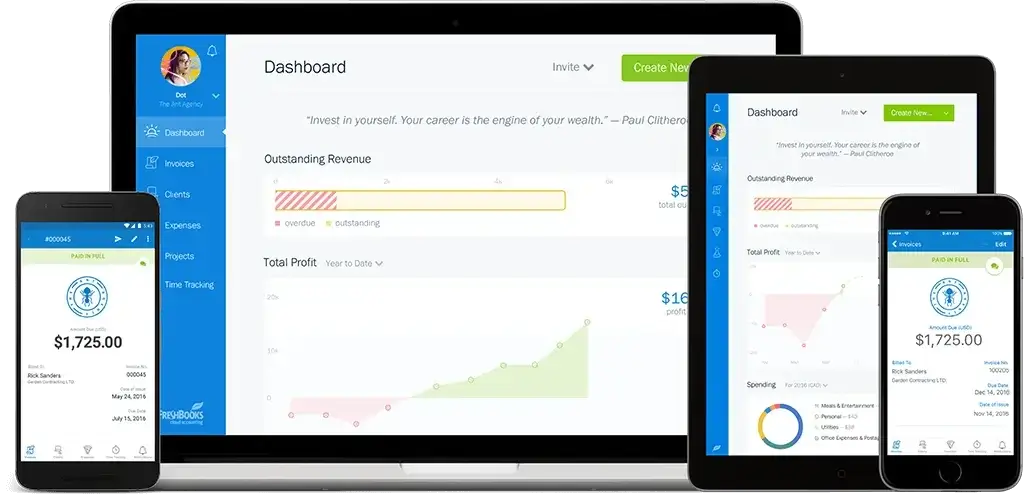
FreshBooks is not trying to be the most advanced accounting system on the market. That is exactly why many freelancers and service businesses like it.
It focuses on the work you do every day: sending invoices, tracking billable hours, creating estimates, accepting payments, and keeping expenses organized.
If QuickBooks feels too heavy for your needs, FreshBooks can feel faster, cleaner, and easier to manage.
Key Features That Make FreshBooks Stand Out
- Professional invoices with recurring billing and automated reminders.
- Built-in time tracking for hourly billing.
- Estimates and proposals for client-based work.
- Expense tracking with receipt capture.
- Client management tools for service professionals.
- Mobile access for invoicing and expense management on the go.
FreshBooks vs QuickBooks
| Feature | FreshBooks | QuickBooks |
| Invoicing | Excellent for client-based billing | Strong invoicing, but broader accounting focus |
| Time Tracking | Central to the product experience | Available, but not as service-focused |
| Ease of Use | Very beginner-friendly | More powerful, but more complex |
| Project Billing | Good for freelancers and agencies | Better for broader job costing in higher plans |
| Inventory | Limited | Better for inventory in higher plans |
| Accounting Depth | Best for simple service businesses | Stronger for complex bookkeeping |
Where FreshBooks Is Better Than QuickBooks
FreshBooks is better for freelancers, consultants, designers, agencies, coaches, and other service providers who need to bill clients quickly.
Its invoicing and time tracking experience feels more natural for client work than QuickBooks. You spend less time navigating accounting menus and more time getting paid.
Where QuickBooks Is Still Better
QuickBooks is better if you need more advanced accounting, inventory, class tracking, payroll options, or a stronger accountant ecosystem.
FreshBooks is simple by design, but that simplicity can become a limitation for businesses with more complex accounting needs.
Who Should Use FreshBooks?
- Freelancers who invoice clients regularly.
- Agencies that track billable time and project expenses.
- Consultants who need proposals, invoices, and payment tracking.
- Service businesses that want simple accounting without a steep learning curve.
Migration From QuickBooks to FreshBooks
FreshBooks works best when you are moving from a simple QuickBooks setup.
If your accounting history is complex, you may not want to move every historical transaction. Many small businesses start fresh from a new financial period and keep QuickBooks records available for reference.
👉 Want to learn more? Read our full Freshbooks Review.
Xero

Why Xero Is a Strong QuickBooks Alternative
Xero is one of the most balanced QuickBooks alternatives because it combines ease of use with real accounting depth.
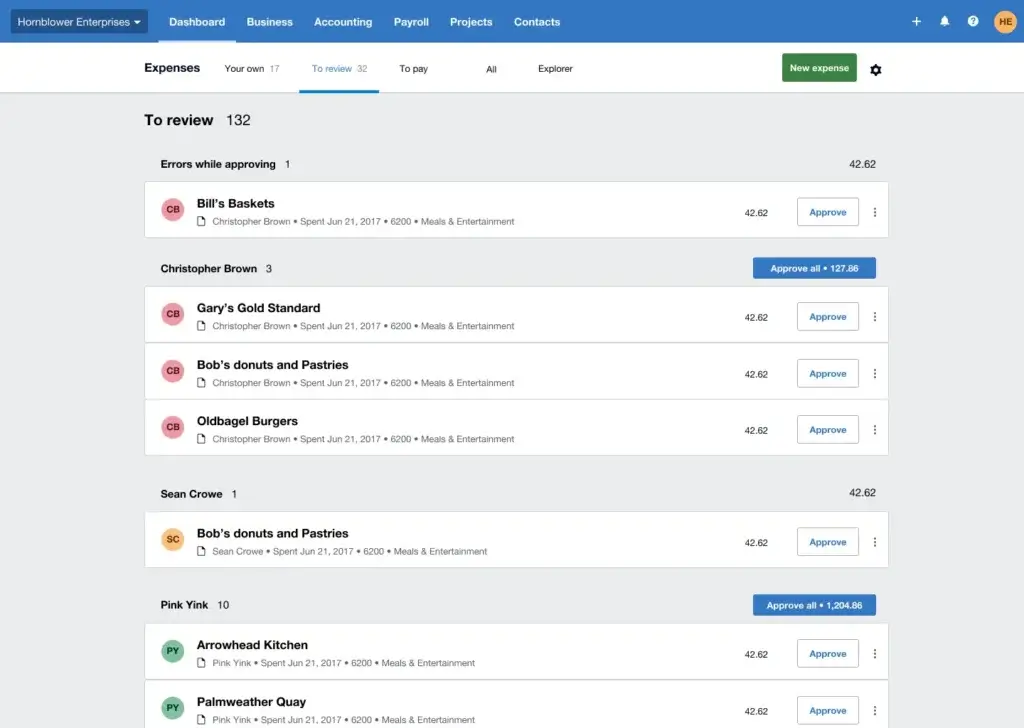
It is especially strong if you want a modern cloud accounting platform that supports collaboration between business owners, finance teams, bookkeepers, and external accountants.
Its biggest advantage is simple: you can invite multiple users without treating collaboration as a premium luxury. That makes Xero a strong fit for businesses where more than one person needs access to financial data.
Key Features That Make Xero Stand Out
- Unlimited users with role-based permissions.
- Bank reconciliation designed for fast transaction matching.
- Cloud-based access for teams, accountants, and remote work.
- App marketplace with integrations for payments, payroll, CRM, and e-commerce.
- Multi-currency support available in higher-tier plans.
- Inventory and project tracking for businesses that need more than basic bookkeeping.
Xero vs QuickBooks
| Feature | Xero | QuickBooks |
| User Access | Unlimited users are a major advantage | User limits depend on plan level |
| Ease of Use | Clean, modern, and accountant-friendly | Powerful, but can feel busy |
| Bank Reconciliation | One of Xero’s strongest areas | Strong bank feeds and reconciliation tools |
| Inventory | Useful for light inventory needs | More advanced in higher plans |
| Integrations | Large app marketplace | Large app ecosystem and Intuit connections |
| Customer Support | Mostly online support | Phone and live support options vary by plan |
Where Xero Is Better Than QuickBooks
Xero is often better when you want a cleaner cloud experience, easier collaboration, and fewer restrictions around user access.
It also works well if you already use multiple apps for payments, payroll, CRM, e-commerce, or reporting, because Xero’s app ecosystem is one of its major strengths.
Where QuickBooks Is Still Better
QuickBooks may still be stronger if you want a deeply familiar U.S.-focused accounting product with broad accountant adoption, integrated payroll options, and a large support ecosystem.
It may also be better if your accountant already works mainly inside QuickBooks and does not want to switch systems.
Who Should Use Xero?
- Small and mid-sized businesses with several users involved in finance.
- Growing teams that need better collaboration with accountants.
- Businesses with app-heavy workflows across payroll, payments, CRM, or e-commerce.
- Companies with international activity that may need multi-currency accounting.
Migration From QuickBooks to Xero
Moving from QuickBooks to Xero is manageable for many small businesses, especially if your chart of accounts, contacts, and transaction history are clean.
Before switching, review your open invoices, unpaid bills, bank feeds, and historical reports. If your books are complex, involve your accountant before importing data.
👉 Want a closer look? Read our full Xero Review.
Zoho Books


Why Zoho Books Is a Strong QuickBooks Alternative
Zoho Books is one of the best QuickBooks alternatives if you care about value, automation, and connected business apps.
It is especially useful if you already use Zoho CRM, Zoho Inventory, Zoho Projects, or other Zoho tools. Instead of stitching multiple disconnected systems together, you can build a more unified workflow inside the Zoho ecosystem.
For small businesses, this can reduce manual entry and make accounting feel more connected to sales, operations, and customer management.
Key Features That Make Zoho Books Stand Out
- Free plan available with usage limits.
- Automated workflows for reminders, recurring invoices, and approvals.
- Client portal for estimates, invoices, payments, and customer communication.
- Bank feeds and reconciliation for cleaner bookkeeping.
- Inventory tools available in selected plans.
- Native Zoho integrations across CRM, projects, inventory, analytics, and more.
Zoho Books vs QuickBooks
| Feature | Zoho Books | QuickBooks |
| Pricing Value | Often more affordable for small teams | Can become expensive as needs grow |
| Automation | Strong workflow automation for the price | Automation depends on plan and add-ons |
| CRM Integration | Excellent with Zoho CRM | Strong integrations, but not as unified with Zoho |
| Client Portal | Strong customer-facing portal | More basic customer interaction options |
| Inventory | Available in selected plans | Available in higher QuickBooks plans |
| Accountant Adoption | Growing, but less universal | Very widely used by accountants |
Where Zoho Books Is Better Than QuickBooks
Zoho Books is better if you want a lower-cost system that connects accounting to other business functions.
It is particularly strong for businesses that already manage leads, sales, projects, or inventory inside Zoho. In that case, Zoho Books can feel more natural than QuickBooks because it belongs to the same ecosystem.
Where QuickBooks Is Still Better
QuickBooks still has stronger brand recognition and broader accountant familiarity, especially in the U.S.
If your accountant only supports QuickBooks or your business relies heavily on Intuit products, switching to Zoho Books may require more coordination.
Who Should Use Zoho Books?
- Startups that want affordable accounting software.
- Zoho CRM users who want sales and accounting connected.
- Service businesses that need invoicing, time tracking, and automation.
- Small product-based businesses that need inventory without moving to a larger ERP.
Migration From QuickBooks to Zoho Books
Zoho Books supports imports for key business data, but you should prepare your records before switching.
Clean up inactive customers, duplicate vendors, old products, and outdated chart of accounts categories. This makes the migration smoother and improves reporting from day one.
👉 Want to learn more? Read our full Zoho Books Review.
Sage 50
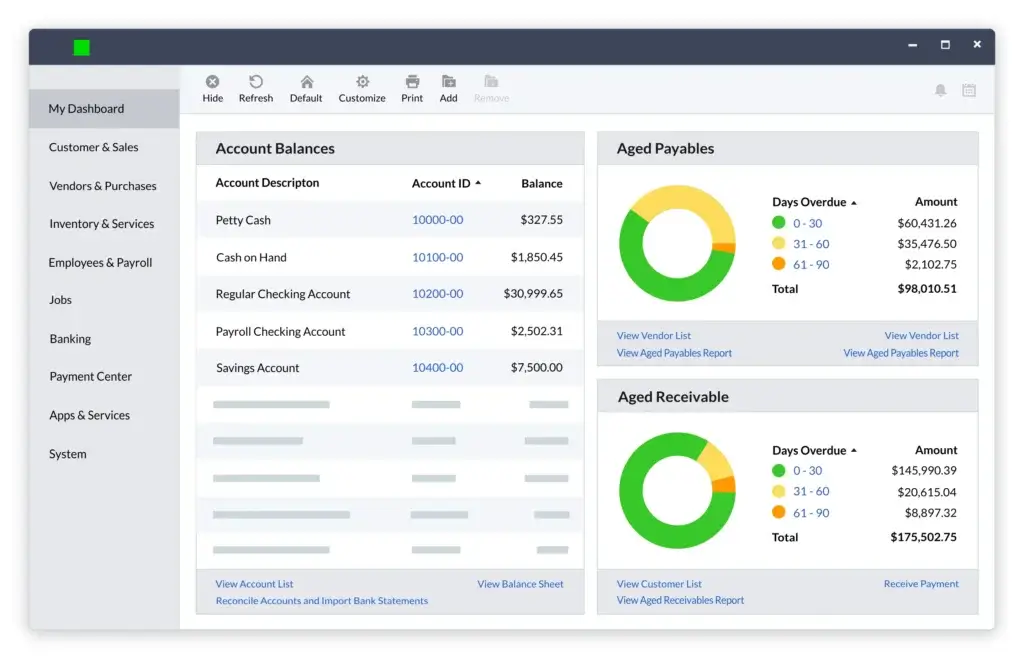
Why Sage 50 Is a Strong QuickBooks Alternative
Sage 50 is different from the other tools on this list because it is not focused only on lightweight cloud bookkeeping.
It is a more traditional accounting solution with strong desktop roots, deeper inventory features, and a structure that appeals to businesses that want more control over accounting data.
If you run a product-based company, manage stock, track jobs, or prefer desktop accounting with cloud-connected features, Sage 50 may be more relevant than simpler tools like Wave or FreshBooks.
Key Features That Make Sage 50 Stand Out
- Inventory management for product-based businesses.
- Job costing for tracking profitability by project or customer.
- Advanced reporting for owners and finance teams.
- Accounts payable and receivable with detailed controls.
- Audit trails for stronger financial oversight.
- Desktop accounting depth with cloud-connected capabilities.
Sage 50 vs QuickBooks
| Feature | Sage 50 | QuickBooks |
| Deployment Style | Desktop-focused with cloud-connected features | Cloud-first with desktop options available separately |
| Inventory | Strong fit for product-based businesses | Available in higher QuickBooks plans |
| Job Costing | Useful for tracking profitability by job | Available, but varies by plan and setup |
| Ease of Use | More traditional accounting feel | More familiar to many small businesses |
| Reporting | Strong accounting reports and controls | Strong reporting, especially in higher tiers |
| Best Fit | Inventory-heavy and accounting-focused companies | General small business accounting |
Where Sage 50 Is Better Than QuickBooks
Sage 50 can be better for businesses that need stronger inventory, traditional accounting controls, and detailed job costing.
It is also a strong fit if you prefer desktop accounting software rather than relying completely on a browser-based platform.
Where QuickBooks Is Still Better
QuickBooks Online is generally easier to adopt for cloud-first small businesses. It also has broader third-party app adoption and a larger pool of accountants who use it daily.
If you want a simple online accounting tool that connects easily with many apps, QuickBooks may feel more flexible.
Who Should Use Sage 50?
- Product-based businesses that need stronger inventory control.
- Small manufacturers or distributors that track stock and costs.
- Businesses with job costing needs across customers or projects.
- Owners who prefer desktop accounting with deeper financial control.
Migration From QuickBooks to Sage 50
Moving from QuickBooks to Sage 50 may require more planning than switching to a lightweight cloud tool.
Because Sage 50 is more accounting-structured, you should review your chart of accounts, inventory items, vendors, customer balances, and open transactions before switching.
👉 Explore our full evaluation. Read our Sage 50 Review.
Wave

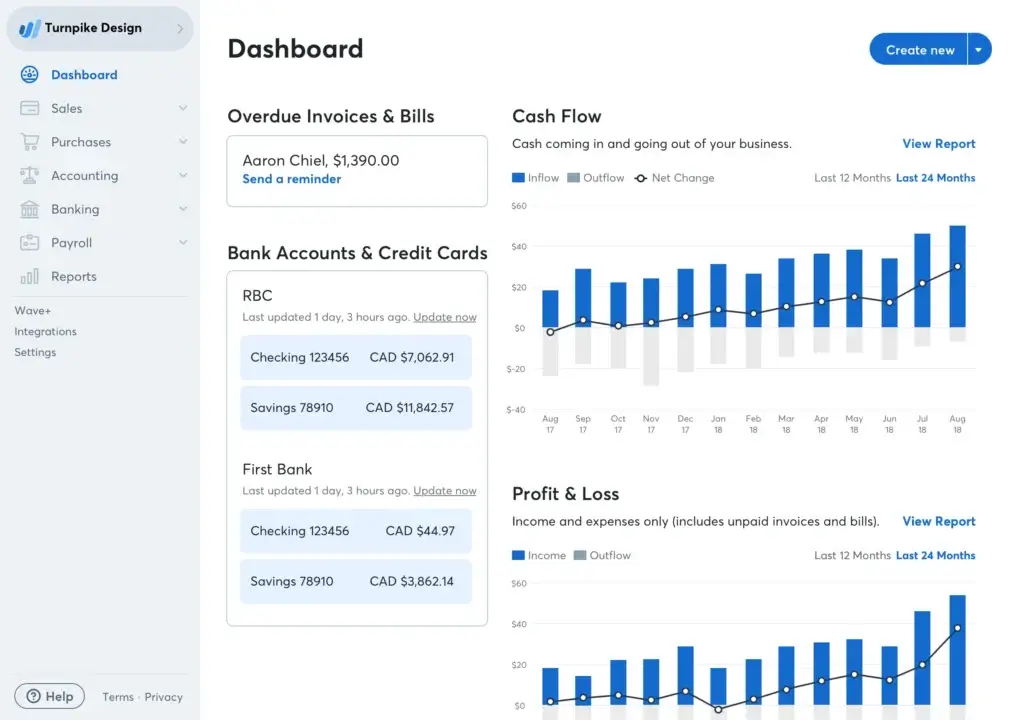
Why Wave Is a Strong QuickBooks Alternative
Wave is the best free QuickBooks alternative for very small businesses with simple accounting needs.
It is not built for complex inventory, advanced reporting, or multi-entity operations. But if you mainly need invoices, expenses, bookkeeping records, and a basic view of cash flow, Wave gives you a lot without a monthly subscription.
For freelancers, side hustlers, and early-stage businesses, that can be enough.
Key Features That Make Wave Stand Out
- Free core accounting for basic bookkeeping.
- Unlimited invoices and estimates for simple customer billing.
- Expense tracking for everyday business costs.
- Cash flow dashboard for quick financial visibility.
- Online payments available with transaction fees.
- Payroll options available in supported regions.
Wave vs QuickBooks
| Feature | Wave | QuickBooks |
| Cost | Free core accounting tools | Paid subscription plans |
| Invoicing | Simple and free for basic needs | More advanced invoicing features |
| Expense Tracking | Good for simple bookkeeping | More advanced expense workflows |
| Inventory | Not a strong fit | Available in higher plans |
| Reporting | Basic reports | More advanced reporting options |
| Best Fit | Solopreneurs and micro-businesses | Small businesses with broader accounting needs |
Where Wave Is Better Than QuickBooks
Wave is better when cost is your top priority and your accounting needs are simple.
If you are just starting out, sending a few invoices, tracking expenses, and keeping basic records, Wave can help you stay organized without committing to a paid accounting platform.
Where QuickBooks Is Still Better
QuickBooks is better for growing businesses that need inventory, payroll depth, advanced reporting, accountant collaboration, app integrations, and more structured workflows.
Wave is excellent for basic needs, but many businesses outgrow it once accounting becomes more operationally important.
Who Should Use Wave?
- Freelancers who need a free invoicing and accounting tool.
- Side hustlers who want to separate business finances.
- Micro-businesses with simple income and expenses.
- New businesses testing software before committing to a paid platform.
Migration From QuickBooks to Wave
Wave is best for simple migrations. If your QuickBooks file includes years of complex history, inventory, payroll, or multiple classes, Wave may not be the best landing place.
For a clean switch, export key customer, vendor, invoice, and account data, then decide whether to migrate full history or start from a fresh accounting period.
👉 See more in our full review. Read our Wave Review.
QuickBooks Alternatives Pricing Comparison
Pricing changes often in accounting software, especially when vendors update plans, add AI features, or adjust payroll and payment add-ons.
Instead of choosing based only on the lowest entry price, look at what each plan includes and what you may need to pay for later.
| Software | Pricing Style | Best Value For | Watch Out For |
| Xero | Tiered monthly plans | Teams needing multiple users | Advanced features may require higher plans |
| Zoho Books | Free and paid plans | Budget-conscious small businesses | Usage limits on lower plans |
| FreshBooks | Tiered plans based on features and client needs | Freelancers and service providers | Add-ons and client limits can affect cost |
| Sage 50 | Subscription plans with accounting depth | Inventory and desktop accounting users | May feel more complex for very small businesses |
| Wave | Free core tools plus paid services | Solopreneurs and micro-businesses | Payment processing, payroll, and premium services cost extra |
Other QuickBooks Alternatives Worth Considering
The five tools above cover the most common switching scenarios. Still, they are not the only options.
If your business has more advanced needs, you may want to compare these tools as well.
NetSuite
NetSuite is a strong option if you have outgrown small business accounting software and need a full ERP with financials, inventory, CRM, procurement, and multi-entity capabilities.
It is not a simple QuickBooks replacement. It is a larger business system for companies that need more operational control.
Microsoft Dynamics 365 Business Central
Business Central is a good option for companies already using Microsoft tools and needing accounting, inventory, operations, and reporting in one ERP-style platform.
It is especially relevant for growing businesses that want a deeper finance and operations system without jumping straight to enterprise ERP complexity.
Sage Intacct
Sage Intacct is a better fit for finance teams that have outgrown QuickBooks Advanced.
It is useful for multi-entity accounting, advanced reporting, revenue recognition, approval workflows, and stronger financial controls.
Kashoo
Kashoo can be a practical option for very small businesses that want simple accounting without too much setup.
It is not as feature-heavy as QuickBooks, but simplicity can be an advantage if your accounting needs are basic.
FreeAgent
FreeAgent is especially popular with freelancers and small businesses in the UK.
It is worth considering if you want simple invoicing, expense tracking, project tracking, and tax-focused workflows designed for smaller service businesses.
For a broader list of options, visit our Top 10 Accounting Software comparison.
How to Switch From QuickBooks Without Losing Control
Switching accounting software is not just a software decision. It affects invoices, reports, taxes, bank feeds, inventory, payroll, and accountant workflows.
Before you migrate, slow down and prepare your books properly.
Step 1: Clean Up Your QuickBooks File
Start by reviewing inactive customers, duplicate vendors, unused accounts, old products, and open transactions.
A messy QuickBooks file can create problems in the new system.
Step 2: Decide How Much History to Move
You do not always need to migrate every transaction from the last several years.
Many businesses move opening balances, active customers, vendors, products, and unpaid invoices, then keep QuickBooks as a historical archive.
Step 3: Export Key Reports
Before switching, export your balance sheet, profit and loss statement, trial balance, accounts receivable aging, accounts payable aging, and general ledger.
These reports help you confirm that your new system starts with accurate numbers.
Step 4: Involve Your Accountant
Your accountant can help you avoid mistakes with chart of accounts mapping, tax settings, opening balances, and reconciliation.
This is especially important if you manage inventory, payroll, multiple entities, or complex sales tax.
Step 5: Test Before You Fully Commit
Use a free trial or demo account before moving all your data.
Test the tasks you perform most often: sending invoices, matching bank transactions, reviewing reports, adding users, and exporting data.
Final Thoughts
Which QuickBooks Alternative Is Right for You?
The best QuickBooks alternative depends on why you want to switch.
If you want the strongest all-around alternative, Xero is my top recommendation for growing teams because it combines collaboration, automation, and a clean accounting experience.
If your priority is value, Zoho Books is one of the smartest choices, especially if you already use Zoho CRM or other Zoho apps.
If you are a freelancer, consultant, or agency owner, FreshBooks is usually easier and more natural than QuickBooks.
If you want free accounting software for basic needs, Wave is the best starting point.
If you need stronger inventory, job costing, and traditional accounting depth, Sage 50 deserves serious consideration.
QuickBooks is still a strong product, but it is not always the best fit. The right accounting software should match how you work now and where your business is heading next.
Compare more tools in our Top 10 Accounting Software guide if you want to evaluate a wider range of accounting platforms before deciding.
FAQs
What is the best QuickBooks alternative?
Xero is the best overall QuickBooks alternative for many small and growing businesses because it offers strong bank reconciliation, unlimited users, automation, and a clean cloud accounting experience. Zoho Books is better if you want the best value, while FreshBooks is better for freelancers and service businesses.
What is the best free QuickBooks alternative?
Wave is the best free QuickBooks alternative for solopreneurs, freelancers, and very small businesses. It includes free invoicing, basic bookkeeping, expense tracking, and simple financial reports. However, it is not ideal for advanced inventory, complex reporting, or growing finance teams.
Is Xero better than QuickBooks?
Xero can be better than QuickBooks if you need unlimited users, a cleaner interface, and strong bank reconciliation. QuickBooks may still be better if you want broader accountant adoption, deeper U.S.-focused payroll options, and a larger Intuit ecosystem.
Is Zoho Books a good QuickBooks alternative?
Yes. Zoho Books is a strong QuickBooks alternative for small businesses that want affordable accounting software with automation, a client portal, invoicing, bank feeds, and tight integration with Zoho CRM and other Zoho apps.
Which QuickBooks alternative is best for freelancers?
FreshBooks is the best QuickBooks alternative for many freelancers because it focuses on invoicing, time tracking, estimates, proposals, expense tracking, and client billing. Wave is also a good option if you want a free tool for basic freelance accounting.
Which QuickBooks alternative is best for inventory?
Sage 50 is a strong QuickBooks alternative for inventory-heavy businesses because it offers more traditional accounting depth, stock tracking, job costing, and financial controls. Zoho Books can also work well for smaller product-based businesses that want cloud accounting with inventory features.
Can I switch from QuickBooks to another accounting software?
Yes. Most QuickBooks alternatives allow you to import customers, vendors, chart of accounts, products, invoices, and balances through CSV files or migration tools. For complex books, it is best to involve your accountant before switching.
What is the easiest QuickBooks alternative to use?
FreshBooks and Wave are two of the easiest QuickBooks alternatives to use. FreshBooks is ideal for service businesses that need invoicing and time tracking, while Wave is best for very small businesses that want free, simple accounting.
What is the best QuickBooks alternative for growing teams?
Xero is one of the best QuickBooks alternatives for growing teams because it supports unlimited users and strong collaboration between business owners, bookkeepers, finance teams, and accountants.
When should I replace QuickBooks?
You should consider replacing QuickBooks when it becomes too expensive, too complex, too limited, or no longer fits your workflow. Common signs include user limits, weak reporting for your needs, inventory challenges, poor fit for freelancers, or the need for more advanced financial controls.







