
Introduction
Choosing a landing page platform is not just about building a nice-looking page. It affects how quickly you can launch campaigns, how closely your pages match ad intent, how efficiently your team can run experiments, and how much control you have over conversion performance. In this Instapage review, you will get a practical look at what the platform offers, where it stands out, where it is harder to justify, and which type of buyer will get the most value from it.
Instapage is not trying to be an all-purpose website builder. Its focus is narrower and more performance-driven. It is built for marketers, paid media teams, agencies, and growth-focused businesses that need dedicated landing pages, experimentation tools, personalization, and collaboration in one platform. That focused positioning is exactly why Instapage still matters in 2026.
What Is Instapage?
Instapage is a landing page builder and conversion optimization platform designed to help you create, personalize, test, and scale post-click experiences. You can use it to launch standalone landing pages, lead generation pages, ad campaign pages, webinar registrations, demo request pages, and other conversion-focused destinations without relying on developers for every update.
Its biggest advantage is specialization. While many platforms include landing pages as a side feature, Instapage is built around campaign relevance and conversion performance. That means the builder, collaboration tools, experimentation stack, personalization features, and analytics all revolve around one core goal, turning paid or targeted traffic into leads and customers.
Background and Positioning
Instapage has evolved from a drag-and-drop landing page builder into a more complete post-click optimization platform. The current product lineup is centered on three plans, Create, Optimize, and Convert, which makes the product structure easier to understand than in older reviews. The company now emphasizes AI-powered page creation, experimentation, personalization, and performance infrastructure more heavily than simple page design alone.
Target Users and Use Cases
Instapage is especially relevant for several buyer types:
- Paid media teams – You can connect ads to highly relevant landing pages and improve campaign efficiency.
- Performance marketers – You get experimentation, heatmaps, personalization, and conversion analytics.
- Agencies – Collaboration and scalable page management are strong fits for client work.
- B2B demand generation teams – Lead gen forms, CRM integrations, and workflow automation are well aligned.
- Brands running high-intent campaigns – Instapage is built for post-click conversion quality, not just page publishing.
That said, Instapage is not the best fit if you primarily need a full website builder, a low-cost page tool, or a CMS-first platform. It is strongest when landing pages are a core part of your acquisition engine and conversion lift matters enough to justify a premium tool.
Key Features of Instapage
How Does It Work?
Instapage stands out because it combines landing page creation, publishing, conversion analytics, experimentation, and personalization in one focused environment. The value is not just that it helps you build pages. It helps you run a more disciplined post-click workflow.
Dedicated Landing Page Builder
Instapage includes a drag-and-drop builder with precise placement controls, fluid grid blocks, grouping, alignment, reusable assets, and custom code support. This gives you more freedom than many simpler landing page tools while still keeping the experience easier than a developer-led workflow.

Collections for Programmatic or Scaled Page Creation
One of the more overlooked strengths in Instapage is Collections. This lets you create a group of landing pages that share a common template and a connected content source. For teams running multiple audience variants, service pages, location pages, or campaign-specific experiences, this can save serious production time.
Collaboration Built for Marketing Teams
Instapage is clearly designed for team workflows. You can leave in-context comments, use threaded feedback, and speed up approvals without relying on screenshots or long email threads. That makes it a better operational fit for agencies and internal marketing teams than many cheaper page builders.
Publishing Flexibility
You can publish to custom subdomains, WordPress, Drupal, and, on higher plans, the root domain. That is useful if you want landing pages to feel like a natural extension of your main website instead of a disconnected campaign asset.
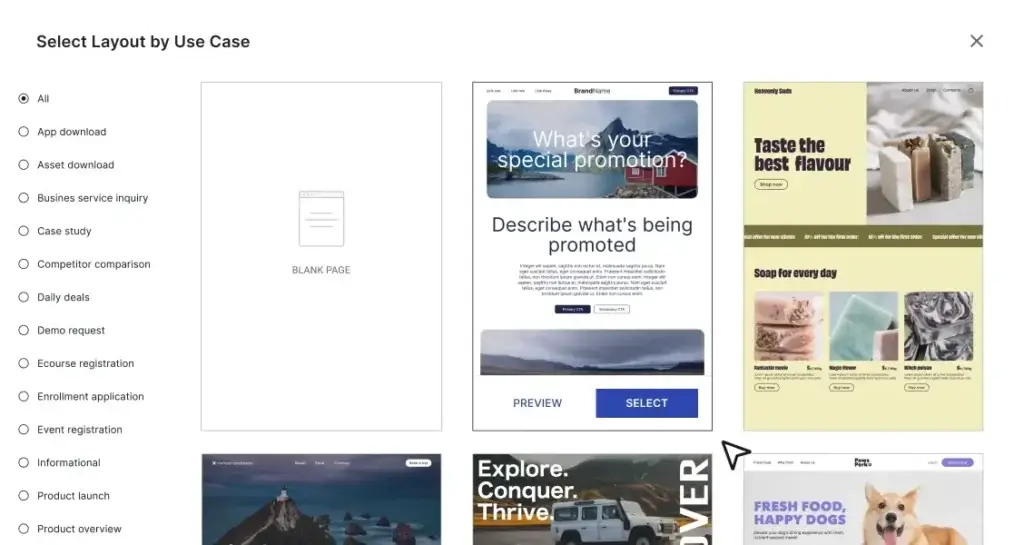
Templates, Layouts, and Reusable Assets
Instapage promotes more than 200 conversion-optimized templates on its pricing page and 500+ customizable templates and layouts across its broader features and materials. In practice, the important point is not the exact template number, but that you get a large enough library to launch quickly without designing every page from scratch. Reusable Instablocks also make repeated production much faster.
AI Features
Instapage AI Capabilities
AI is now part of the Instapage workflow, but it is positioned more as a productivity layer than as a fully autonomous site builder. That distinction matters. Instapage uses AI to help you create copy, generate variants faster, and automate parts of experimentation, rather than promising that AI alone will produce the finished page strategy.
AI Content Generation
Instapage includes AI content support for headlines, paragraphs, CTAs, and variant creation. This is useful when you need to launch campaigns faster, test multiple value propositions, or create more personalized messaging without writing every version manually.
AI Experiments
One of the more interesting features is AI experiments, which help automate experimentation by routing traffic toward better-performing variants. This is stronger than basic A/B testing because it reduces some of the manual overhead involved in optimization.
AI Works Best Alongside a Real CRO Strategy
The platform’s AI tools are most valuable when you already know what you want to improve. They can accelerate production and testing, but they do not replace clear positioning, strong offer structure, or a disciplined testing plan. Instapage’s AI is useful, but it is still most effective in the hands of a team that understands paid acquisition and conversion rate optimization.
Pros and Cons
Benefits and Limitations of Using Instapage
Positive
✅ Built for performance marketing
✅ Very good collaboration and page reuse workflow
✅ Advanced optimization capabilities
✅ Strong publishing and infrastructure
✅ Enterprise-friendly security profile
Negative
❌ Expensive for small businesses
❌ Not a full website builder replacement
❌ Higher-tier dependency
❌ Best value depends on traffic and testing maturity
Strengths & Benefits
- Built for performance marketing – The product is clearly designed around post-click conversion quality.
- Very good collaboration and page reuse workflow – Collaboration, reusable blocks, and scalable page management are practical strengths.
- Advanced optimization capabilities – Server-side A/B testing, dynamic text replacement, heatmaps, and AI experiments make it more than a page builder.
- Strong publishing and infrastructure – Root domain options, WordPress and Drupal integrations, global data centers, and high uptime support campaign reliability.
- Enterprise-friendly security profile – Instapage emphasizes SOC 2, GDPR, SSO, SSL, and data privacy controls more than many entry-level competitors.
Limitations & Drawbacks
- Expensive for small businesses – Many smaller teams will find the cost hard to justify.
- Not a full website builder replacement– If you need blogs, full CMS depth, or broader site management, another platform may make more sense.
- Higher-tier dependency – Some of the most compelling CRO and personalization features are locked higher in the stack.
- Best value depends on traffic and testing maturity – The platform shines when you are already serious about campaign optimization.
Growth Features
Instapage Optimization, Personalization, and Business Tools
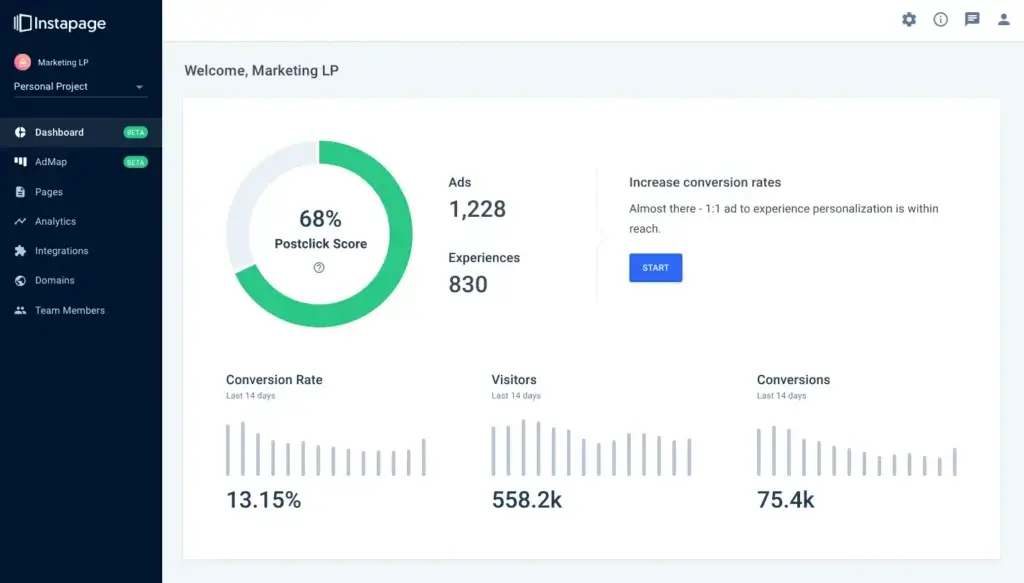
What separates Instapage from simpler page builders is the optimization layer. The platform is built around the idea that landing pages should not just be published, they should be tested, personalized, and improved continuously.
Server-Side A/B Testing
Instapage includes server-side A/B testing, which matters because it reduces flicker and page-load delays during experiments. That is a meaningful quality point if you care about clean testing conditions and user experience.
Dynamic Text Replacement
Dynamic text replacement lets you personalize copy based on URL parameters and campaign variables. This is especially valuable for paid search and segmented paid social campaigns where message match has a direct impact on conversion rate.
AdMap and Ad-to-Page Relevance
AdMap is one of Instapage’s most distinctive features. It helps you visualize how ads connect to landing pages and encourages tighter alignment between campaign intent and post-click experience. That is a smarter approach than treating landing pages as generic destinations for multiple ad groups.
Heatmaps and Behavior Visibility
On higher plans, Instapage includes heatmaps for clicks, movement, and scroll depth. This gives you practical insight into what people actually do on the page, not just whether they converted. For optimization teams, that adds a useful layer between raw analytics and page redesign decisions.
Lead Capture and Workflow Connections
Forms, multi-step forms, popups, sticky bars, CRM integrations, marketing automation connections, and direct lead routing all make Instapage more operationally useful than a basic visual builder. It is clearly designed for teams that want landing pages connected to the rest of their revenue workflow.
Performance and Connectivity
Instapage Integrations and Infrastructure
Instapage is strong on connectivity. The platform supports 120+ integrations across advertising, analytics, CRM, email marketing, automation, call tracking, webinars, ecommerce, and more. It also highlights direct integrations for tools such as Google Analytics, HubSpot, Salesforce, Marketo, Zapier, WordPress, and Drupal.
Marketing Stack Compatibility
This matters because landing page tools lose value quickly if they sit outside your actual campaign stack. Instapage does a good job of fitting into a performance marketing environment rather than forcing you into a closed ecosystem.
Performance Infrastructure
Instapage also makes a serious case for infrastructure. It promotes global data centers, worldwide CDN support, dual-cloud redundancy across Amazon and Google, high uptime, and its Thor Render Engine for fast page delivery. My view is that this is one reason enterprise and high-spend teams still take the platform seriously.
Security and Compliance
Security is another area where Instapage positions itself above simpler page tools. The company highlights SOC 2 Type I and Type II, GDPR support, CCPA/CPRA language, SSL, SAML 2.0 SSO, Google sign-on, and a broader security program aligned with recognized frameworks. That does not automatically make it the right enterprise choice for every company, but it does make the platform more credible for security-conscious buyers.
Pricing
Instapage Pricing & Plans
Instapage pricing is clearer than it used to be, but it is still a premium proposition. The current plans are Create, Optimize, and Convert. All plans include unlimited pages, conversions, and contacts, but visitor allowances, workspaces, subdomains, and optimization depth vary by plan.
Create
Create starts at about $79 per month when billed annually, or $99 month month-to-month. It includes 15,000 unique monthly visitors, 10 team members, 2 subdomains, one workspace, AI content, reusable blocks and forms, collaboration, triggered popups, sticky bars, and programmatic page support through Collections. This is the entry point, but it is still priced above most lightweight competitors.
Optimize
Optimize starts at about $159 per month annually, or $199 month to month, and is the plan most performance-focused teams should look at first. It adds server-side A/B testing, hypothesis setting, experimentation history, customizable traffic splitting, scheduling, multi-step forms, and dynamic text replacement. This is where Instapage starts to feel like a true CRO platform rather than just a builder.
Convert
Convert is a custom-priced enterprise plan. It adds ad-to-page personalization, global elements, root domain publishing, heatmaps, direct lead bypass, dedicated customer success support, and professional services. This is the version aimed at larger teams, more complex campaign structures, and stricter security or workflow requirements.
Pricing Table
The table below gives a practical view of how Instapage’s current plans compare.
| Feature Type | Create | Optimize | Convert |
| Starting price | About $79/mo annually, $99 monthly | About $159/mo annually, $199 monthly | Custom pricing |
| Unique monthly visitors | 15,000 | 30,000 standard, 50,000 expanded | Custom |
| Published pages | Unlimited | Unlimited | Unlimited |
| Contacts and conversions | Unlimited | Unlimited | Unlimited |
| Team members | 10 | 10 | Custom |
| Subdomains | 2 | 2 to 10 depending on usage tier | Custom |
| Best for | Page creation and lead capture | Testing and optimization | Enterprise personalization and scale |
For many readers, the real issue is not whether Instapage can justify its pricing, but whether your campaign maturity can justify it. If you only need simple landing pages, it will likely feel expensive. If you are actively optimizing paid traffic at scale, the pricing becomes easier to defend.
Use Cases
Who Should Use Instapage?
Instapage is not for every business, but it fits several types of buyers very well.
Paid Acquisition Teams
If you run Google Ads, paid social, retargeting, or segmented demand generation campaigns, Instapage is a strong fit. Its core strengths are message match, testing, and post-click optimization, which are exactly the areas that matter most for paid acquisition efficiency.
Agencies Managing Multiple Campaigns
Agencies can benefit from the collaboration tools, reusable assets, and structured publishing workflow. Instapage is especially useful when client turnaround speed and campaign iteration matter more than full-site content management.
B2B Lead Generation
For B2B marketers, Instapage is a practical fit for demo requests, webinar registrations, gated assets, consultation pages, and other conversion-focused use cases. CRM integrations and multi-step forms make it useful for more serious lead capture workflows.
When Instapage Might Not Be Right
Instapage may not be the best choice if you need a full website builder, a content-heavy CMS, or a low-cost landing page tool for occasional campaigns. In those situations, a platform like WordPress, Webflow, Leadpages, or Unbounce may be a more natural fit depending on your priorities.
Competitors
Competitor Alternatives to Instapage
Instapage competes most directly with tools like Unbounce and Leadpages, but buyers also compare it with Webflow, HubSpot landing pages, and sometimes WordPress-based landing page setups. The right alternative depends on whether you care most about cost, CRO depth, publishing flexibility, or broader site control.
| Feature Type | Instapage | Unbounce | Leadpages | Webflow |
| Core focus | Landing page optimization platform | Landing pages and conversion tools | Budget-friendly lead gen pages | Broader website design platform |
| Best for | Paid media teams and agencies | SMBs and marketers wanting flexibility | Simple funnels and lower-cost launches | Design-led sites and broader web projects |
| Optimization depth | Very strong | Strong | Basic to moderate | Limited compared with CRO tools |
| Personalization | Strong | Moderate | Limited | Depends on setup |
| Ease of use | High | High | High | Moderate |
| Pricing angle | Premium | Mid to premium | More budget-friendly | Varies by site needs |
| Overall angle | Best for serious post-click optimization | Best balance for many SMB marketers | Best for simpler campaigns on a budget | Best for broader design control |
Compared with Unbounce, Instapage usually looks stronger for enterprise-style workflow, ad relevance, and premium CRO operations, while Unbounce often feels easier to justify on price. Compared with Leadpages, Instapage is much more advanced, but Leadpages is often enough for smaller businesses that just need attractive conversion pages without a sophisticated testing program. Compared with Webflow, Instapage is the better landing page optimization platform, while Webflow is the better broader web design environment.
If I had to summarize it simply, Instapage is one of the best choices for teams that take paid traffic and landing page optimization seriously enough to want a dedicated platform, not just a page builder.
Best Practices
Getting Started with Instapage
To get the most out of Instapage, you should make a few smart decisions early.
Use It for the Right Job
Instapage works best when you treat it as a landing page optimization platform, not a general website tool. It is strongest for paid campaigns, high-intent lead capture, segmented offers, and conversion testing.
Match Pages to Audience Intent
The platform becomes much more valuable when you create more than one generic landing page. Use campaign segmentation, dynamic text replacement, and audience-specific messaging so the post-click experience actually reflects the traffic source.
Build Reusable Assets Early
Instablocks, saved forms, and scalable page structures pay off quickly. If you standardize sections early, your team will move faster and maintain stronger brand consistency across campaigns.
Do Not Skip Experimentation
If you are paying for Instapage and not testing, you are not using the platform fully. A large part of its value comes from experimentation and optimization, not just publishing.
Track the Economics, Not Just the Leads
Instapage is most useful when you connect landing page performance to real campaign efficiency. Focus on lead quality, cost per lead, and downstream conversion impact, not just form submissions.
Conclusion
Final Thoughts
Instapage remains one of the strongest dedicated landing page platforms because it is built for a very specific job and does that job well. It helps you create pages quickly, match them more closely to ad intent, test them with more rigor, collaborate more smoothly, and scale updates without relying on constant developer support.
Its biggest strengths are specialization, experimentation depth, personalization, collaboration, and premium infrastructure. Its biggest drawbacks are price and focus. It is not the cheapest option, and it is not trying to replace a full website stack.
Overall, Instapage is a strong recommendation for teams that run serious acquisition campaigns and want a landing page platform built around conversion performance, not just visual page creation.
Have more questions?
Frequently Asked Questions
What is Instapage best used for?
Instapage is best for building and optimizing landing pages for paid campaigns, lead generation, and segmented post-click experiences.
Is Instapage a website builder?
Not in the broad sense. It is primarily a landing page and conversion optimization platform, not a full website CMS.
Is Instapage good for agencies?
Yes. Its collaboration features, reusable blocks, scalable workflows, and campaign-focused structure make it a strong fit for agencies.
Does Instapage support A/B testing?
Yes. Instapage supports server-side A/B testing on higher plans, along with experiment history and customizable traffic splitting.
What is AdMap in Instapage?
AdMap is a feature that helps you visualize and connect ads to the right landing pages so your campaigns achieve stronger message match and relevance.
Does Instapage include heatmaps?
Yes, but heatmaps are part of the higher-tier Convert plan, not the entry plan.
Can Instapage publish to WordPress?
Yes. Instapage supports publishing through WordPress and Drupal integrations, and higher plans also support root domain publishing.
Does Instapage have AI features?
Yes. Instapage includes AI content generation and AI-assisted experimentation to help you build and optimize faster.
Is Instapage expensive?
For many small businesses, yes. Instapage is a premium platform, and its value is easiest to justify when landing page performance has a direct effect on paid acquisition results.
Is Instapage worth it overall?
Yes, for the right buyer. If landing pages are a serious part of your growth engine and you need more than basic page creation, Instapage is worth serious consideration.