
Introduction
If you’re searching for an affordable business email service that gives your brand a professional identity without forcing you into an oversized productivity suite, Spacemail is worth a close look. Built by Spaceship, Spacemail is designed to make custom-domain email simple, accessible, and budget-friendly for solopreneurs, startups, and small businesses that want branded email without the usual complexity.
But does Spacemail actually deliver in 2026? In this review, you’ll find a detailed breakdown of what Spacemail offers, from pricing and core features to usability, security, and how it compares to alternatives like Fastmail, Proton Mail, and Tuta. Whether you need your first business mailbox or want a cheaper and more modern replacement for a traditional email host, this guide will help you decide if Spacemail is the right fit.
Let’s dive into how Spacemail works, who it’s best for, and where it stands out in today’s increasingly competitive business email market.
Company Background
Spacemail is part of the broader Spaceship ecosystem, a modern web services brand focused on simplifying domain management, hosting, and digital identity tools for businesses and creators. Rather than positioning itself as a legacy email host or an enterprise collaboration platform, Spaceship has taken a more streamlined route, building a clean business email product that is tightly connected to domain setup and brand presence.
That positioning matters. A lot of business email tools still feel like they were built either for enterprise IT teams or for privacy purists willing to sacrifice convenience. Spacemail tries to sit somewhere in the middle. It offers business-grade email for your domain, integrated calendar, alias support, catch-all functionality, mobile apps, and third-party client compatibility, while keeping setup simple enough for non-technical users.
One of Spacemail’s strongest selling points is accessibility. Spaceship emphasizes an onboarding flow that connects your domain and mailbox quickly, especially if your domain is already managed inside the Spaceship ecosystem. Even if your domain is registered elsewhere, the service still supports third-party domains, which makes it more flexible than many entry-level branded email tools.
In short, Spacemail is not trying to be another Google Workspace clone. It is a focused business email product built for people who want custom-domain email, practical productivity features, and modern account management at a very competitive entry price.
Software Specification
Core Features Breakdown
Spacemail focuses on the essentials that matter most to business users: custom-domain email, practical inbox management, built-in calendar, modern security controls, and a setup process that does not feel intimidating. It is clearly built for users who want branded email without paying enterprise-level pricing.
1. Custom-Domain Business Email
At its core, Spacemail lets you create professional email addresses that match your domain, which immediately makes your business look more credible than using a generic Gmail or Outlook address. You can create mailboxes for yourself, your team, or role-based addresses like hello@, support@, or sales@.
This is one of Spacemail’s biggest strengths. It is built specifically around the idea of email for your domain, not around bundling dozens of business apps you may never use. For many small businesses, that focused approach is exactly what makes it appealing.
2. Built-In Calendar and Scheduling
Unlike some low-cost custom email hosts that stop at inbox functionality, Spacemail includes a built-in calendar across its plans. That gives you a more complete workflow for managing meetings, events, and scheduling without needing a separate tool for the basics.
For freelancers, founders, and small teams, this adds real day-to-day value. It makes Spacemail feel more like a lightweight productivity environment rather than just a mailbox.
3. Aliases and Catch-All Support
Spacemail supports aliases, which are useful for routing messages, protecting your primary mailbox, and keeping your communication organized. Depending on the plan, you get anywhere from 10 aliases per mailbox to unlimited aliases. It also supports catch-all functionality, which is particularly useful for businesses that want flexibility when handling unassigned incoming mail.
4. Third-Party Client Compatibility
One area where Spacemail performs better than many newer email tools is compatibility. It supports:
- IMAP, SMTP, and POP3 for external email clients
- Connections to Outlook, Apple Mail, Thunderbird, and similar apps
- Mobile access through native apps and external mail clients
That flexibility is important. It means you are not locked into one interface, and you can keep using your preferred email workflow if you already have one.
5. AI Email Assistant
Spacemail includes an AI email assistant that can help draft messages faster. This is not the main reason to choose the product, but it is a useful bonus for users who want help writing routine replies, outreach emails, or polished first drafts without switching to an external AI tool.
In my view, this is one of the nicer differentiators at Spacemail’s price point. Many business email services still treat AI as a premium enterprise add-on, while Spacemail includes it as part of the experience.

User Experience
Spacemail User Experience
Intuitive Web Interface
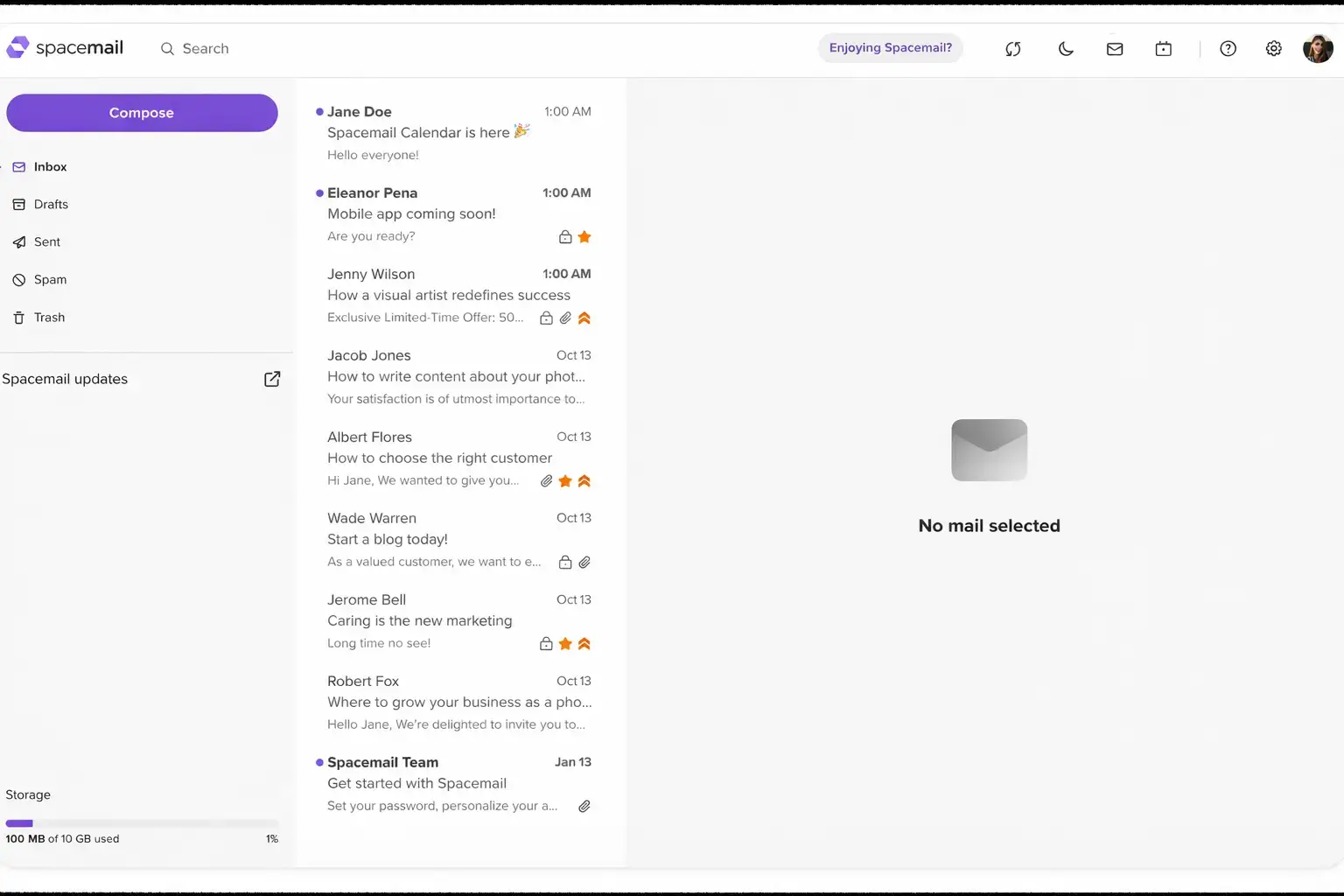
Spacemail’s interface is one of its more underrated advantages. It has a clean, modern design that feels much lighter than traditional business email panels. Navigation is straightforward, the layout is visually tidy, and it is clearly built for usability rather than for overwhelming users with enterprise settings.
That makes a difference, especially for small business owners handling email themselves. You do not need to be an IT admin to get around the dashboard, create mailboxes, manage aliases, or connect a domain. The product feels approachable, which is something many business email platforms still struggle to achieve.
Mobile App Performance
Spacemail includes mobile apps, which adds real value for users who need to manage business email on the go. You can also connect it to other mobile email clients if you prefer a more familiar workflow.
- Clean mobile access for business email
- Calendar access alongside inbox management
- Flexible syncing through supported protocols
- A more practical mobile experience than many budget hosts
For many businesses, that mobile flexibility is a major plus. It means Spacemail can fit into existing habits rather than forcing everyone to adopt a brand-new workflow from scratch.
Setup and Migration Tools
Spacemail is especially strong when it comes to onboarding. Spaceship’s setup flow is designed to connect your domain and mailbox quickly, and if your domain is already with Spaceship, the process is even smoother.
- Easy connection to a Spaceship-managed domain
- Support for third-party domains
- Email migration tools for moving from providers like Gmail and Outlook
- Forwarding, auto-replies, aliases, and catch-all setup
That combination makes Spacemail especially attractive for first-time custom-domain email users who want a simpler path to launch.
Customer Support
Spaceship backs Spacemail with a knowledge base and product guidance that are more detailed than you usually get from a low-cost provider. Setup tutorials cover Outlook, Apple Mail, external clients, domain connection, aliases, forwarding, migration, and security settings. That is a good sign because it suggests the company expects users to actively configure and grow with the platform.
In practical terms, the support experience appears designed around self-service first, with clear onboarding steps and documentation rather than hand-holding. For most small businesses, that should be enough, especially given the low entry cost.
User Feedback and Overall Appeal
Spacemail’s strongest value proposition is simple: it offers a very low-cost entry point into custom-domain business email while still including features many users would expect only in pricier products, such as:
- Built-in calendar
- AI drafting assistance
- Aliases and catch-all support
- Third-party client compatibility
- Modern account management
Its limitations are mostly around depth, not basics. If you need deep collaboration, an encrypted-by-design mail architecture, or an enterprise admin environment, you may outgrow it. But for a small business email, it is a compelling package.
Overall, Spacemail offers a user experience that feels modern, approachable, and practical. For small businesses and solo operators, that may matter more than having the longest enterprise feature list.
Pros and Cons
Advantages and Disadvantages
Pros
✅ Very affordable custom-domain email
✅ Built-in calendar included
✅ Aliases and catch-all support
✅ IMAP, SMTP, and POP3 compatibility
Cons
❌ Not a full productivity suite
❌ Not fully end-to-end encrypted
❌ Less mature than premium email providers
❌ Limited enterprise admin depth
SpaceMail is a strong option for freelancers, small businesses, and domain owners that want affordable custom-domain email without committing to a full productivity suite. Its biggest strengths are low pricing, business email basics, aliases, catch-all support, and built-in AI assistance. Its limitations become clearer when you compare it with more mature providers like Fastmail, Proton Mail, Zoho Mail, Google Workspace, or Microsoft 365.
✅ Strengths
- Very affordable custom-domain email: SpaceMail gives users a low-cost way to create professional email addresses with their own domain, which makes it attractive for startups, freelancers, and small businesses.
- Built-in calendar included: The included calendar adds useful day-to-day productivity value, especially for users who want basic scheduling alongside their mailbox.
- Aliases and catch-all support: SpaceMail supports aliases and catch-all email, making it easier to manage different email identities, departments, campaigns, or missed address variations under one domain.
- IMAP, SMTP, and POP3 compatibility: Support for standard email protocols gives users flexibility to connect SpaceMail with third-party email clients and existing workflows.
❌ Weaknesses
- Not a full productivity suite: SpaceMail is not a complete replacement for Google Workspace or Microsoft 365 if your team needs advanced document collaboration, video meetings, shared drives, and deep admin controls.
- Not fully end-to-end encrypted: SpaceMail includes practical email security, but it is not built around full zero-access or end-to-end encrypted email in the same way as privacy-first providers.
- Less mature than premium email providers: Compared with established services like Fastmail, Proton Mail, Zoho Mail, or Google Workspace, SpaceMail has a shorter track record and fewer advanced ecosystem features.
- Limited enterprise admin depth: SpaceMail can work well for small teams, but larger organizations may need more advanced governance, compliance, user management, and security controls.
Overall, SpaceMail is strongest for users and small businesses that want affordable custom-domain email with useful extras like aliases, catch-all support, calendar, and AI writing assistance. It is less suitable for larger companies that need a full productivity suite, advanced privacy architecture, or enterprise-level administration.
Pricing and Plans
How much does Spacemail cost?
Spacemail’s pricing is one of its biggest advantages. It is positioned as a budget-friendly business email service, with three primary tiers that include a free 30-day trial and progressively larger mailbox bundles, more storage, and more alias capacity. For many small businesses, the pricing alone makes it one of the most accessible branded email tools on the market.
Spacemail Plans
These plans are designed for different stages of business growth, from solo operations to teams that need multiple mailboxes under the same domain.
| Plan | Yearly Price After Trial | Included Mailboxes | Storage per Mailbox | Key Features |
| Pro | $7.60/yr | 1 | 5 GB | 10 aliases per mailbox, email and calendar, 2FA, AI email assistant |
| Business | $14.16/yr | 3 | 10 GB | 50 aliases per mailbox, email and calendar, 2FA, AI email assistant |
| Advanced | $20.80/yr | 5 | 15 GB | Unlimited aliases, email and calendar, 2FA, AI email assistant |
All plans support custom-domain email and include a 30-day free trial. You can also add extra mailboxes later, which makes the service scalable without forcing you into a completely different pricing model as your team grows.
Additional Value
Each plan includes more than just a mailbox. Even the entry tier gets calendar support, aliases, AI drafting, and security features that would often require higher-tier plans elsewhere.
| What You Get Across Plans | Included |
| Custom domain email | Yes |
| Built-in calendar | Yes |
| Mobile app access | Yes |
| IMAP/SMTP/POP3 support | Yes |
| 2FA protection | Yes |
| Password-protected emails | Yes |
| AI email assistant | Yes |
| Catch-all support | Available on plan comparison |
This is where Spacemail becomes especially interesting. Compared with competitors, its entry-level pricing is exceptionally low, yet it still includes calendar and AI assistance. That gives it a strong value argument for freelancers, side businesses, creators, and early-stage teams that want a professional setup without a large monthly commitment.
Spacemail also offers a 30-day free trial, which lowers the barrier to testing the platform before you migrate fully. That is especially helpful if you are moving from a free provider and want to confirm the workflow before committing.
In my opinion, pricing is one of the main reasons to consider Spacemail. If your priority is affordable custom-domain email with modern features, it delivers stronger value than many better-known alternatives. The tradeoff is that it is not as mature or as privacy-specialized as premium providers like Fastmail, Proton Mail, or Tuta.
Security and Privacy
How Spacemail Protects Your Data?
Spacemail positions itself as a secure business email service rather than as an ultra-private, encrypted-first platform. That distinction matters. It includes strong practical protections for everyday business communication, but it is not built around zero-access architecture or end-to-end encryption in the way Proton Mail and Tuta are.
1. Two-Factor Authentication
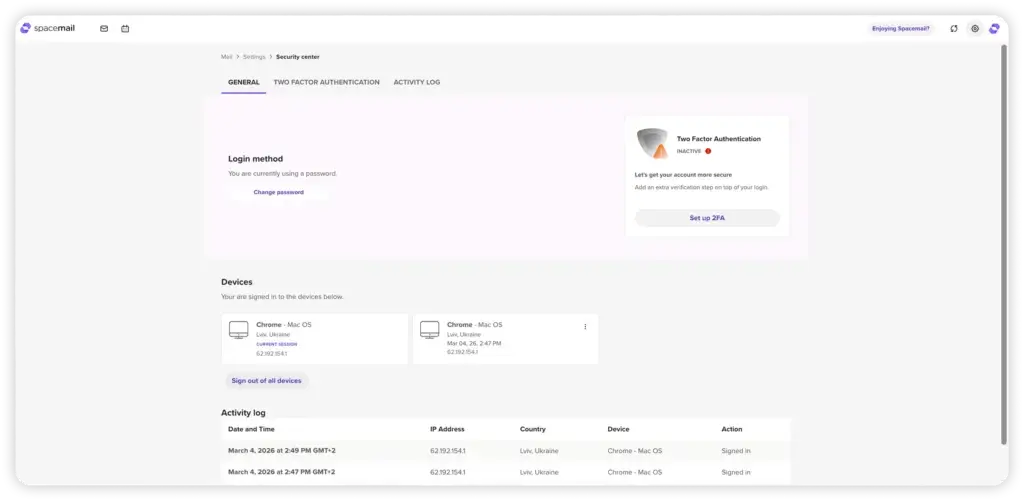
Spacemail includes 2FA as standard, which adds an important layer of protection beyond passwords alone. That is essential for business accounts, especially when multiple branded addresses are tied to your domain and reputation.
2. Password-Protected Emails
One of Spacemail’s more distinctive features is password-protected emails. This allows you to lock sensitive emails so only the intended recipient can open them. It is not the same as full end-to-end encrypted mailbox architecture, but it is a practical feature for sending confidential messages more securely.
3. Activity Logs and Threat Monitoring
Spacemail includes activity logs and threat monitoring tools that help users spot unusual login behavior and track sessions. This is particularly useful for business accounts because it gives visibility into account activity without requiring advanced technical knowledge.
4. Anti-Spam and Tracking Protection
Spaceship highlights Jellyfish anti-spam protection as part of the service, along with automatic tracking link removal. That means Spacemail is designed to reduce spam noise and limit tracking behaviors often embedded in commercial emails. For everyday business use, that adds meaningful value and improves inbox hygiene.
5. The Main Privacy Limitation
The biggest caveat is that Spacemail is not positioned as a fully end-to-end encrypted email provider. If your priority is zero-access encryption for highly sensitive communication, Proton Mail and Tuta remain stronger options. Spacemail is better understood as a secure and practical business email product, not a maximalist privacy solution.
That said, for mainstream business use, Spacemail covers the fundamentals well. It offers stronger security features than many cheap business email hosts, and it does so in a package that remains simple and affordable.
Comparison with Competitors
Spacemail vs Fastmail, Proton Mail, and Tuta
Spacemail enters a competitive market that includes both productivity-first providers and privacy-first specialists. Its main advantage is value for money. It is often cheaper and easier to start with than the alternatives, but it makes tradeoffs in maturity, privacy architecture, and long-term ecosystem depth.
Spacemail vs. Fastmail
| Feature | Spacemail | Fastmail |
| Starting price | Much lower entry price | Higher premium pricing |
| Custom domain email | Yes | Yes |
| Built-in calendar | Yes | Yes |
| Third-party clients | IMAP/SMTP/POP3 | IMAP/SMTP with mature support |
| Aliases | 10 to unlimited depending on plan | Very generous alias support |
| Overall positioning | Affordable business email | Premium productivity-focused email |
Summary: Fastmail is the better choice if you want a more mature premium email platform with stronger long-term reputation, refined productivity tools, and excellent third-party compatibility. Spacemail is the better choice if price matters more and you want an easier, lower-cost way to launch custom-domain email.
Spacemail vs. Proton Mail
| Feature | Spacemail | Proton Mail |
| Encryption model | Standard secure business email | End-to-end encrypted ecosystem |
| Third-party client support | Direct IMAP/SMTP/POP3 | Usually requires Proton Mail Bridge for desktop clients |
| Custom domain support | Yes | Yes |
| Calendar | Built-in | Built-in encrypted calendar |
| Ease of setup | Very straightforward | More privacy-focused, sometimes more complex |
| Best for | Affordable business branding | Privacy-sensitive users and teams |
Summary: Proton Mail is stronger for businesses that prioritize privacy, encryption, and data protection above everything else. Spacemail is the more practical and affordable option for users who want a branded business email with less friction and lower cost.
Spacemail vs. Tuta
| Feature | Spacemail | Tuta |
| Privacy model | Secure mainstream business email | End-to-end encrypted, privacy-first email |
| Custom domains | Yes | Yes on paid plans |
| Third-party mail clients | Yes | More limited than Spacemail |
| Calendar | Built-in | Encrypted calendar |
| Ease of use for small business | Very approachable | Better for privacy-led users |
| Best for | Cost-conscious business email | GDPR-focused encrypted communication |
Summary: Tuta is the better pick for users who want encrypted email and stronger privacy guarantees, especially in a European privacy context. Spacemail is better if you want broader compatibility, simpler setup, and a lower barrier to entry for branded email.
Which One Would I Choose?
If I were choosing purely on value, I would put Spacemail very high for freelancers, creators, micro-businesses, and small teams that want a custom-domain mailbox without overspending. If I were choosing on product maturity and premium daily workflow, I would lean toward Fastmail. If I were choosing on privacy and encrypted architecture, I would pick Proton Mail or Tuta.
That is really the clearest way to think about Spacemail. It is not trying to beat every competitor on every metric. It is trying to be the most accessible, modern, and affordable path to branded business email, and on that front it does a very good job.
Conclusion
Is Spacemail Worth It in 2026?
⭐ Overall Rating: 8.7/10
If you want a business email service that looks professional, feels modern, and costs far less than most established competitors, Spacemail is absolutely worth considering. It gives you the essentials that many small businesses actually need: custom-domain email, calendar, aliases, strong baseline security, mobile access, and compatibility with common email clients.
What makes it stand out most is value. Spacemail is not the deepest or most privacy-intensive email platform on the market, but it gives smaller businesses a very strong feature-to-price ratio. For users who care about affordability and ease of setup, that can matter more than having the most advanced enterprise toolkit.
That said, it is important to choose it for the right reasons. If your top priority is encrypted-by-design communication and strict privacy architecture, Proton Mail and Tuta are stronger picks. If your top priority is a mature premium email workflow with a long track record, Fastmail still has the edge. But if your top priority is affordable, branded business email that is easy to launch and easy to manage, Spacemail makes a very convincing case.
Final Thoughts
Spacemail is an excellent choice for:
- Freelancers and solopreneurs launching branded email for the first time
- Small teams that want multiple mailboxes at a very low cost
- Businesses that need custom-domain email without a heavy collaboration suite
- Users who want flexibility with aliases, catch-all, and third-party email clients
- Anyone who values affordability and simplicity over advanced enterprise depth
If that sounds like your use case, Spacemail is one of the more interesting business email options in 2026. It may not be the most famous provider yet, but from a value perspective, it is one of the easiest to recommend.
Frequently Asked Questions
Have more questions?
Is Spacemail good for business use?
Yes, Spacemail is built specifically for business email on your custom domain. It is especially well suited for freelancers, startups, and small teams that want professional email at a low cost.
Does Spacemail support custom domains?
Yes, custom-domain email is the core of the service. You can use a domain registered with Spaceship or connect a third-party domain manually.
Does Spacemail include a calendar?
Yes, Spacemail includes a built-in calendar, which makes it more useful than many budget email hosting tools that only offer mailbox functionality.
Can I use Spacemail with Outlook or Apple Mail?
Yes, Spacemail supports IMAP, SMTP, and POP3, so you can connect it to third-party email clients like Outlook, Thunderbird, Apple Mail, and others.
Does Spacemail have a free plan?
Spacemail does not appear to offer a permanent free tier, but it does offer a 30-day free trial so you can test the full experience before paying.
Does Spacemail include aliases?
Yes, alias support is included across plans. The number of aliases depends on the plan, ranging from 10 per mailbox to unlimited on the top tier.
Is Spacemail secure?
Spacemail includes practical business security features such as 2FA, password-protected emails, anti-spam protection, tracking link removal, and account activity logs. However, it is not a fully end-to-end encrypted email platform.
Is Spacemail better than Fastmail?
That depends on your priorities. Spacemail is more affordable and easier to recommend for budget-conscious small businesses. Fastmail is stronger if you want a more mature premium experience with a longer track record.
Is Proton Mail better than Spacemail?
Proton Mail is better for users who prioritize privacy, encryption, and secure architecture. Spacemail is better for users who prioritize affordability, straightforward setup, and flexible business email on a custom domain.
Who should choose Spacemail?
Spacemail is best for solopreneurs, creators, startups, and small businesses that want low-cost branded email with calendar support, aliases, and modern usability, without paying for a large productivity suite.