

Introduction
If you’re searching for a business email provider that helps you create a professional online identity quickly, Neo Mail is one of the more interesting options to consider. Instead of offering email alone, Neo combines custom-domain business email, a free .co.site domain option, an AI website builder, calendar tools, mobile apps, email tracking, appointment booking, and practical growth features for small businesses.
That makes Neo different from traditional email hosting services. It is not trying to be only a Gmail or Outlook replacement. It is designed for entrepreneurs, freelancers, startups, agencies, and small teams that want to launch a branded email address and basic web presence without dealing with complicated DNS setup, multiple vendors, or expensive productivity suites.
But is Neo Mail actually worth using in 2026? In this review, I’ll break down its core features, pricing, user experience, security, strengths, limitations, and how it compares to alternatives like Google Workspace, Zoho Mail, Fastmail, and Proton Mail. By the end, you should have a clear idea of whether Neo is the right email provider for your business.
Company Background
Neo is a business growth suite built around one simple idea: small businesses should be able to get online quickly with a professional email address, a domain, and a simple website. Its core product, Neo Mail, gives users business email addresses that match their brand, while its wider suite adds tools such as AI website creation, appointment booking, email campaigns, templates, and signatures.
This positioning is important because Neo is not just competing with email hosts. It is also competing with beginner-friendly website builders, domain bundles, and lightweight productivity platforms. For a new business owner, that can be a major advantage. Instead of buying a domain from one provider, email from another, and a landing page tool from a third, Neo packages the essentials into one place.
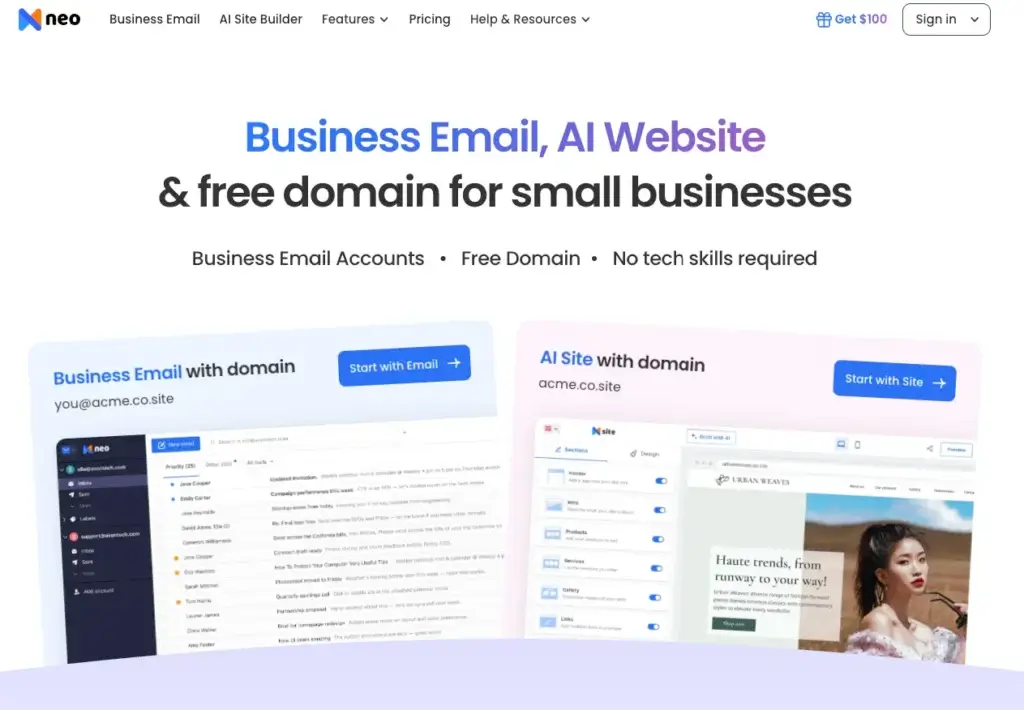
Neo’s homepage highlights business email, a free domain option, and an AI website for small businesses. It also promotes a no-code setup experience, which is clearly aimed at non-technical users who want to avoid the friction of traditional web hosting and email configuration.
In short, Neo is best understood as a small-business email and online presence platform. It is not the most advanced enterprise collaboration suite, and it is not a privacy-first encrypted email provider like Proton Mail or Tuta. Its strength is speed, simplicity, affordability, and a feature set built around real small-business needs.
Software Specification
Core Features Breakdown
Neo Mail focuses on the features small businesses usually need first: a professional email address, custom-domain branding, easy setup, enough storage, mobile access, email organization tools, security controls, and lightweight business growth features. The result is a platform that feels closer to a small-business launch kit than a traditional inbox.
1. Custom-Domain Business Email
Neo lets you create a professional email address using your own domain or a free .co.site domain offered during signup. This is useful for new businesses that do not already own a domain and want to move away from generic email addresses like Gmail, Outlook, or Yahoo.
For example, instead of using a personal address, you can create branded addresses such as hello@yourcompany.co.site, sales@yourcompany.co.site, or yourname@yourdomain.com. That immediately makes client communication look more professional and consistent.
This is one of Neo’s biggest strengths. It does not assume every small business already has a domain, web host, or IT setup. It gives users a simpler path to getting a branded email identity live quickly.
2. Free Domain and One-Page Website Option
Neo stands out because it can bundle email with a free .co.site domain and a one-page website. This is particularly helpful for freelancers, consultants, local service providers, creators, and early-stage startups that need a credible web presence but are not ready to build a full website.
The website builder is AI-assisted, which means users can generate a simple site by describing their business. From there, they can customize copy, images, colors, fonts, and sections. This is not a replacement for a deep WordPress site or advanced website builder, but it is valuable for users who only need a clean starter presence.
3. AI Smart Write
Neo includes AI writing assistance through its Smart Write feature. This can help users draft replies, create outreach emails, write follow-ups, and improve the tone of messages. For small businesses that send a lot of client communication, this can save time and help produce more polished emails.
In my view, this is one of Neo’s more practical differentiators. AI writing is not just a marketing add-on here. It fits naturally into the daily workflow of business email, especially for users who write proposals, appointment confirmations, customer replies, and sales follow-ups.
4. Email Tracking and Read Receipts
Neo includes email tracking features on higher plans, which can show when a recipient opens an email. This is especially useful for sales teams, freelancers, recruiters, consultants, and client-facing professionals who need to know whether important messages are being seen.
This feature gives Neo a stronger business communication angle than many basic email hosts. For example, if you send a proposal or follow-up, read receipts can help you decide when to follow up again without guessing.
5. Priority Inbox and Email Rules
Neo offers inbox organization features such as Priority Inbox and email rules. These tools help users sort important messages, organize incoming mail automatically, and reduce the noise that often builds up in business inboxes.
For small teams, this is useful because email can quickly become difficult to manage once customer inquiries, supplier communication, newsletters, invoices, and internal messages all arrive in the same inbox. Neo’s organization tools are not as deep as enterprise email management systems, but they cover the practical basics well.
6. Calendar, Appointment Booking, and Scheduling
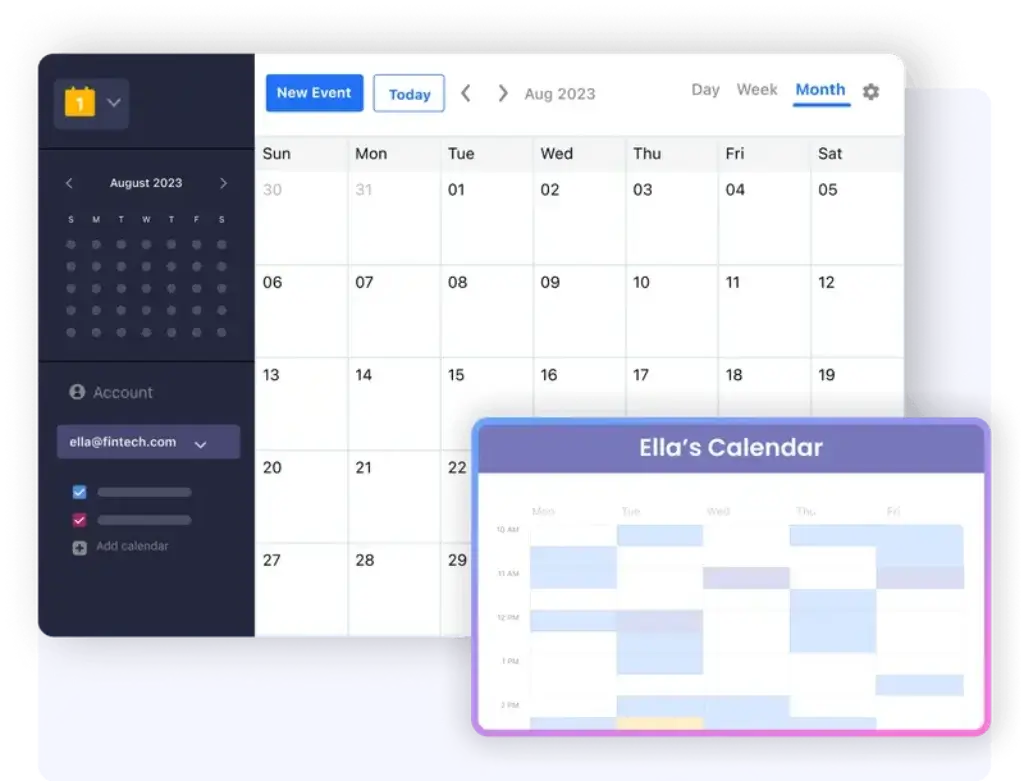
Neo includes an inbuilt calendar, and its higher-tier business suite features include appointment booking links. This gives users a simple way to let clients, prospects, or team members schedule time without needing a separate booking app.
This is a meaningful advantage for service-based businesses. Consultants, designers, coaches, agencies, accountants, and local service providers can use booking links to reduce back-and-forth scheduling emails.
7. Campaign Mode and Email Designer
Neo also includes growth-focused features such as Campaign Mode and Email Designer. Campaign Mode allows users to send personalized emails to multiple recipients while keeping the recipient list private. This can be useful for small-scale outreach, updates, newsletters, and customer communication.
It is important to set expectations correctly. Neo is not a full email marketing automation platform like Mailchimp, Brevo, or HubSpot Marketing Hub. However, for users who want simple promotional or announcement emails from the same business email environment, it adds useful flexibility.
8. Mobile Apps and Third-Party Mail App Access
Neo supports webmail, Android and iOS apps, and third-party email access through POP/IMAP. This means users are not locked into only one interface. You can use Neo through its web app, on your phone, or in other mail apps depending on your preferred workflow.
This is important because many users already have habits around email. Some prefer webmail, others prefer Apple Mail, Outlook, or mobile-first access. Neo’s flexibility makes adoption easier, especially for users migrating from another provider.
User Experience
Neo Mail User Experience
Simple Setup for Non-Technical Users
Neo’s user experience is clearly designed for people who do not want to spend hours configuring business email manually. The setup flow focuses on getting users from business name to domain, email address, and website presence as quickly as possible.
This is a strong fit for users who are launching a business for the first time. Traditional email hosting often requires buying a domain separately, editing DNS records, connecting MX records, setting up SPF and DKIM, and testing deliverability. Neo reduces much of that friction by keeping domain, email, and site setup closely connected.
Clean Webmail Interface
Neo’s webmail interface is modern and approachable. It includes the core inbox experience users expect, along with productivity features such as calendar access, email rules, tracking, signatures, and follow-up tools depending on the plan.
The interface is not as deeply integrated into an office suite as Gmail is with Google Workspace or Outlook is with Microsoft 365. However, that can also be a benefit. Neo feels lighter, more focused, and easier to understand for small business users who primarily need email and a basic digital presence.
Mobile Experience
Neo offers mobile apps for Android and iOS, which makes it suitable for business owners who manage communication while moving between meetings, clients, or field work. The mobile support is important because many small-business users do not sit at a desk all day.
- Access business email from mobile devices
- Manage inbox communication while on the go
- Use Neo webmail or third-party mail apps
- Keep professional email separate from personal inboxes
For many users, this is enough to make Neo practical as a daily email provider. It gives you the branded identity of business email without forcing you into a complex enterprise environment.
Migration and Import Tools
Neo includes migration tools to help users move existing emails and contacts from other platforms. This is important because switching email providers can be stressful, especially if you already have years of client communication stored elsewhere.
For small businesses, migration support is not just a convenience. It lowers the risk of moving from Gmail, Outlook, Zoho Mail, or another email host. If you are starting fresh, Neo is very easy to launch. If you are migrating, you should still plan the move carefully, but Neo provides a clearer path than many low-cost email hosts.
Customer Support
Neo promotes 24/7 support, and its support center includes documentation for settings, two-factor authentication, forwarding, migration, domain setup, email authentication, and common mailbox tasks. This is useful because small-business users often need guidance during setup rather than after everything is already working.
Third-party reviews are generally positive about Neo’s ease of use and affordability, although some reviews also mention that the support experience can vary and that more advanced features sit behind higher-tier plans. That is a fair tradeoff to keep in mind. Neo is strong for beginners and small businesses, but it may not satisfy power users who expect enterprise-grade controls.
Pros and Cons
Advantages and Disadvantages
Pros
✅ Easy business email setup
✅ Free domain option available
✅ AI website builder included
✅ Useful small-business features
Cons
❌ Not a full productivity suite
❌ Privacy features are not advanced
❌ Best tools are on higher plans
❌ Less mature than top email rivals
Neo Mail is a strong option for small businesses that want to create a professional email address and online presence without dealing with multiple tools. Its biggest strengths are simplicity, branding, and practical business features. Its limitations become clearer when you compare it with more mature email platforms, larger productivity suites, or privacy-first providers.
✅ Strengths
- Easy business email setup: Neo makes it simple to create professional email addresses with your own domain or a free .co.site domain, which is ideal for freelancers, startups, and small businesses launching their brand.
- Free domain option available: The free .co.site domain option gives new businesses a fast way to start using branded email without buying a separate domain first.
- AI website builder included: Neo goes beyond email by helping users create a simple website with AI, making it useful for businesses that need a basic online presence quickly.
- Useful small-business features: Features like email tracking, appointment booking, campaign mode, aliases, calendar, and mobile apps make Neo more practical than a basic mailbox provider.
❌ Weaknesses
- Not a full productivity suite: Neo is not as complete as Google Workspace or Microsoft 365 if your team needs advanced document collaboration, video meetings, shared drives, and enterprise admin controls.
- Privacy features are not advanced: Neo includes practical business email security, but it is not built around end-to-end encryption or zero-access privacy like Proton Mail or Tuta.
- Best tools are on higher plans: Some of Neo’s most valuable features, such as stronger business-growth tools, email tracking, campaign features, and larger storage, are more relevant on the higher-tier plans.
- Less mature than top email rivals: Fastmail, Proton Mail, Zoho Mail, and Google Workspace have stronger reputations in their specific categories, so Neo is better for quick business setup than for advanced email power users.
Overall, Neo Mail is strongest for small businesses that want professional email, simple branding, and a starter web presence in one place. It is less suitable for larger teams that need a full collaboration suite, strict privacy architecture, or advanced IT administration.
Pricing and Plans
How Much Does Neo Mail Cost?
Neo uses a per-mailbox pricing model with three main business email plans: Business Starter, Business Standard, and Business Max. Pricing may change based on promotions, billing cycle, and region, so it is always worth checking Neo’s live pricing page before purchasing.
At the time of writing, Neo lists the following business email pricing:
| Plan | Price | Storage per Mailbox | Best For | Key Features |
| Business Starter | $2.49/mailbox/month | 15 GB | New businesses and solo users | Business email, webmail, mobile apps, calendar, POP/IMAP access, basic business email features |
| Business Standard | $4.99/mailbox/month | 50 GB | Growing teams and client-facing users | More storage, email tracking, priority inbox, stronger productivity features, business suite tools |
| Business Max | $9.99/mailbox/month | 100 GB | Power users, outreach-heavy teams, and small sales teams | Maximum storage, advanced business features, campaign tools, AI Smart Write, and broader growth features |
The entry price is competitive, especially when you consider that Neo can also help with a free .co.site domain and a one-page website. For a new business, this can reduce the number of separate tools needed at launch.
What You Get Across Plans
Neo’s plans are not just basic inboxes. The platform includes several features that are especially useful for small-business communication and online presence.
| Feature | Included or Available |
| Custom business email | Yes |
| Free .co.site domain option | Available during signup |
| AI website builder | Available as part of Neo’s wider platform |
| Webmail | Yes |
| Android and iOS apps | Yes |
| Inbuilt calendar | Yes |
| POP/IMAP support | Yes |
| Email aliases | Available |
| Send email from alias | Available on supported plans |
| Catch-all account | Available |
| Email tracking | Available on higher plans |
| Campaign Mode | Available on higher plans |
| Appointment booking | Available on supported plans |
| Two-factor authentication | Yes |
| Anti-virus and anti-spam protection | Yes |
| Custom DKIM | Available |
Neo is priced well for the audience it serves. The Starter plan is attractive for users who simply need affordable branded email. The Standard plan is likely the better fit for most growing businesses because it adds more storage and stronger productivity features. The Max plan is the best option if you want the full value of Neo’s AI writing, campaign, and growth-focused tools.
My recommendation is simple: choose Starter only if your needs are basic. Choose Standard if email is part of your daily client workflow. Choose Max if you plan to use Neo for outreach, client communication, campaigns, and heavier business development activity.
Security and Privacy
How Neo Mail Protects Your Data
Neo is best described as a secure business email provider, not a privacy-first encrypted email provider. That distinction matters. It includes practical security features that small businesses need, but it is not positioned in the same category as Proton Mail or Tuta for end-to-end encrypted communication.
1. Two-Factor Authentication
Neo supports two-factor authentication, which gives accounts an extra layer of protection beyond a password. This is essential for business email because mailbox compromise can lead to lost client trust, invoice fraud, data exposure, and reputational damage.
Every business using Neo should enable 2FA immediately. This is especially important for admin accounts and email addresses used for billing, sales, support, or domain management.
2. Anti-Spam and Anti-Virus Protection
Neo includes inbound and outbound anti-virus protection as well as advanced anti-spam measures. These protections help reduce phishing, malware, spam, and suspicious email activity. For small businesses, this is important because employees and owners are often targeted through invoices, fake login pages, delivery messages, and payment requests.
No email provider can remove every threat, but Neo covers the expected security baseline for mainstream business email.
3. Custom DKIM and Email Authentication
Neo supports custom DKIM, and its support documentation explains the importance of SPF, DKIM, and DMARC records for email deliverability. This is particularly important because Gmail and other major inbox providers increasingly expect authenticated sending domains.
For business users, email authentication is not only a security issue. It also affects whether your messages land in the inbox or spam folder. If you use Neo with your own domain, you should set up SPF, DKIM, and DMARC properly.
4. Catch-All, Aliases, and Forwarding Controls
Neo offers features such as catch-all accounts, email aliases, sending from aliases, and external forwarders. These tools can improve privacy and organization when used correctly. For example, you can use sales@, support@, or billing@ aliases without exposing a personal mailbox address.
However, admins should manage these features carefully. Too many aliases or unmanaged forwarding rules can make inbox governance harder over time.
5. Privacy Limitation
The main privacy limitation is that Neo is not positioned as a zero-access or end-to-end encrypted email provider. If your business handles highly sensitive legal, medical, political, financial, or regulated communication, Proton Mail, Tuta, or another privacy-focused provider may be a better fit.
For mainstream business use, Neo’s security is practical and competitive. For high-security privacy use cases, it is not the strongest option.

Comparison with Competitors
Neo Mail vs Top Alternatives
Neo Mail competes in a crowded business email market, but it has a very specific angle. It is not only an inbox provider. It combines business email, a free .co.site domain option, AI website creation, calendar tools, mobile apps, email tracking, appointment booking, and lightweight growth features for small businesses.
That makes the comparison more interesting. Fastmail is stronger as a mature premium email platform. Proton Mail is stronger for privacy and encrypted communication. Zoho Mail is stronger if you want a broader business software ecosystem. Spaceship Mail, also known as Spacemail, is probably the closest direct competitor for affordable custom-domain email.
Neo Mail vs Fastmail
| Feature | Neo Mail | Fastmail |
| Main positioning | Business email plus online presence tools | Premium email, calendar, and contacts platform |
| Starting price | From $2.49/mailbox/month | Individual plan from about $6/month, or less with annual billing |
| Custom domain email | Yes | Yes |
| Storage | 15 GB to 100 GB per mailbox depending on plan | 60 GB total storage on the Individual plan |
| AI website builder | Yes, available in Neo’s wider platform | No |
| Email tracking and business tools | Available on higher plans | More focused on email productivity than sales-style tracking |
| Best for | Small businesses that need email, branding, and a simple web presence | Users who want a polished, mature, email-first platform |
Summary: Fastmail is the better choice if you want a refined, email-first product with strong reliability, premium mailbox controls, calendar, contacts, and excellent support. It is more mature than Neo as a pure email platform.
Neo is better if you are launching a small business and want more than email. The free .co.site domain option, AI website builder, email tracking, campaign tools, and appointment booking make it more useful for users who need a professional online presence quickly, not just a better inbox.
Neo Mail vs Proton Mail
| Feature | Neo Mail | Proton Mail |
| Main positioning | Small-business email and branding platform | Privacy-first encrypted email provider |
| Encryption model | Standard secure business email | End-to-end encrypted and zero-access focused |
| Custom domain support | Yes | Yes on paid plans |
| Calendar | Yes | Yes, with encrypted calendar features |
| Third-party email clients | POP/IMAP support | Usually requires Proton Mail Bridge for many desktop client workflows |
| Website/domain bundle | Free .co.site domain option and AI website builder | Not the main focus |
| Best for | Small businesses that want simple setup and professional branding | Privacy-sensitive users, founders, journalists, and security-conscious teams |
Summary: Proton Mail is the stronger option if privacy is your main reason for switching email providers. Its encrypted email architecture, privacy-focused ecosystem, and security-first positioning make it a better fit for sensitive communication.
Neo is the more practical choice for small businesses that care more about professional branding, quick setup, business email, appointment booking, and lightweight growth features. If you want an easy way to launch business email and a basic online presence, Neo is more approachable. If you want maximum privacy, Proton Mail is the better pick.
Neo Mail vs Zoho Mail
| Feature | Neo Mail | Zoho Mail |
| Main positioning | Simple business email with domain and website tools | Affordable business email within a larger software ecosystem |
| Starting price | From $2.49/mailbox/month | Free plan available in select regions, paid plans are generally very affordable |
| Custom domain email | Yes | Yes |
| Free domain option | Yes, .co.site option | Not the main value proposition |
| Website builder | AI website builder available | Website tools exist in the wider Zoho ecosystem, but not as central to Zoho Mail |
| Business ecosystem | Focused mainly on email, web presence, and communication tools | Very broad ecosystem including CRM, projects, finance, support, HR, and more |
| Best for | New businesses that want fast setup and simple branding | Businesses that may grow into a larger suite of apps |
Summary: Zoho Mail is one of the strongest value options in business email, especially for teams that may later use Zoho CRM, Zoho Projects, Zoho Books, Zoho Desk, or Zoho Workplace. It is the better long-term choice if you want your email provider to connect with a wide business software ecosystem.
Neo is better for users who want a simpler launch path. The free .co.site domain option, AI site builder, email tracking, booking tools, and campaign features make Neo feel more like a business starter kit. Zoho is broader and more scalable. Neo is easier and more focused for early-stage businesses.
Neo Mail vs Spaceship Mail
| Feature | Neo Mail | Spaceship Mail / Spacemail |
| Main positioning | Business email plus domain, website, and growth tools | Low-cost secure business email for custom domains |
| Starting price | From $2.49/mailbox/month | From about $0.59/month on promotional biyearly pricing |
| Included mailboxes | Priced per mailbox | Plans include 1, 3, or 5 mailboxes depending on tier |
| Storage | 15 GB to 100 GB per mailbox depending on plan | 5 GB to 15 GB per mailbox depending on plan |
| Custom domain email | Yes | Yes |
| Built-in calendar | Yes | Yes |
| AI tools | AI Smart Write and AI website builder | AI email assistant |
| Website builder | Yes, AI website builder available | Available through the wider Spaceship ecosystem, not the core Spacemail offer |
| Best for | Small businesses that need email plus a simple web presence | Cost-conscious users who mainly need affordable domain-based email |
Summary: Spaceship Mail, or Spacemail, is the better choice if your main priority is getting custom-domain email at the lowest possible price. It is very affordable, includes calendar, aliases, 2FA, an AI email assistant, and supports branded email for your domain.
Neo is the better choice if you want a more complete small-business launch package. It costs more than Spacemail at the entry level, but it also adds stronger business-growth features, more storage on higher plans, email tracking, appointment booking, Campaign Mode, and an AI website builder. For pure affordability, Spacemail wins. For business setup and growth tools, Neo is more complete.
Which One Would I Choose?
If I were choosing only for the best email experience, I would lean toward Fastmail. It is mature, polished, and built for users who care deeply about email quality. If privacy was my top priority, I would choose Proton Mail. If I wanted a wider business software ecosystem, I would choose Zoho Mail. If I wanted the cheapest custom-domain email, I would choose Spaceship Mail.
However, if I were launching a new small business and wanted email, a branded identity, a simple website, appointment booking, and lightweight outreach tools in one place, I would choose Neo. It is not the strongest product in every category, but it offers one of the most practical combinations for early-stage businesses that want to look professional quickly.
Conclusion
Is Neo Mail Worth It in 2026?
⭐ Overall Rating: 9.2/10
Neo Mail is worth considering if you want a simple, affordable, and business-focused email provider that helps you create a professional identity quickly. Its biggest advantage is that it combines email, domain setup, AI website creation, calendar tools, mobile access, and growth features into one beginner-friendly platform.
That makes it especially valuable for freelancers, consultants, creators, local service providers, small agencies, and early-stage startups. These users often do not need a full enterprise suite. They need a professional email address, a simple web presence, and tools that help them communicate with clients.
Neo is not perfect. It is not as mature as Google Workspace for collaboration, not as deep as Zoho’s business ecosystem, not as refined as Fastmail for pure email power users, and not as privacy-focused as Proton Mail. However, it does not need to win in every category to be useful. Its value comes from making business email and online presence simple.
Final Thoughts
Neo Mail is an excellent choice for:
- Freelancers who want a professional email address without complex setup
- Small businesses that need email, a domain, and a simple website
- Entrepreneurs launching a new brand online
- Service providers who need appointment booking and client communication tools
- Sales-focused users who want email tracking and follow-up features
- Businesses that want a lower-cost alternative to large productivity suites
In my opinion, Neo is one of the strongest choices for beginners and small businesses that care about fast setup, branding, and affordability. If your business needs deep collaboration, advanced admin controls, or privacy-first encryption, you may outgrow it. But if your goal is to launch professional business email quickly and manage client communication from one simple platform, Neo Mail is easy to recommend.
Frequently Asked Questions
Have more questions?
1. What is Neo Mail?
Neo Mail is a business email provider designed for small businesses, freelancers, startups, and entrepreneurs. It helps users create professional email addresses using a custom domain or Neo’s free .co.site domain option. Neo also includes related tools such as an AI website builder, calendar, mobile apps, email tracking, appointment booking, and business communication features.
2. Is Neo Mail free?
Neo offers a limited-time free trial, but it is not a permanently free business email provider. After the trial, users need to choose a paid plan based on the number of mailboxes and features they need. Neo may also offer promotions, so it is best to check the current pricing page before signing up.
3. Does Neo Mail include a free domain?
Yes, Neo offers a free .co.site domain option during signup for users who do not already own a domain. You can also bring your own existing domain and use it to create professional email addresses through Neo.
4. Can I use Neo Mail with my existing domain?
Yes, Neo supports custom domains. If you already own a domain, you can connect it to Neo and create business email addresses using that domain. You should also set up the correct SPF, DKIM, and DMARC records to improve email authentication and deliverability.
5. Is Neo Mail good for small businesses?
Yes, Neo Mail is a strong option for small businesses that want professional email, simple setup, mobile access, and basic online presence tools. It is especially useful for new businesses that need email, a domain, and a simple website without managing several separate platforms.
6. How does Neo Mail compare to Google Workspace?
Google Workspace is better for teams that need deep collaboration, file storage, shared documents, meetings, and advanced admin controls. Neo Mail is better for small businesses that want a simpler and more affordable way to create business email, get a domain option, and launch a basic website.
7. Does Neo Mail support mobile apps?
Yes, Neo Mail supports mobile access through Android and iOS apps. Users can also access Neo through webmail and supported third-party email apps, depending on their setup and preferences.
8. Is Neo Mail secure?
Neo Mail includes practical business email security features such as two-factor authentication, anti-spam protection, anti-virus protection, and custom DKIM support. However, it is not positioned as a privacy-first encrypted email provider like Proton Mail or Tuta.
9. Does Neo Mail include email marketing features?
Neo includes lightweight business growth features such as Campaign Mode, Email Designer, email tracking, templates, and appointment booking on supported plans. It can be useful for simple outreach and client communication, but it is not a full replacement for advanced email marketing platforms like Mailchimp, Brevo, or HubSpot.
10. Who should use Neo Mail?
Neo Mail is best for freelancers, consultants, entrepreneurs, local service businesses, small agencies, creators, and startups that want professional business email with fast setup. It is less ideal for large organizations that need enterprise collaboration, advanced compliance controls, or privacy-first encrypted email architecture.








