

Introduction
If you are looking for affordable business email with custom domains, strong admin controls, and a wider productivity ecosystem, Zoho Mail is one of the best options to consider. It is built for freelancers, startups, small businesses, agencies, and growing teams that want professional email without paying Google Workspace or Microsoft 365 prices.
Zoho Mail is not just another inbox. It is part of the larger Zoho ecosystem, which includes Zoho CRM, Zoho Projects, Zoho Books, Zoho Desk, Zoho Workplace, Zoho Cliq, Zoho WorkDrive, and many other business applications. That makes it especially useful for companies that want email, contacts, calendar, tasks, notes, collaboration, and business app integrations under one vendor.
Unlike privacy-first email providers such as Proton Mail and Tuta, Zoho Mail is not mainly positioned around end-to-end encrypted personal email. Its strongest value is business email hosting. You get domain-based email, admin management, mobile apps, migration tools, aliases, groups, email policies, collaboration features, and affordable plans that work well for cost-conscious teams.
That makes Zoho Mail especially relevant for small businesses, consultants, agencies, ecommerce stores, service providers, nonprofit teams, and companies already using Zoho CRM or other Zoho apps. It is also a practical option for businesses that want a clean, ad-free email experience without building their entire workflow around Google or Microsoft.
But is Zoho Mail the right email provider for your business in 2026? This review covers its core features, pricing, user experience, security, pros and cons, and how it compares with alternatives like Proton Mail, Fastmail, and Tuta.
Company Background
Zoho Mail is part of Zoho Corporation, a long-established software company known for building a large suite of business applications. Zoho’s product ecosystem covers sales, marketing, finance, HR, project management, help desk, collaboration, analytics, and workplace productivity.
This matters because Zoho Mail is not designed as a standalone secure email niche product only. It is designed as business email inside a wider operating system for work. For teams that already use Zoho CRM, Zoho Books, Zoho Projects, Zoho Desk, or Zoho Workplace, Zoho Mail can become a natural communication layer across the business.
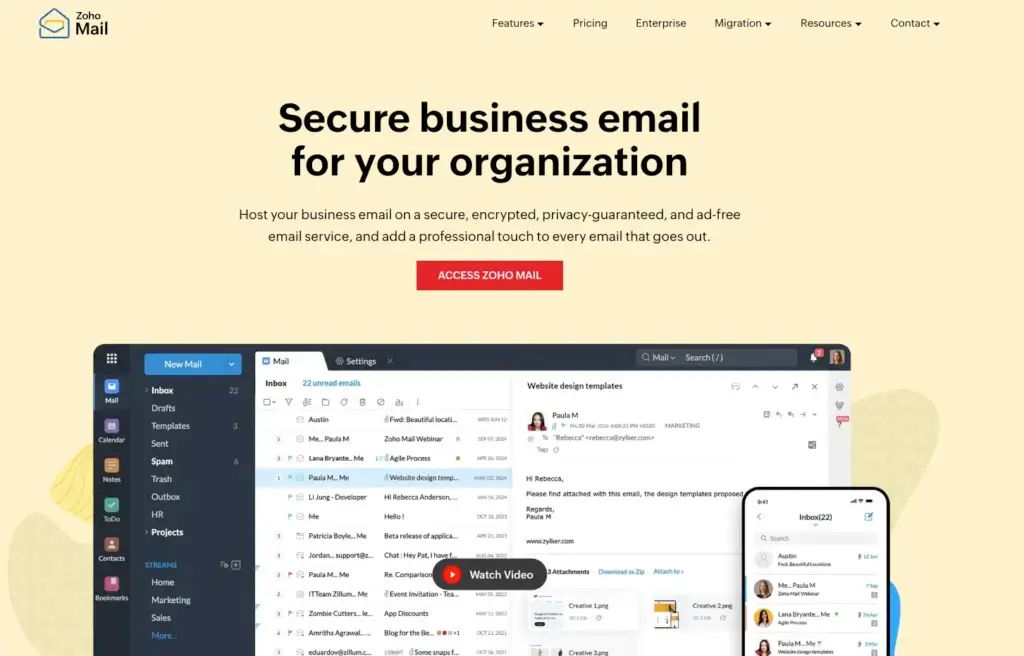
Zoho Mail focuses on professional email hosting with custom domains, an ad-free interface, admin controls, calendar, contacts, tasks, notes, bookmarks, team collaboration through Streams, and integrations through eWidget. It also offers business security features such as two-factor authentication, email policies, SAML SSO on supported plans, encryption in transit, encryption at rest, PGP support, and S/MIME on higher-tier plans.
In simple terms, Zoho Mail is best understood as an affordable business email platform. It is stronger than basic web hosting email, cheaper than many business email suites, and more business-oriented than most personal email providers. It is not the strongest option for users who want maximum encrypted-email privacy, but it is one of the strongest choices for small business email value.
Software Specification
Core Features Breakdown
Zoho Mail’s feature set is designed for professional email hosting and business communication. It includes custom-domain email, webmail, mobile apps, calendar, contacts, tasks, notes, bookmarks, aliases, groups, migration tools, team collaboration, admin controls, security policies, and useful integrations with other Zoho apps.
1. Custom-Domain Business Email
Zoho Mail allows businesses to create professional email addresses using their own domain. Instead of using a generic email address, businesses can create addresses such as info@yourcompany.com, support@yourcompany.com, billing@yourcompany.com, or team member addresses under the company domain.
This is one of Zoho Mail’s strongest use cases. It gives small businesses a professional email identity without forcing them into a more expensive workplace suite. For freelancers, consultants, agencies, ecommerce brands, and service businesses, this can make the company look more credible while keeping monthly costs low.
2. Mail, Calendar, Contacts, Tasks, Notes, and Bookmarks
Zoho Mail is more than a mailbox. The platform includes a set of productivity tools that help users manage daily communication and follow-up work from one place.
- Email inbox and folder management
- Calendar for meetings and scheduling
- Contacts for address book management
- Tasks for follow-up work
- Notes for saving context
- Bookmarks for storing useful links
This makes Zoho Mail more useful than basic email hosting from many web hosting providers. It gives users a small productivity workspace around email, which is important because business communication rarely stops at sending and receiving messages.
3. Streams for Team Collaboration
Zoho Mail includes Streams, a collaboration layer that helps teams reduce long email reply chains. Instead of forwarding emails back and forth, users can discuss messages, comment, share updates, and collaborate inside a more structured team environment.
This is useful for departments that regularly discuss client emails, internal requests, support updates, project communication, billing messages, or sales follow-ups. Streams is not a full project management system, but it improves email collaboration by keeping team conversations closer to the message context.
4. Email Aliases, Groups, and Domain Aliases
Zoho Mail supports email aliases, group email addresses, and domain aliases on supported plans. This helps businesses organize communication without creating unnecessary separate inboxes for every use case.
For example, a business can use addresses like support@, sales@, billing@, and partnerships@ while routing messages to the right people or teams. Aliases also help reduce inbox exposure because users do not always need to share their main address for every workflow.
5. IMAP, POP, ActiveSync, and External Email Client Support
Zoho Mail supports standard email access options on paid plans, including IMAP and POP. This is important for businesses that want to use Zoho Mail with third-party clients such as Outlook, Apple Mail, Thunderbird, or mobile mail apps.
This is a key advantage over some encrypted email providers, which restrict third-party email client access because of their encryption models. Zoho Mail is more flexible for traditional business email workflows, especially for teams that already have preferred desktop or mobile email clients.
6. eWidget and Zoho CRM Integration
Zoho Mail’s eWidget is one of its most useful business features. It allows users to access connected Zoho applications from inside the mailbox. For teams using Zoho CRM, this means sales and customer data can be accessed directly from email.
Users can view CRM details for leads and contacts, add new leads or contacts from emails, associate messages with CRM records, create tasks, manage deals, and send templates from the email interface. This makes Zoho Mail especially strong for sales teams, account managers, support teams, and businesses already using Zoho CRM.
7. Migration Tools
Zoho Mail provides migration tools that help businesses move from other email providers. This is important because switching email systems can be stressful for small teams. A proper migration plan should cover users, domains, DNS records, inbox history, aliases, forwarding rules, groups, and calendar needs.
Zoho Mail is a practical choice for businesses moving away from basic hosting email, Gmail, Outlook, or another business email provider. However, teams should still plan carefully before migration, especially if they rely heavily on shared mailboxes, advanced routing, third-party integrations, or large historical archives.
8. Admin Console and Business Controls
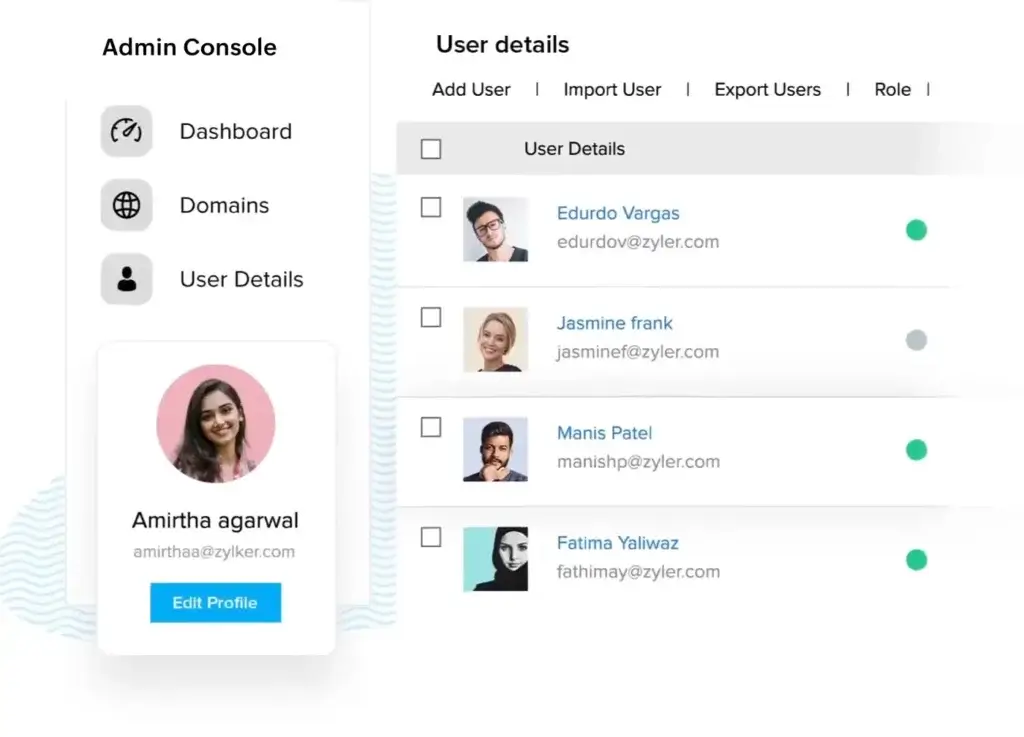
Zoho Mail includes an admin console for managing users, domains, security policies, groups, mail routing, email policies, storage, and organization-wide settings. This is essential for businesses because email is one of the most sensitive systems in any company.
Admin controls help businesses manage onboarding, offboarding, mailbox access, domain setup, and security settings more professionally. This is one of the main reasons Zoho Mail is a better choice than using personal email accounts for business communication.
User Experience
Zoho Mail User Experience
Clean Business Email Interface
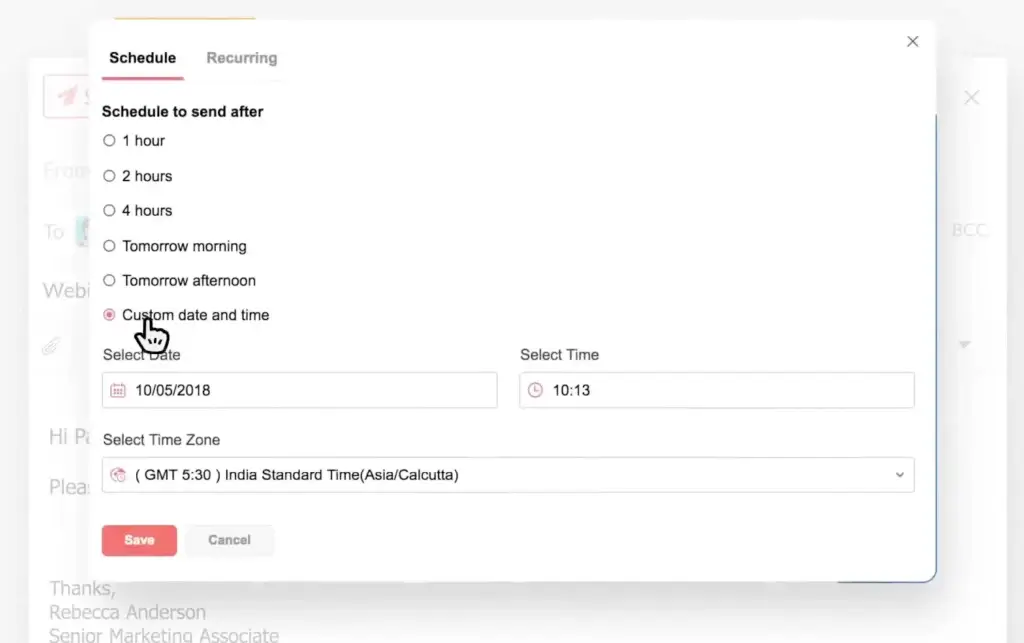
Zoho Mail has a clean and professional interface that feels built for business users. The layout is familiar enough for users coming from Gmail or Outlook, but it still has Zoho’s own workflow style. Users can manage email, folders, tags, contacts, calendar, notes, tasks, bookmarks, and app integrations from the same environment.
The interface is not as instantly familiar as Gmail for many users, but it is logical once the team adapts. The main learning curve is understanding Zoho’s broader workspace structure, especially if the business also uses Zoho CRM, Zoho Cliq, Zoho WorkDrive, or Zoho Projects.
Good Fit for Zoho Ecosystem Users
Zoho Mail becomes much more valuable when used with other Zoho apps. A business using Zoho CRM can connect email communication with leads, contacts, deals, and follow-up tasks. A company using Zoho Workplace can combine mail with documents, chat, file storage, meetings, and office tools.
This ecosystem advantage is one of the biggest reasons to choose Zoho Mail over a standalone inbox. If your business already uses Zoho products, Zoho Mail can reduce app switching and make communication more connected to customer and operational data.
Mobile Apps and Admin App
Zoho Mail offers mobile apps for iOS and Android. It also has mobile access for administrators, which is useful for businesses that need to manage accounts, users, or email settings while away from a desktop.
- Use Zoho Mail on web, iOS, and Android
- Access mail, calendar, contacts, and tasks on mobile
- Manage business email communication across devices
- Use supported third-party email clients on paid plans
For most small businesses, the mobile experience is more than enough for daily email management. Users who prefer Outlook, Apple Mail, or Thunderbird should confirm the plan includes the access method they need before choosing a subscription.
Setup and Migration
Setting up Zoho Mail requires domain verification and DNS configuration, including MX records and email authentication records such as SPF, DKIM, and DMARC. This is standard for professional email hosting, but non-technical users may need help from a domain administrator or hosting provider.
Once configured, the daily experience is straightforward. The bigger challenge is migration planning. Businesses moving from another provider should map out every mailbox, alias, group, shared address, forwarding rule, and retention requirement before switching.
Best for Practical Business Workflows
Zoho Mail is strongest when used as a business communication hub. It is not the most privacy-focused encrypted email provider, and it is not the most polished premium inbox for personal email enthusiasts. Its real strength is practical business value.
For teams that need affordable custom-domain email, admin controls, mobile access, collaboration, CRM connection, and integration with a wider business suite, Zoho Mail delivers a strong user experience for the price.
Pros and Cons
Advantages and Disadvantages
Pros
✅ Very affordable business email
✅ Custom-domain email support
✅ Strong Zoho ecosystem integrations
✅ Good admin and security controls
Cons
❌ Not the strongest encrypted-email provider
❌ Free plan availability varies by region
❌ Interface has a learning curve
❌ Lower-tier storage may be limited
Zoho Mail is one of the strongest email providers for small businesses that care about cost, custom domains, and business software integration. Its strengths are clear: low pricing, professional email hosting, admin controls, migration tools, mobile apps, and deep Zoho ecosystem value. Its limitations are also clear: it is not the most privacy-first email provider, and its lower-tier storage may feel limited for teams with heavy attachment usage.
✅ Strengths
- Very affordable business email: Zoho Mail is one of the best-value professional email hosting services, especially for small teams and startups.
- Custom-domain support: Businesses can create branded email addresses under their own domain, which improves trust and professionalism.
- Strong Zoho ecosystem: Zoho Mail connects naturally with Zoho CRM, Zoho Workplace, Zoho Cliq, Zoho WorkDrive, and other Zoho tools.
- Useful collaboration features: Streams, tasks, notes, groups, and eWidget help teams work around email without relying only on forwarded messages.
- Business admin controls: Admins can manage domains, users, policies, groups, routing, security settings, and access controls.
❌ Weaknesses
- Not a privacy-first encrypted email provider: Zoho Mail is secure business email, but Proton Mail and Tuta are stronger for users who prioritize end-to-end encrypted private email.
- Free plan availability varies: Zoho states that its free plan is available in select regions, so not every business will see the same free-plan option.
- Lower-tier storage can be limited: Mail Lite storage is practical for basic use, but teams with heavy attachments may need Mail Premium or Zoho Workplace.
- Learning curve for Gmail users: Zoho Mail is clean, but teams used to Gmail or Outlook may need time to adjust to the interface and ecosystem.
- Best value comes inside Zoho ecosystem: Businesses that do not use other Zoho tools may not benefit from its strongest integration advantages.
Overall, Zoho Mail is best for businesses that want affordable, professional, custom-domain email with strong admin controls and useful productivity features. It is less suitable for users who want maximum private email encryption, the most polished consumer inbox, or deep Google and Microsoft ecosystem alignment.
Pricing and Plans
How Much Does Zoho Mail Cost?
Zoho Mail is one of the most affordable business email providers available, especially for freelancers, startups, small businesses, and teams that need custom-domain email without paying for a full Google Workspace or Microsoft 365 subscription. Zoho’s official pricing page lists a free plan in select regions and paid Mail plans starting from $1/user/month when billed annually. Zoho also offers broader Zoho Workplace plans for teams that want email plus office productivity tools.
Pricing can vary by country, currency, taxes, billing cycle, and data center, so businesses should always confirm the latest pricing on Zoho’s official pricing page before subscribing. However, the current public pricing structure is clear: Mail Lite is the low-cost business email plan, Mail Premium is the advanced email plan, and Zoho Workplace is the broader productivity suite option.
Zoho Mail Plans
| Plan | Price | Storage | Best For | Key Features |
| Forever Free Plan | $0 | 5 GB per user | Very small businesses testing Zoho Mail | Email hosting for one domain, up to 5 users, web access, mobile app access, 25 MB attachment limit, no IMAP/POP/ActiveSync |
| Mail Lite – 5 GB | $1/user/month, billed annually | 5 GB per user | Freelancers, startups, and small teams | Custom-domain email, email aliases, domain aliases, email groups, email sharing, IMAP/POP access, email forwarding, offline access, calendar, tasks, notes, and mobile apps |
| Mail Lite – 10 GB | $1.25/user/month, billed annually | 10 GB per user | Small businesses that need more mailbox space | Everything in Mail Lite 5 GB, but with double the mailbox storage per user |
| Mail Premium | $4/user/month, billed annually | 50 GB mail storage per user plus archival storage | Growing businesses, agencies, and teams with compliance needs | Everything in Mail Lite, 1 GB huge attachment limit, email backup, archiving, eDiscovery, retention, S/MIME, white labeling, and larger storage |
The Forever Free Plan is useful for very small teams, but it is limited. It supports up to 5 users and one domain in select data centers, with 5 GB of mail storage per user. The main limitation is that IMAP, POP, and ActiveSync are not included, so it is best for users who are comfortable using Zoho Mail through webmail or Zoho’s apps.
Mail Lite is the best starting point for most small businesses. At $1/user/month for the 5 GB version or $1.25/user/month for the 10 GB version, it gives businesses professional custom-domain email at a very low cost. It is a strong fit for consultants, agencies, service providers, ecommerce stores, and startups that need branded email addresses without advanced compliance features.
Mail Premium is the better choice for businesses that need more storage, larger attachments, backup, archiving, retention, eDiscovery, S/MIME encryption, and white labeling. At $4/user/month, it is still affordable compared with many business email suites, but it gives teams more serious email management and governance features.
Zoho Workplace Plans
Zoho Workplace is different from Zoho Mail because it includes more than email. It is designed for companies that want an affordable productivity suite with email, file storage, office documents, spreadsheets, presentations, team chat, online meetings, and collaboration tools.
| Plan | Price | Storage | Best For | What It Adds |
| Workplace Standard | $3/user/month, billed annually | 30 GB mail storage per user plus 10 GB shared WorkDrive storage per user | Teams that want email plus basic office productivity tools | Zoho Mail, Zoho WorkDrive, Zoho Writer, Zoho Sheet, Zoho Show, Zoho Cliq, Zoho Meeting, calendar, tasks, and collaboration tools |
| Workplace Professional | $6/user/month, billed annually | 100 GB mail storage per user plus 100 GB shared WorkDrive storage per user | Growing teams that need more storage and a fuller business productivity suite | Everything in Workplace Standard, higher storage, stronger collaboration capacity, and a broader alternative to Google Workspace or Microsoft 365 |
Workplace Standard is worth considering if the business wants more than email but still wants to keep costs low. At $3/user/month, it adds Zoho’s office and collaboration tools, making it a practical alternative to basic Google Workspace or Microsoft 365 plans for budget-conscious teams.
Workplace Professional is better for teams that need significantly more storage and a fuller workplace suite. At $6/user/month, it is still competitively priced, especially for companies that want email, file storage, documents, spreadsheets, presentations, chat, and meetings under one platform.
What You Get Across Paid Plans
| Feature | Mail Lite | Mail Premium | Workplace Standard | Workplace Professional |
| Starting price | $1/user/month | $4/user/month | $3/user/month | $6/user/month |
| Custom-domain email | Yes | Yes | Yes | Yes |
| Mail storage | 5 GB or 10 GB per user | 50 GB per user | 30 GB per user | 100 GB per user |
| Email aliases | Yes | Yes | Yes | Yes |
| Domain aliases | Yes | Yes | Yes | Yes |
| IMAP/POP access | Yes | Yes | Yes | Yes |
| ActiveSync | Yes | Yes | Yes | Yes |
| Huge attachment limit | Up to 250 MB | Up to 1 GB | Up to 500 MB | Up to 1 GB |
| S/MIME encryption | No | Yes | No | Yes |
| PGP encryption | Yes | Yes | Yes | Yes |
| TLS encryption | Yes | Yes | Yes | Yes |
| Email backup | No | Yes | No | Yes |
| Email retention | No | Yes | No | Yes |
| eDiscovery | No | Yes | No | Yes |
| Zoho WorkDrive | No | No | Yes | Yes |
| Zoho Writer, Sheet, and Show | No | No | Yes | Yes |
| Zoho Cliq and Zoho Meeting | No | No | Yes | Yes |
For most small businesses, Mail Lite at $1/user/month is the best starting point. It provides professional custom-domain email at one of the lowest prices in the market. The 10 GB Mail Lite option at $1.25/user/month is worth choosing if users receive many attachments or want more breathing room.
Mail Premium at $4/user/month is the better option for businesses that need stronger email governance, including retention, eDiscovery, backup, S/MIME, and larger attachment limits. It is also a better fit for agencies, finance-related teams, legal-adjacent workflows, and companies with more serious email recordkeeping requirements.
Zoho Workplace Standard at $3/user/month is a strong value if the business wants email plus office tools. Zoho Workplace Professional at $6/user/month is the better choice for teams that need more storage and a more complete workplace suite.
Overall, Zoho Mail is one of the best-priced business email providers. Choose Mail Lite for low-cost professional email, Mail Premium for advanced email management, and Zoho Workplace if your team wants a full productivity suite around email.
Security and Privacy
How Zoho Mail Protects Your Data
Zoho Mail provides a strong security foundation for business email. It includes encryption at rest and in transit, spam protection, authentication options, administrative policies, two-factor authentication, SAML SSO on supported plans, PGP support, S/MIME on higher-tier plans, and business controls for managing users and domains.
1. Encryption at Rest and in Transit
Zoho Mail protects email data with encryption at rest and in transit. This means mailbox data is protected while stored and while moving between systems using supported encryption protocols.
This is important for business email because inboxes often contain invoices, contracts, login alerts, customer records, internal discussions, and sensitive operational information. While this is not the same as a fully end-to-end encrypted mailbox model like Proton Mail or Tuta, it is a strong baseline for professional email hosting.
2. S/MIME and PGP Support
Zoho Mail supports additional email security options such as S/MIME and PGP on supported plans. S/MIME can be used to digitally sign and encrypt email, while PGP can support secure communication workflows for users that need stronger message-level protection.
This makes Zoho Mail more capable than basic email hosting providers. However, businesses should understand that these features may require setup, certificates, user training, and consistent security practices to be effective.
3. Two-Factor Authentication
Two-factor authentication is an essential security feature for business email. Every Zoho Mail user should enable 2FA, especially administrators and users with access to sensitive client, finance, legal, or operational messages.
Email is often the recovery channel for other business tools. If a mailbox is compromised, attackers may gain access to password resets, invoices, internal files, SaaS accounts, and customer communication. 2FA should be treated as a requirement, not an optional setting.
4. Admin Policies and Organization Controls
Zoho Mail gives administrators control over users, groups, domains, authentication, email policies, routing, and security settings. These controls are important for onboarding, offboarding, compliance, and reducing operational risk.
For businesses, admin control is one of the biggest differences between using a real email hosting platform and relying on personal inboxes. Zoho Mail makes it easier to manage email professionally as the team grows.
5. Retention, Backup, and eDiscovery
Higher-tier Zoho Mail plans include features such as email retention, backup, restore, archiving, and eDiscovery. These features are important for businesses that need to preserve records, recover deleted emails, investigate issues, or meet internal governance requirements.
This is especially useful for professional services, finance-related teams, legal-adjacent workflows, support teams, agencies, and organizations that need more control over business communication history.
6. Privacy Limitation
Zoho Mail is secure and ad-free, but it is not the same kind of privacy product as Proton Mail or Tuta. Those providers are more focused on end-to-end encrypted personal communication and privacy-first architecture.
Zoho Mail is better understood as secure business email with strong administrative value. It is a good fit for teams that need professional email hosting, but users seeking maximum encrypted communication should compare it carefully with Proton Mail and Tuta.
Comparison with Competitors
Zoho Mail vs Top Alternatives
Zoho Mail competes with several types of email providers. It can be compared with secure email providers, premium traditional email platforms, and privacy-first alternatives. For this comparison, the most useful competitors are Proton Mail, Fastmail, and Tuta.
These three tools show where Zoho Mail fits best. Proton Mail is stronger for a full privacy ecosystem. Fastmail is stronger for a polished traditional email experience. Tuta is stronger for encrypted email and private calendars. Zoho Mail is stronger for affordable business email connected to a broad software ecosystem.
Zoho Mail vs Proton Mail
| Feature | Zoho Mail | Proton Mail |
| Main positioning | Affordable business email and Zoho ecosystem integration | Privacy-first email and broader secure digital workspace |
| Free plan | Available in select regions for up to 5 users | Yes, personal free plan available |
| Custom domains | Available, strong business use case | Available on paid plans |
| Encryption focus | Encryption at rest and in transit, S/MIME and PGP support on supported plans | End-to-end and zero-access encryption focus |
| Business ecosystem | Very strong with Zoho CRM, Workplace, Desk, Projects, Books, and more | Strong privacy ecosystem with Mail, Calendar, Drive, VPN, Pass, and more |
| Best for | Cost-conscious businesses that want email plus business apps | Privacy-conscious users and teams that want a secure ecosystem |
Summary: Proton Mail is the better choice if privacy is the main reason for switching email providers. It offers a stronger encrypted-email experience and a broader privacy ecosystem that includes tools such as secure calendar, cloud storage, VPN, and password management.
Zoho Mail is better if the priority is affordable business email, custom domains, admin controls, and integration with CRM, finance, support, project management, and workplace apps. For most small businesses focused on cost and operations, Zoho Mail is more practical. For privacy-first users, Proton Mail is stronger.
Zoho Mail vs Fastmail
| Feature | Zoho Mail | Fastmail |
| Main positioning | Business email with productivity and Zoho ecosystem tools | Premium traditional email, calendar, and contacts |
| Custom domains | Yes, strong for business email | Yes, strong for personal and business users |
| User experience | Business-focused, feature-rich, and integrated with Zoho apps | Very polished, fast, and refined for email power users |
| Third-party clients | Supported on paid plans | Strong support for traditional email clients |
| Business ecosystem | Much broader through Zoho’s software suite | More focused on email, calendar, and contacts |
| Best for | Small businesses that want affordable email plus business software integration | Users who want one of the best traditional email experiences |
Summary: Fastmail is the better option if the main priority is a polished, fast, traditional email experience. It is excellent for users who care about inbox quality, custom domains, calendars, contacts, and flexible email workflows.
Zoho Mail is better if the business needs more than email. Its advantage is not just the inbox, but the surrounding ecosystem. If your team uses CRM, accounting, project management, help desk, or office tools, Zoho Mail offers more business value. Fastmail is better for premium email simplicity. Zoho Mail is better for business software depth.
Zoho Mail vs Tuta
| Feature | Zoho Mail | Tuta |
| Main positioning | Affordable business email and productivity ecosystem | Private encrypted email, calendar, and contacts |
| Free plan | Available in select regions for up to 5 users | Yes, personal free plan available |
| Encryption focus | Secure business email with encryption, PGP, TLS, and S/MIME options | End-to-end encrypted email, calendar, and contacts |
| Custom domains | Strong business custom-domain support | Available on paid plans |
| Third-party email clients | More traditional access on paid plans | Limited by encrypted architecture |
| Business ecosystem | Very broad through Zoho apps | Focused mainly on privacy-first communication |
| Best for | Businesses that need low-cost email and admin controls | Users who want private encrypted communication |
Summary: Tuta is the better choice for users who want private encrypted email, encrypted calendars, encrypted contacts, no ads, no tracking, and a stronger privacy-first architecture. It is especially relevant for privacy-conscious individuals, journalists, nonprofits, consultants, and sensitive communication workflows.
Zoho Mail is the better choice for practical business email. It offers stronger admin flexibility, traditional email access on paid plans, CRM integrations, productivity tools, and broader business software value. Choose Tuta for privacy-first encrypted communication. Choose Zoho Mail for affordable business email and operational productivity.
For a privacy-first email ecosystem, Proton Mail is the stronger choice. For the most polished traditional inbox experience, Fastmail is the better option. For encrypted email, encrypted calendars, and privacy-first communication, Tuta stands out.
However, when the main requirement is affordable business email with custom domains, admin controls, mobile access, aliases, groups, calendar, tasks, notes, Streams collaboration, CRM integration, and access to a wider business software suite, Zoho Mail is one of the best-value options available.
Conclusion
Is Zoho Mail Worth It in 2026?
⭐ Overall Rating: 8.5/10
Zoho Mail is worth considering if your business needs professional email hosting at a low cost. Its strongest advantages are custom-domain email, affordable pricing, Zoho ecosystem integrations, admin controls, mobile apps, aliases, groups, Streams collaboration, migration tools, and business-ready security features.
It is especially valuable for freelancers, startups, small businesses, consultants, agencies, ecommerce teams, service providers, and companies already using Zoho CRM or other Zoho applications. It gives these teams a professional email system without the higher cost of Google Workspace or Microsoft 365.
Zoho Mail is not perfect. It is not as privacy-focused as Proton Mail or Tuta, not as polished as Fastmail for traditional email power users, and not always as familiar as Gmail for teams that have used Google Workspace for years. The free plan also depends on regional availability, and lower-tier storage may not fit attachment-heavy teams.
Final Thoughts
Zoho Mail is an excellent choice for:
- Small businesses that need affordable custom-domain email
- Freelancers and consultants who want professional email branding
- Startups that want low-cost email with room to grow
- Agencies and service providers using shared addresses and aliases
- Sales teams that use Zoho CRM
- Businesses already using Zoho Workplace or other Zoho tools
- Teams that want admin controls without paying premium suite pricing
Zoho Mail is not the best product for every email user. Privacy-first users should compare Proton Mail and Tuta. Email power users who want the smoothest traditional inbox should compare Fastmail. But for affordable business email connected to a serious software ecosystem, Zoho Mail is one of the strongest options in its category.
Frequently Asked Questions
Have more questions?
1. What is Zoho Mail?
Zoho Mail is a professional business email hosting service from Zoho. It supports custom-domain email, webmail, mobile apps, calendar, contacts, tasks, notes, aliases, groups, admin controls, and integrations with other Zoho business applications.
2. Is Zoho Mail free?
Zoho Mail offers a free plan in select regions. The free plan can support up to 5 users in an organization with limited storage and basic access. Businesses should check Zoho’s current pricing page because free-plan availability can vary by data center and region.
3. Is Zoho Mail good for business email?
Yes, Zoho Mail is a strong option for business email, especially for freelancers, startups, small businesses, agencies, and teams that need affordable custom-domain email with admin controls and productivity features.
4. Does Zoho Mail support custom domains?
Yes, Zoho Mail supports custom-domain email. Businesses can use addresses such as info@yourcompany.com, support@yourcompany.com, or team member addresses under their own domain.
5. How much does Zoho Mail cost?
Zoho Mail has a free plan in select regions and paid plans such as Mail Lite and Mail Premium. Mail Lite typically starts around $1 per user per month when billed yearly, while Mail Premium is designed for users who need more storage, archiving, eDiscovery, backup, and advanced features. Pricing can vary by region and billing cycle.
6. What is the difference between Zoho Mail and Zoho Workplace?
Zoho Mail focuses mainly on business email, calendar, contacts, tasks, notes, and admin controls. Zoho Workplace is broader and can include email plus office productivity tools such as documents, spreadsheets, presentations, file storage, meetings, chat, and team collaboration.
7. Is Zoho Mail secure?
Zoho Mail includes important security features such as encryption at rest and in transit, two-factor authentication, admin policies, spam protection, PGP support, and S/MIME on supported plans. Higher-tier plans also include features such as retention, backup, and eDiscovery.
8. Is Zoho Mail better than Proton Mail?
Zoho Mail is better for affordable business email, custom domains, admin controls, and integration with business apps. Proton Mail is better for privacy-first users who want stronger end-to-end encrypted email and a broader secure privacy ecosystem.
9. Does Zoho Mail work with Outlook or Apple Mail?
Zoho Mail supports standard email access options such as IMAP and POP on paid plans, which allows users to connect supported third-party email clients. Businesses should confirm the exact plan features before subscribing because access options can differ between free and paid tiers.
10. What is the main disadvantage of Zoho Mail?
The main disadvantage is that Zoho Mail is not the strongest choice for maximum encrypted-email privacy. It is secure business email, but privacy-first providers like Proton Mail and Tuta are stronger for users who prioritize end-to-end encrypted communication. Lower-tier storage may also be limited for attachment-heavy teams.








