
Introduction
Most security threats no longer begin with a file you download intentionally. They begin when you browse, click, sign in, shop, or respond to a message. That shift is exactly why Guardio has become more relevant in 2026.
Rather than trying to be a traditional antivirus suite, Guardio focuses on the places where modern scams usually appear first – your browser, your inbox, your text messages, and your online accounts. It is designed to block phishing pages, malicious sites, risky downloads, dangerous browser extensions, and account-related threats before they turn into a bigger problem.
In this Guardio review, you’ll see what the product actually does well, where it still falls short, how its pricing works today, and whether it makes sense as your main browser protection layer or as a companion to a full antivirus.
- What Guardio protects, and what it does not
- Which features matter most for real-world scam prevention
- How Guardio performs across desktop and mobile
- Whether the current plans offer good value
- How it compares with Norton, Bitdefender, McAfee, and Malwarebytes Browser Guard
If you spend a large part of your day in Chrome, Opera, Gmail, online banking, ecommerce, and social media, this guide will help you decide whether Guardio fits your security stack.
📎 Want to compare Guardio with more traditional security tools? Check out our best antivirus software guide.
Overview
Guardio Overview
Company Background
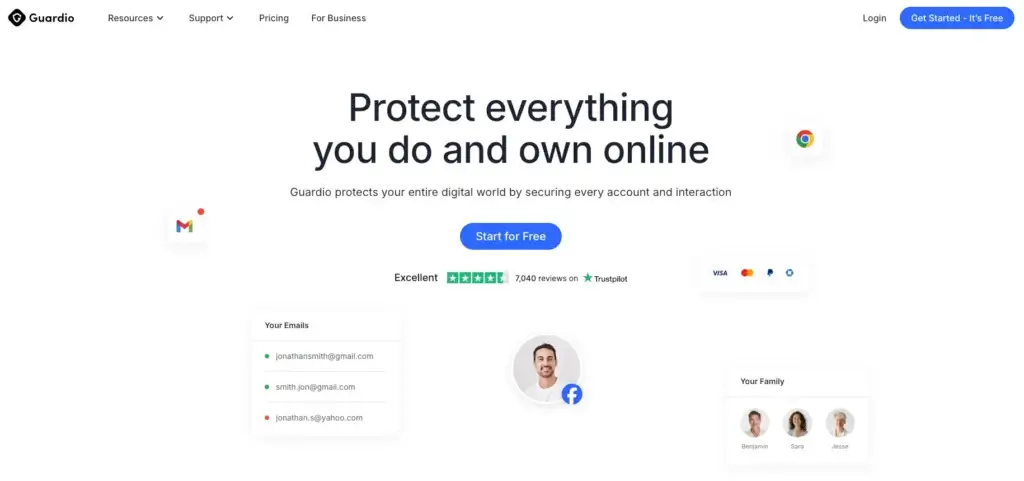
Guardio launched in 2018 with a browser-first approach to personal cybersecurity. That positioning still defines the product, but the company has grown far beyond a simple warning extension. Guardio now presents itself as a full online protection platform focused on scams, phishing, identity exposure, and account safety across devices.
The company says more than 1.5 million people use Guardio, and it raised significant funding to expand its AI-era detection and visibility capabilities. That matters because Guardio’s strongest value is not old-school malware cleanup. It is the ability to react to fast-moving web threats, suspicious pages, risky account settings, and modern scam tactics that increasingly rely on AI-generated content.
It is also worth noting that Guardio is expanding beyond the consumer browser extension use case. The company now talks openly about Safe Browsing for AI and business-focused use cases, but this review stays focused on the product most people will actually buy – the consumer plans.
What Guardio Actually Does Best
Guardio is not trying to be everything. Its sweet spot is very specific: it protects you while you browse, read emails, click links, receive text messages, and manage exposed accounts.
That narrower focus is important because it shapes how you should evaluate the product. If you need deep system scans, ransomware cleanup, firewall controls, or device optimization tools, Guardio is not built for that. If you want a lightweight layer that can stop phishing, fake shopping sites, scam pages, malicious extensions, risky downloads, and account exposure before they become a larger problem, it becomes much more compelling.
- Browser protection for dangerous sites, phishing pages, and harmful downloads
- Scam interception across web, email, and text-based attacks
- Malicious extension detection and browser cleanup
- Identity monitoring for leaked emails, phone numbers, and credentials
- Account insights that help surface weak security settings and exposures
That is why Guardio makes the most sense for people who live in their browser all day. It protects the layer where modern scams are most likely to reach you first.
📱 Device and Browser Compatibility
Compatibility is broader than many older Guardio reviews suggest. On desktop, Guardio is available on Google Chrome, Opera Mini, Opera, Samsung Internet, Mi Browser, and Google Go. That makes it a stronger fit for Chromium-based browsing than it was before.
Firefox and Safari are still not supported, which remains one of the biggest product limitations. If you or your household rely heavily on Safari, that gap matters and should be called out clearly.
On mobile, the picture is better. The Guardio app works across iOS and Android, and mobile browsing protection is designed to protect you regardless of which mobile browser you use. It can also warn you about dangerous links that show up in apps like social media platforms, which makes the mobile experience more useful than a simple companion app.
In practical terms, Guardio is strongest for users who browse primarily on Chromium-based desktop browsers and want broader support on mobile.
Core Features and Security Tools
How Guardio Protects You Online
Guardio’s value comes from how its features work together. Instead of focusing on one type of threat, it builds a browser-and-account safety layer that targets the common routes scammers use to reach you.
Malicious Site Blocking and Phishing Defense
The first layer is site and link protection. Guardio scans web pages in real time and blocks malicious destinations before they load fully. This includes phishing pages, fake login screens, scam stores, fraud pages, and dangerous domains designed to steal money or credentials.
That protection also extends beyond the browser tab you are actively thinking about. If you click a suspicious result, open a phishing email, or land on a cloned login page from a text message, Guardio is designed to stop the interaction before you submit information.
This is where Guardio feels most different from many antivirus products. Traditional suites often detect malware after something has already landed on your device. Guardio is built to interrupt the scam earlier.
Email Security and SMS Scam Protection
Guardio’s phishing coverage is not limited to websites. One of its more useful consumer features is Email Security, which is designed to detect harmful emails that make it past Gmail’s spam filter, alert you, and label them clearly in your inbox. For people who receive realistic phishing attempts, this can be one of the most practical features in the product.
It also offers Text Message Filter functionality, which is especially relevant as smishing scams continue to grow. Guardio can filter suspicious SMS messages from unknown senders and move them away from your main conversation flow, reducing the chance that you tap a malicious link on impulse.
If you are comparing Guardio with more traditional antivirus tools, this is one of the clearest reasons it stands out. Email phishing and text-based scams are major attack channels, and Guardio is more directly focused on them than most classic endpoint suites.
Malicious Extensions, Browser Hijackers, and Risky Downloads
Guardio is particularly strong when it comes to browser-native threats. That includes malicious extensions, search hijackers, abusive notifications, and harmful downloads that often slip under the radar of users who assume a browser is safe by default.
It can identify risky extensions before or after installation, disable extensions that create security issues, and help clean up the browsing environment if something has already hijacked your search behavior. It also blocks malicious downloads before they reach your device, which is an important bridge between web security and traditional malware prevention.
This feature set is a major reason Guardio makes sense as a second layer alongside antivirus. It covers a class of threats that many users underestimate until their browser starts behaving strangely.
Identity Monitoring and Account Security Insights
Guardio does more than block scam pages. It also monitors your digital exposure. You can add email addresses and phone numbers to a monitoring list so Guardio can alert you when your personal information appears in breaches or suspicious databases.
What makes this more useful than a simple breach alert is the account context. Guardio increasingly emphasizes visibility, which means helping you understand where your risks are, what accounts may be exposed, and what settings you should tighten. That gives the product more strategic value than a one-time breach notification tool.
If you want a browser protection tool that also helps you understand your wider online risk posture, this is one of Guardio’s strongest arguments.
Critical Security Alerts
One of the more distinctive features is Critical Security Alerts. This is meant for higher-risk scam scenarios, especially financial scams where speed matters. Guardio says this feature uses AI-based detection and can intervene with live phone calls and text messages if it detects behavior associated with financial fraud or scam manipulation.
That is not a standard feature you see in most consumer security products. It also shows where Guardio is trying to differentiate itself: not just by flagging bad pages, but by stepping in when a user may already be under pressure from a sophisticated scam.
For people concerned about refund scams, wire-fraud setups, impersonation attempts, or urgent account-related social engineering, this feature adds a layer that feels more proactive than passive.
Guardio VIP
VIP is Guardio’s premium support layer for people who want more than standard app-based protection. It includes faster support, access to a dedicated 1-on-1 security expert, and extra family coverage.
This matters most if you are protecting older family members, dealing with repeated scam attempts, or simply want a human point of contact when something suspicious happens online. Many security tools promise protection, but few combine it with hands-on guidance in a way that everyday users can actually use under pressure.
It is not necessary for everyone, but it makes sense if your biggest concern is a practical scam response rather than just passive monitoring.
Pros and Cons
Advantages and Disadvantages
Positive
✅ Excellent phishing and scam blocking
✅ Strong browser cleanup and extension protection
✅ Useful email and SMS security features
✅ Broad mobile coverage and multi-user plans
✅ VIP support adds real human guidance
Negatives
❌ Not a full antivirus replacement
❌ No Firefox or Safari support
❌ Monthly pricing is not cheap for solo users
❌ Some users may still prefer more traditional suites
✅ Pros
Focused protection where modern scams actually happen
Guardio is strongest where many people are most vulnerable: while browsing, opening emails, following text links, and signing into accounts. That makes the product more relevant than a traditional suite for users whose biggest risk is phishing and fraud rather than deep system infections.
Stronger browser-native protection than most antivirus tools
Malicious extensions, hijacked searches, abusive notifications, fake shopping pages, and dangerous redirects are exactly the kinds of threats Guardio is designed to stop. That browser-first specialization gives it a sharper identity than many antivirus add-ons that treat web protection like a secondary feature.
Practical mobile and account-related value
The mobile app adds real usefulness through browsing protection, scam-link detection, and text message filtering. Combined with identity monitoring and account security insights, Guardio feels more like an online safety platform than a simple extension.
Family-friendly plan structure
The Duo and Family tiers make Guardio easier to justify if you are protecting more than one person. That becomes even more useful if you want to cover children, parents, or a less technical household that would benefit from alerts and centralized visibility.
VIP is a meaningful differentiator
Many products say they offer support, but Guardio VIP adds dedicated expert help and priority access. For scam-heavy situations, human support can be more useful than another technical feature most users will never touch.
❌ Cons
It is still not a full antivirus
This remains the biggest limitation. Guardio does not replace system-level malware scanning, full endpoint protection, ransomware rollback, or deep device cleanup. You should think of it as a layer that complements antivirus software, not a suite that fully replaces one.
Safari and Firefox users are still left out
Even though desktop support is broader than many reviews mention, Safari and Firefox are still missing. For Apple-heavy households or mixed-browser workflows, that may be enough to disqualify it.
Solo-user pricing is less aggressive than older reviews suggest
Monthly pricing for the Individual plan is now high enough that some buyers will compare it more directly with broader suites. The annual plans are more attractive, but if you only need protection for one person, Guardio is no longer a bargain impulse buy.
Some users may expect more traditional security tools
Because Guardio sits in the security category, some readers will still expect VPNs, password managers, cloud backup, firewall controls, or device optimization features. That is not really what Guardio is built for, so expectation setting matters.
Software Capabilities
Performance and User Experience
Guardio is built for people who want protection that feels present when needed and invisible the rest of the time. That is a major part of the product appeal.
💻 System Impact
Because Guardio works at the browser and cloud level rather than as a heavy desktop suite, it generally has a light footprint. You are not dealing with long full-device scans, large signature downloads, or the kind of background resource use that some traditional antivirus products can create.
- No heavy scheduled scans running across your whole machine
- Fast browser-based alerts and warning pages
- Minimal friction during everyday browsing
If you are sensitive to performance drag, Guardio is easier to live with than many full antivirus products. That said, the tradeoff is obvious: less system overhead also means less system-level protection.
⚡ Speed of Alerts and Protection
Guardio’s usefulness depends on timing, and timing is one of the product’s strengths. Its warning model is designed to trigger while you are about to land on a risky page, interact with a suspicious email, or tap a dangerous text link. That is exactly the right moment for a product like this to be valuable.
For higher-risk situations, the product goes further with Critical Security Alerts, which are designed to intervene quickly if behavior suggests an active financial scam. That makes Guardio feel more immediate than products that mainly log activity after the fact.
🧭 Ease of Setup and Navigation
Setup is straightforward. On desktop, you install the browser extension, create or connect your account, and let Guardio run its initial checks. On mobile, you install the app and enable the relevant protections you want, such as browsing protection or text filtering.
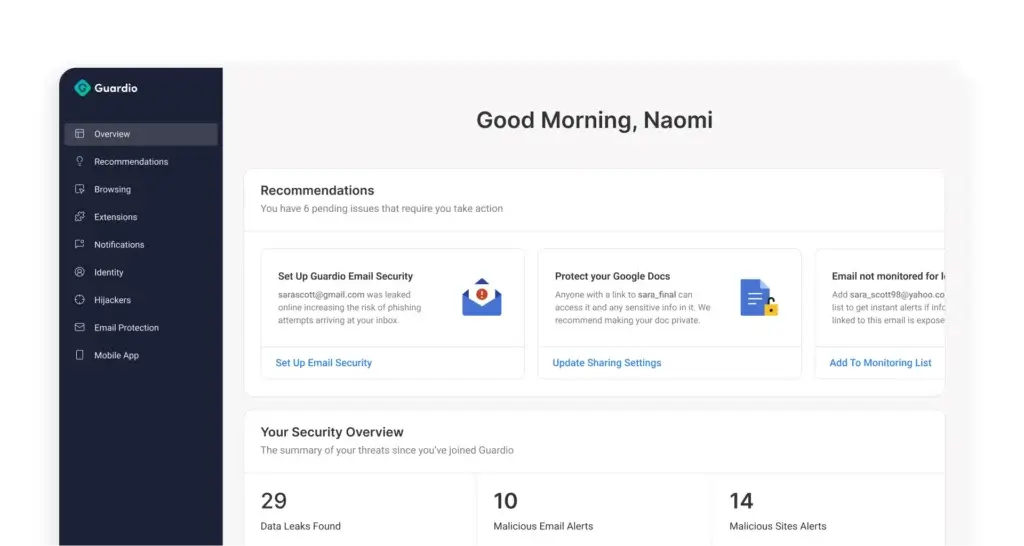
The dashboard is one of the better parts of the experience. It gives you a readable summary of blocked threats, identity exposures, risky account settings, flagged emails, and general security recommendations. That emphasis on clarity helps make Guardio more approachable for non-technical households.
📱 Mobile App Experience
The mobile side is more than an afterthought. Guardio’s app extends browsing protection to mobile, flags phishing emails that get through Gmail, and adds text message filtering for scam-heavy scenarios. That creates continuity between desktop and phone, which is important because many people now click more risky links from mobile than they do from desktop.
If your real-world browsing behavior moves constantly between laptop and phone, Guardio’s cross-device approach is one of its strongest selling points.
Protection and Innovation
Real-World Protection and AI Innovation
Guardio should not be judged by the same lab framework used for traditional antivirus suites. It is a different type of product. That makes real-world relevance, product direction, and browser-level effectiveness more important than classic malware lab charts.
🔍 Why Guardio Feels More Relevant Now
Guardio’s core thesis has aged well. Scams are more convincing, more frequent, and more personalized than they were a few years ago. AI is making phishing messages, fake websites, and social-engineering attempts harder to spot with the naked eye. That threat pattern aligns directly with what Guardio is built to stop.
The company has leaned into that shift by emphasizing AI-powered detection, scam prevention, visibility into weak account settings, and protection built for how people actually use the web now. That positioning feels much more current than legacy antivirus messaging centered mostly on device cleanup.
🧠 Product Direction in the AI Era
Guardio is not standing still. The company is investing in AI-focused protection, including Safe Browsing capabilities built for AI browsers, AI agents, and generative platforms. That may not matter to every buyer right now, but it tells you something important about where the product is heading.
It suggests Guardio sees the next wave of consumer threats not just as bad URLs, but as behavior-driven attacks, AI-generated scam pages, risky account exposures, and deceptive environments that require more context-aware detection.
From a review perspective, that gives Guardio more strategic upside than a browser extension that simply blocks known bad domains from a static list.
📈 Trust Signals and Scale
Guardio says it protects more than 1.5 million users and has expanded meaningfully in recent years. It has also raised major funding to build out more advanced detection, visibility, and account-safety capabilities.
That does not automatically make the product better, but it does suggest Guardio is not a niche add-on struggling to stay relevant. It is an actively developing platform with a clearer long-term roadmap than many browser-only security tools.
🛡️ How to Think About Effectiveness
The most realistic way to evaluate Guardio is simple: if your biggest risks are phishing, fake stores, malicious extensions, scam texts, dangerous downloads, and account exposure, Guardio is highly aligned with those threats.
If your biggest concern is infected local files, ransomware response, device fleet management, or broad endpoint control, a classic antivirus suite still does more of the heavy lifting.
That is why Guardio works best either as a specialist protection layer or as part of a broader setup, not as a one-product answer to every cybersecurity need.
Pricing and Packages
Pricing and Plans for Guardio
Guardio’s pricing is more mature than many older reviews suggest. You are no longer looking at a simple low-cost browser extension. You are choosing between consumer plans built around individual, two-person, family, and VIP-style protection.
| Plan | Price | Members Covered | Key Features |
| Free | $0 | 1 member | Basic browser protection, manual security scan |
| Individual | $14.99/month $119.88 billed yearly | 1 member | Full device coverage, scam and phishing protection, data leak alerts, account security insights, 24/7 support |
| Duo | $22.99/month $183.90 billed yearly | 2 members | All Individual features for two people, desktop and mobile coverage, shared household value |
| Family | $34.99/month $279.90 billed yearly | 5 members | All Duo features, best value for larger households, separate coverage across all connected devices |
| VIP | Custom add-on | Primary user + 4 family members | Everything in Premium plus priority support and a dedicated security expert |
💡 Notes on Pricing
- All paid plans include a 3-day money-back guarantee
- Annual billing offers a much better per-user value than monthly billing
- Paid plans include desktop and mobile coverage, real-time scam protection, identity monitoring, and 24/7 support
- VIP is best treated as a support-and-guidance upgrade, not just a feature add-on
🎯 Value for Money
Whether Guardio feels expensive or well-priced depends on what you expect it to replace. If you compare it against a cheap browser extension, it looks premium. If you compare it against the cost of fraud recovery, identity cleanup, or security products that cover an entire household, the pricing becomes more reasonable.
The Family plan is where the value improves most clearly. Solo users may hesitate at the monthly price, but households that want phishing protection, mobile coverage, and account monitoring across multiple people will find the higher tiers more compelling.
If you are already using a traditional antivirus, Guardio can still justify its price as a second layer because its protection focus is different rather than redundant.
Feedbacks
User Feedback and Reviews
Public user sentiment around Guardio tends to cluster around a few recurring themes. People usually like the product for the same reasons: it is easy to install, it feels proactive, and it blocks scam activity that people actually encounter in daily life.
🌟 Common Praise
- Fast setup – Most users can install it quickly and understand what it is doing without technical knowledge
- Strong scam blocking – Reviews often focus on fake shopping sites, dangerous links, phishing attempts, and suspicious messages
- Useful alerts – Users like seeing issues surfaced clearly rather than buried in technical logs
- Household coverage – Family plans are especially attractive for protecting multiple people with different tech skill levels
- Cross-device protection – The move from desktop browser to mobile app adds practical value
⚠️ Common Complaints
- Not a full antivirus – Some users still misunderstand the product and expect deep system scanning
- Browser gaps – Safari and Firefox support remain frequent friction points
- Price sensitivity – Individual monthly pricing can feel high if you only want one layer of protection
- Occasional overblocking – Like many aggressive protection tools, Guardio can sometimes flag pages a user believes are safe
⭐ What the Feedback Pattern Tells You
User feedback makes the most sense when you look at fit. People who want a browser-first, scam-focused tool often rate Guardio highly because it solves exactly the problem they bought it for. People who expected a classic antivirus experience are more likely to feel disappointed.
That is not really a contradiction. It is a positioning issue. Guardio performs best when you buy it for phishing defense, browser safety, and identity exposure management, not when you expect it to become your entire device security suite.
👥 Who It’s Best For
- Individuals who want better protection against phishing and scam websites
- Families protecting less technical users across desktop and mobile
- Freelancers and remote workers who live in browser-based tools
- Anyone who worries more about fraud, fake sites, and account exposure than about advanced endpoint management
Guardio VS. Alternatives
Comparison with Other Software
Guardio is easiest to understand when you compare it against products that solve adjacent problems rather than identical ones. It is not trying to outdo every antivirus suite on system protection. It is trying to win where browser and scam protection matter most.
Guardio vs. Norton
Norton is the better choice if you want classic antivirus depth, broader device-level protection, and a more traditional suite model. It covers categories Guardio simply does not try to own.
Guardio is stronger when your biggest concern is phishing, fake sites, scam links, malicious extensions, and cross-device web safety. If you want a clean, modern browser protection layer, Guardio feels more specialized and often more relevant.
✅ Choose Guardio if you want modern web and scam protection
✅ Choose Norton if you want broader all-around antivirus coverage
Guardio vs. Bitdefender
Bitdefender is stronger for traditional security depth, enterprise-style control, and richer endpoint capabilities. It is a better choice if you care more about complete system security than browsing-focused scam prevention.
Guardio wins on simplicity and web-native relevance. It is easier to understand, lighter to run, and more directly built for phishing-heavy real-world browsing behavior.
✅ Choose Bitdefender for deeper security coverage
✅ Choose Guardio for simpler browser-focused protection
Guardio vs. McAfee
McAfee brings broader antivirus functionality and extra suite-style components. That can be useful if you want one vendor covering more categories inside a conventional security package.
Guardio is the sharper option if you care about speed, low friction, and scam prevention across browser, email, and mobile. It feels more focused and less cluttered.
✅ Choose Guardio for lighter scam-focused protection
✅ Choose McAfee for a broader traditional suite
Guardio vs. Malwarebytes Browser Guard
This is a more direct comparison because both products sit closer to the browser security layer. Malwarebytes Browser Guard is attractive if you want a lighter, simpler browser add-on with less emphasis on the full account and family ecosystem.
Guardio offers a broader experience with identity monitoring, email and SMS protection, household plans, account insights, and VIP support. It feels more like a consumer protection platform than a single-purpose browser tool.
✅ Choose Guardio for broader online safety coverage
✅ Choose Browser Guard for a more minimal browser-only add-on
Where Guardio Stands Out
- Excellent fit for phishing-heavy, scam-heavy browsing behavior
- More practical mobile and email protection than many antivirus add-ons
- Strong browser extension and hijacker coverage
- Useful household plan structure
- VIP support adds a real-world guidance layer
Where Guardio Falls Short
- Still not a full antivirus replacement
- No Safari or Firefox support
- Monthly solo pricing is less aggressive than before
- Less suitable for users who want device-level management and classic suite extras
Conclusion
Is Guardio Worth It for You?
If your main concern is phishing, fake stores, scam links, dangerous downloads, malicious extensions, exposed accounts, and text-based fraud, Guardio is one of the more relevant consumer security products you can buy in 2026. It is modern, focused, and much better aligned with real-world online risk than many traditional suites that still speak mainly in terms of malware cleanup.
That does not mean it replaces antivirus software. It does not. But that limitation is easier to accept once you understand what Guardio is actually built to do. It is there to protect the paths you use every day – browsing, email, messaging, social media, and account access – before something harmful spreads into a bigger incident.
For many users, especially families and browser-heavy remote workers, that makes Guardio genuinely useful. Its strongest argument is not that it does everything. It focuses on the threats most people are most likely to face.
Best for:
- People who want a strong browser and phishing protection
- Families covering multiple devices and less technical users
- Users who want email, SMS, and account-related safety in one product
- Anyone looking for a smart second layer next to a traditional antivirus
FAQs
Have more questions?
Is Guardio a real antivirus?
Guardio is not a traditional antivirus. It is a browser-first security tool designed to protect you from dangerous websites, phishing scams, malicious downloads, harmful extensions, and identity-related threats while you browse online. Guardio itself says its core job is to protect browsing, block phishing across web, email, and text, and alert you when sensitive information appears in a data breach.
What does Guardio actually protect against?
Guardio focuses on online threats that start in the browser and around your accounts. According to its Help Center, it protects against dangerous websites and downloads, phishing scams across email, text, and the web, and identity-related risks tied to leaked personal information. Its pricing page also highlights scam and phishing protection, data leak alerts, and account security insights.
Does Guardio work on mobile devices?
Yes. Guardio offers a mobile app for iOS and Android. The company says the app works alongside the browser extension to provide real-time alerts and mobile protection, including browsing protection, identity monitoring, email security access, and text-message filtering features.
What browsers does Guardio support?
On desktop, Guardio says its browsing protection is currently available on Google Chrome, Opera Mini, Opera, Samsung Internet, Mi Browser, and Google Go. It says Firefox and Safari are not currently supported, and its mobile app can protect you on any mobile browser you use.
Does Guardio protect Gmail?
Yes. Guardio’s Email Security feature is designed for Gmail. Guardio says it detects harmful emails that get past the spam filter, alerts you right away, shows them in the dashboard, and adds a “Flagged by Guardio” label in Gmail so they are easier to spot.
Does Guardio block scam text messages?
Yes, but the text-message filtering feature is specifically documented as an iOS Text Message Filter. Guardio says it scans texts from unknown senders, and if it finds a suspicious link, it sends that message to your junk folder instead of leaving it in your main inbox.
What are Guardio Critical Security Alerts?
Critical Security Alerts are Guardio’s higher-urgency scam intervention feature. Guardio says this technology monitors for signs of fraud and, if it detects a serious scam risk, it sends a live alert by phone call and text message to help stop financial harm. The company specifically mentions scams such as wire fraud and refund scams.
How much does Guardio cost?
Guardio currently offers a Free plan plus paid Individual, Duo, and Family plans. On monthly billing, the pricing page lists Individual at $14.99, Duo at $22.99, and Family at $34.99. On yearly billing, it lists Individual at $119.88, Duo at $183.90, and Family at $279.90, while the free plan remains $0.
What is included in Guardio Premium plans?
Guardio says its paid plans include full device coverage, scam and phishing protection, data leak alerts, account security insights, and 24/7 support. It also states that all members on Duo and Family plans receive full security coverage and protection across their personal devices.
What is Guardio VIP?
Guardio VIP is the company’s highest-tier support and protection option. Guardio says VIP includes everything in Premium plus priority support, access to a dedicated 1-on-1 security expert, and full Premium protection for up to four additional family members at no extra cost.
Can Guardio replace my existing antivirus?
Not fully. Guardio is built around browser, scam, phishing, and identity protection rather than classic device-wide malware scanning. Its own feature descriptions focus on protecting browsing, email, text, downloads, and leaked personal data, which makes it a strong complementary layer, but not the same thing as a traditional antivirus suite.
Is Guardio good for families?
Yes, especially if your goal is protecting multiple people from phishing, scam texts, suspicious sites, and data leaks. Guardio’s Family plan covers up to 5 members, and its VIP plan adds coverage for up to four additional family members on top of the main account holder.