
Introduction
Choosing a website builder is not just about design. It affects how quickly you can launch, how much control you have over your branding, how well your pages can rank in search, how easily you can sell online, and how much work it takes to manage your site over time. In this Wix review, you will get a practical look at what the platform offers, where it stands out, where it still has limits, and which type of user will get the most value from it.
Wix has grown well beyond a beginner drag-and-drop builder. In 2026, it is better understood as an all-in-one website platform that combines design tools, hosting, business apps, ecommerce, CRM, SEO features, and increasingly strong AI capabilities. That broader positioning is exactly why Wix remains one of the most relevant website builders to review seriously today.
What Is Wix?
Wix is a website builder and hosted website platform that lets you create, manage, and grow a website without needing separate hosting, design software, or a patchwork of third-party tools. You can use it for business websites, portfolios, blogs, landing pages, booking-based businesses, and online stores.
Its biggest appeal is convenience. Wix bundles hosting, security, templates, design controls, business tools, and app integrations into one ecosystem. That makes it easier to launch quickly and keep your site centralized, especially if you do not want to manage a separate CMS, hosting provider, and plugin stack.
Background and Evolution
Wix has changed meaningfully over the last two years. Wix ADI is no longer supported, and the platform now points users to the AI Website Builder instead. Editor X also completed its transition to Wix Studio in January 2025, giving agencies and advanced users a more professional environment. More recently, Wix introduced Wix Harmony, a newer hybrid experience that blends AI prompting with direct drag-and-drop editing. This matters because a modern Wix review should not treat the platform as a single editor. It is now a family of creation environments designed for different use cases.
Target Users and Use Cases
Wix appeals to several different audiences:
- Beginners – You get templates, hosting, built-in tools, and an approachable editor.
- Small businesses – You can manage site content, leads, bookings, email, and payments in one platform.
- Creators and freelancers – Portfolios, landing pages, blogs, and service sites are easy to launch.
- Online sellers – Wix includes ecommerce, payments, multichannel selling, and store management features.
- Agencies and professionals – Wix Studio gives more advanced responsive design and workflow tools.
That said, Wix is not automatically the best choice for every project. It looks strongest when you want a polished all-in-one platform with a relatively fast learning curve. It is less compelling if you want the open-ended flexibility of a self-hosted CMS or the deeper commerce specialization of Shopify.
Key Features of Wix
How Does It Work?
Wix stands out because it combines site creation, hosting, business tools, and marketing functions in one platform. The value is not just that it helps you design pages. It reduces the number of tools you need to run a real website.
All-in-One Website Building
Wix includes hosting, templates, security, domain connection, basic marketing features, and built-in apps for common business needs. That gives it a practical advantage over more fragmented setups. Instead of finding separate hosting, installing a theme, and managing plugins from day one, you can launch from one dashboard.
Template and Design Flexibility
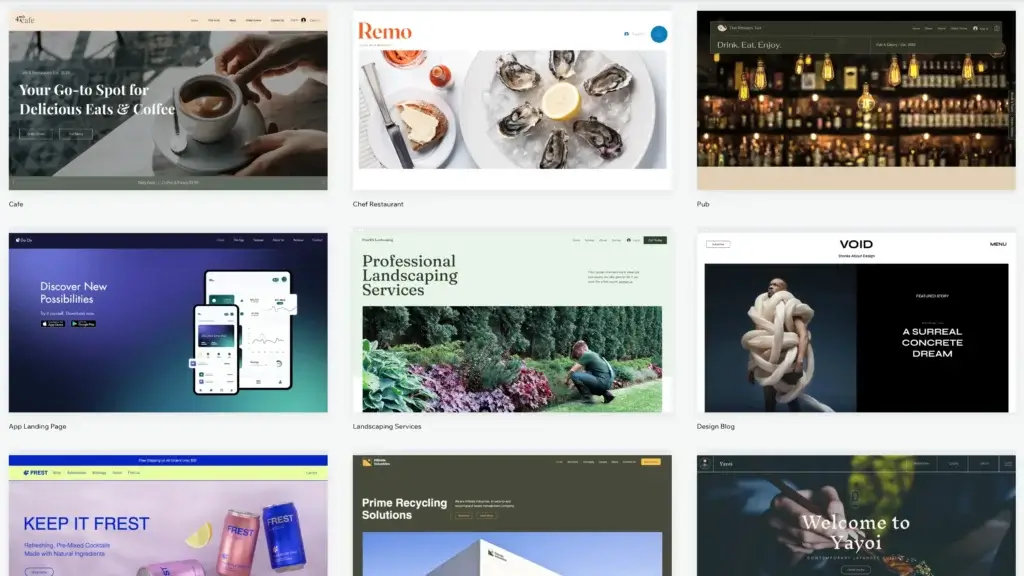
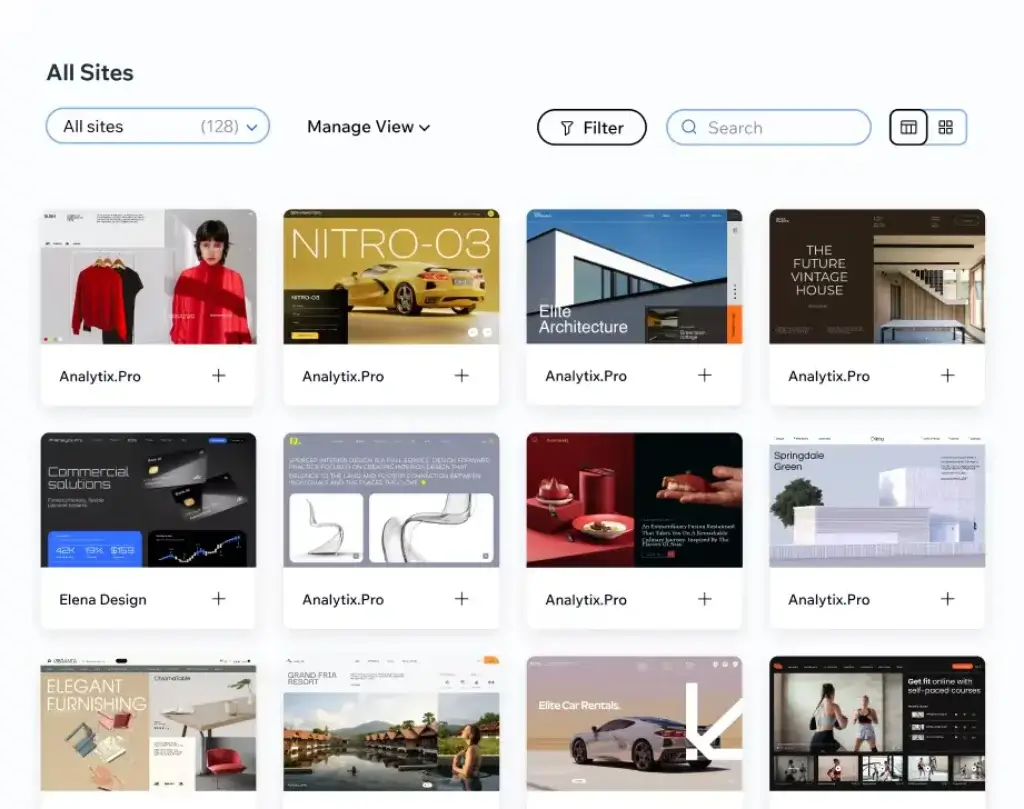
Wix is still one of the more flexible visual builders in the market. The main Wix platform offers more than 900 templates, while its e-commerce area alone promotes 500+ professional store templates. This gives you a broad starting point for different industries and site types. That flexibility is one of Wix’s biggest strengths compared with more rigid builders like Squarespace
Built-In Business Tools
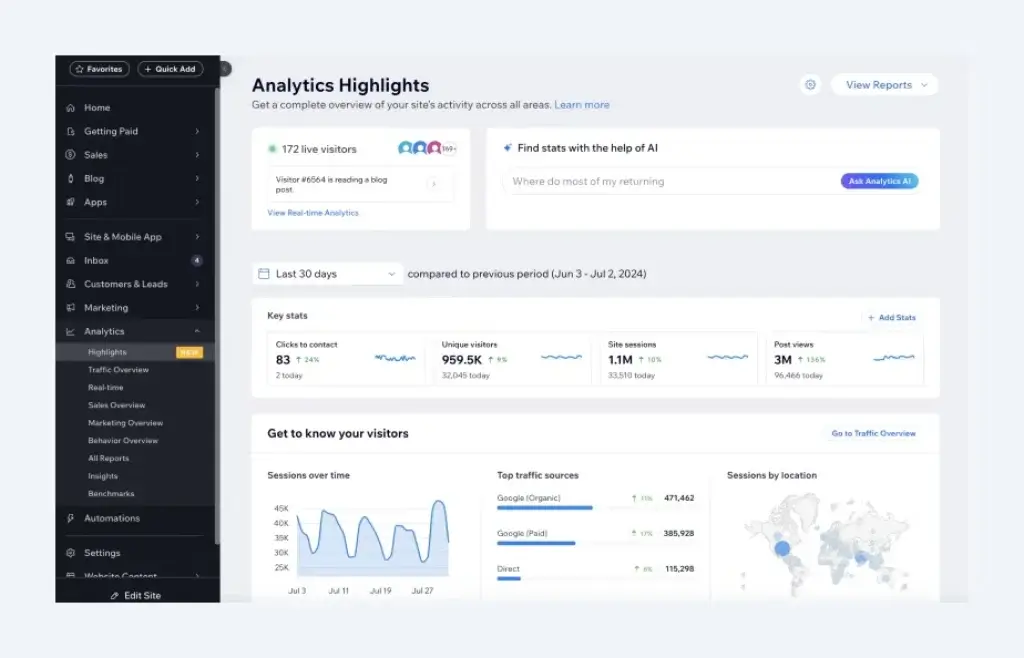
Wix is not only a site builder. It also includes CRM, lead capture, email marketing, booking tools, payments, and analytics. For many small businesses, that reduces the need to add separate tools too early. Wix even states that users who use its built-in lead capture solutions can get up to 20 times more leads, which shows how aggressively it positions the platform as a business operating layer, not just a design tool.
Managed Hosting and Infrastructure
Wix handles hosting for you, which is a major convenience for non-technical users. According to its Trust Center, every Wix site comes with free multi-cloud hosting, using Wix’s own servers together with AWS, Google Cloud, and Fastly. It also claims automatic scaling and no required server maintenance for users. That is a meaningful strength for buyers who want less technical overhead.
Apps and Extensibility
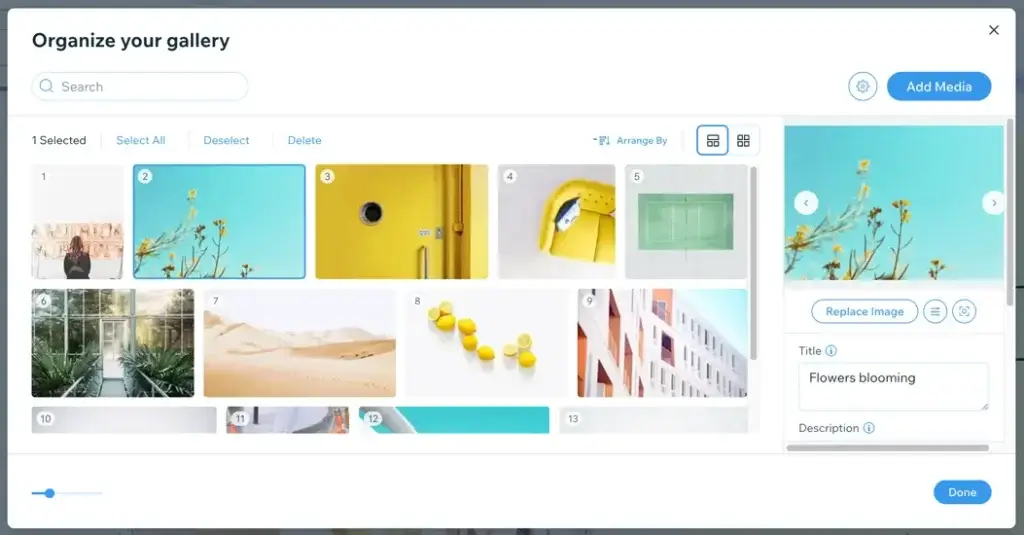
Wix also benefits from a large app ecosystem and deeper development options through Velo and APIs. This is important because Wix is often criticized for being closed. In practice, it is more accurate to say it is a managed platform with controlled extensibility. You still get room to customize and connect tools, but within Wix’s ecosystem rather than through raw server access.
AI Features
Wix AI Capabilities
AI is now one of the most important reasons Wix remains competitive. This is no longer limited to small content suggestions or a simple onboarding wizard. AI is now built into how Wix wants users to create websites, write copy, generate sections, and speed up setup.
Wix AI Website Builder Replaced ADI
Wix officially ended support for ADI on November 10, 2024. ADI has been replaced by the Wix AI Website Builder, which Wix now presents as its AI-powered solution for creating websites. That matters because older Wix reviews often discuss ADI as if it were still part of the current product mix. It is not. In a current review, the AI Website Builder is the relevant starting point for AI-first creation.
Wix Harmony Changes the Editing Experience
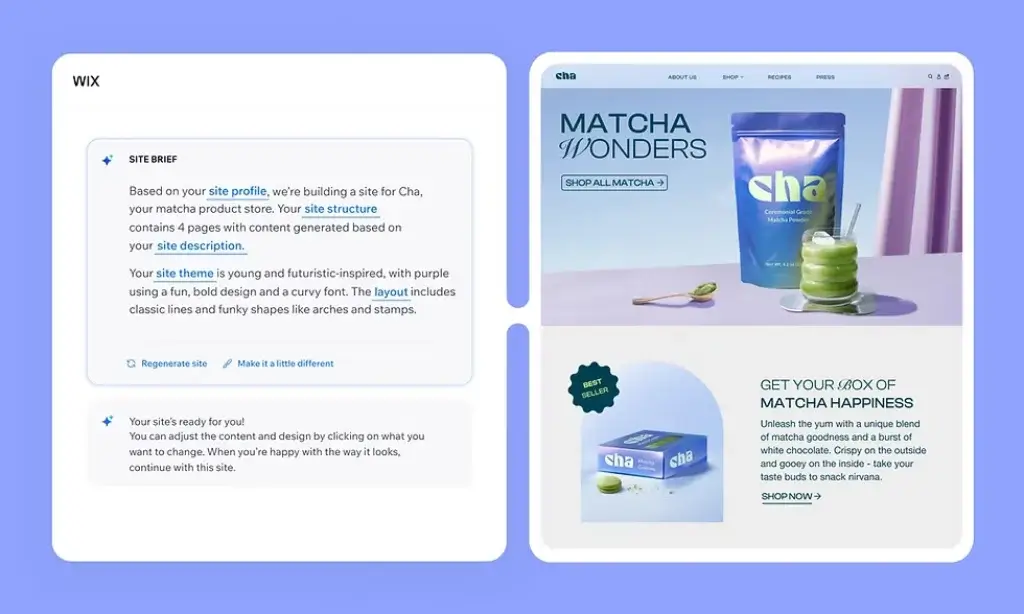
Wix Harmony is one of the more interesting newer developments in the platform. Wix describes it as a hybrid website builder that blends AI-powered creation with precise drag-and-drop control. In practical terms, that means you can prompt AI to generate layouts, pages, sections, text, and images, then refine everything manually without leaving the editor.
This is a smart direction for Wix. Many AI builders are good at giving you a fast first draft, but weaker when you want more control afterward. Harmony tries to solve that problem by combining speed and editability in the same experience. That makes it more appealing than a purely prompt-based builder.
Aria and AI-Assisted Creation
Wix Harmony also introduces Aria, its AI agent inside the editor. Wix positions Aria as a design and business assistant that can help generate full pages, create sections, produce copy, and guide users through setup decisions. This is especially useful for solo users and small businesses that want a faster launch process without hiring a designer immediately.
AI Is Useful, But Not the Final Product
The strongest way to use Wix AI is as a productivity layer, not as a substitute for editorial judgment or design taste. You can use it to build first drafts, generate ideas, and accelerate production, but the best results still come when you refine the output manually. That is one reason Wix Harmony is more compelling than older AI-first approaches. It keeps you in control.
Pros and Cons
Benefits and Limitations of Using Wix
Positive
✅ Broad platform depth
✅ Better design freedom
✅ Strong fit for SMBs
✅ Reduced technical overhead
Negatives
❌ Template switching is still clunky
❌ Less open-ended than WordPress
❌ Can get expensive at higher tiers
❌ Not ideal for advanced commerce at scale
Strengths & Benefits
Wix gets a lot right for users who want a modern website builder without managing a technical stack.
- Broad platform depth – Website, hosting, SEO, CRM, marketing, and ecommerce are all under one roof.
- Better design freedom – The classic editor remains more flexible than several competing builders.
- Strong fit for SMBs – Small businesses can manage leads, forms, bookings, and payments without leaving the platform.
- Reduced technical overhead – Hosting, scaling, and security are largely handled for you.
Limitations & Drawbacks
Wix is strong, but it still has tradeoffs you should understand before committing.
- Template switching is still clunky – Changing direction after launch is not as flexible as many users expect.
- Less open-ended than WordPress – You gain simplicity, but lose some freedom and portability.
- Can get expensive at higher tiers – Wix starts affordably, but advanced plans are no longer budget-level.
- Not ideal for advanced commerce at scale – Shopify is usually the better fit for complex online selling operations.
Growth Features
Wix SEO, Marketing, and Business Tools
Wix has improved substantially in SEO and growth tooling. Older opinions about Wix SEO are often outdated. The platform now offers far more control than it used to, and for most small business and content sites, the SEO stack is now strong enough to be taken seriously.
Built-In SEO Features
Wix promotes advanced SEO tools built into the platform. Its SEO features page highlights a robots.txt editor, structured data markup, and server-side rendering. It also automatically adds structured data to product pages, blog posts, events, and other content types, while still allowing users to customize markup. For most SMBs, that is more than enough SEO control to build a competitive site.
Practical SEO Strengths
From a practical perspective, Wix now covers the areas most users actually need: editable metadata, structured data support, indexation controls, redirects, XML sitemap support, and reasonable rendering for crawlers. That is why modern Wix reviews should not dismiss the platform on SEO grounds. The bigger SEO issue is usually not the platform anymore, but the quality of the site’s content, internal linking, and execution.
Marketing and CRM
Wix’s built-in CRM is one of its underrated strengths. The platform frames it as a complete customer management solution already connected to your site. That matters because it reduces friction between attracting a visitor and turning them into a lead. Instead of bolting on a separate CRM from day one, many businesses can get started with what Wix already includes.
Good Fit for Operators, Not Just Designers
This is one of the main reasons Wix has become more attractive over time. It is no longer just a visual website builder. It is a platform for people who need to publish, market, capture leads, and manage simple business workflows without building a complicated software stack around the site.
Online Selling
Wix Ecommerce Capabilities
Wix is a solid e-commerce platform for small and mid-sized sellers, but it is not equally strong for every store type. The core question is not whether Wix can sell online. It absolutely can. The better question is how far you plan to grow and how complex your operations need to become.
What Wix Does Well for E-commerce
Wix’s ecommerce platform includes storefront customization, cart and checkout tools, payments, store analytics, ecommerce apps, multichannel sales, and multilingual selling. It also promotes selling across channels like Facebook, Instagram, Google Shopping, and eBay from one dashboard. For a typical SMB store, that is a strong set of features.
Where It Makes Sense
Wix e-commerce is strongest for businesses that want an attractive storefront design, manageable catalog complexity, and built-in operational tools without moving to a commerce-first ecosystem. If you sell a moderate number of products, services, digital items, or appointment-based offerings, Wix can be a very practical fit.
Where Shopify Still Wins
Shopify is still the better platform when your store is the business, not just a feature of the business. It generally handles deeper inventory operations, app ecosystems built around retail, and larger-scale selling more confidently. My view is that Wix is the better all-in-one site platform, but Shopify is still the better dedicated commerce platform.
The Real Takeaway
If your site needs to combine content, design, lead generation, and moderate online selling, Wix is often the more balanced choice. If you are building a commerce-first machine, Shopify usually remains the stronger bet.
Pricing
Wix Pricing & Plans
Wix pricing is more straightforward than some builders, but you still need to read it carefully. The platform currently lists four main paid plans: Light, Core, Business, and Business Elite. Wix also notes that prices and currency vary by location, and displayed prices are based on yearly subscriptions paid in full.
Light
Light is positioned as the entry paid plan. It includes a custom domain, 2 GB of storage, multi-cloud hosting, a light marketing suite, and support for two collaborators. This is fine for simple websites, portfolios, or brochure-style business sites that do not need payments.
Core
Core is the first plan that becomes commercially interesting for many businesses. It includes 50 GB of storage, basic marketing features, payment acceptance, basic ecommerce, scheduling and services, and support for five collaborators. For many small business websites, this is the practical entry point.
Business
Business is the plan most serious SMBs should consider first. It adds 100 GB of storage, a stronger marketing suite, standard e-commerce capabilities, and more collaborators. This usually feels like the sweet spot if your website is tied to real business activity.
Business Elite
Business Elite is Wix’s premium mainstream tier. It includes unlimited storage, advanced marketing, advanced ecommerce, advanced developer platform access, and up to 100 collaborators. It is not cheap, so you should only move here if you have a real operational need for the higher ceiling.
Pricing Table
The table below gives a practical view of how Wix’s core plans compare.
| Plan | Light | Core | Business | Business Elite |
| Starting price | About $17.77/mo | About $29.77/mo | About $39.77/mo | About $159.77/mo |
| Best for | Basic websites | Small businesses | Growing brands | Advanced teams |
| Storage | 2 GB | 50 GB | 100 GB | Unlimited |
| Accept payments | No | Yes | Yes | Yes |
| eCommerce level | None | Basic | Standard | Advanced |
| Collaborators | 2 | 5 | 10 | 100 |
| Recommended for | Simple launches | The minimum business plan | Best value for most SMBs | Larger teams and advanced needs |
For most readers, Core or Business will be the right starting point. Light is too limited for many business use cases, while Business Elite only makes sense if you genuinely need its scale and collaboration ceiling.
Use Cases
Who Should Use Wix?
Wix is not the right builder for everyone, but it fits several important buyer profiles very well.
Beginners Who Want a Serious Platform
If you want a builder that is easy to start with but not too limited once your site grows, Wix is one of the best options. It is more beginner-friendly than Webflow and more flexible visually than many simplified builders.
Small Businesses
Wix is particularly strong for small businesses that need more than a homepage. If you want forms, bookings, CRM, email marketing, and payments under one system, Wix is a very efficient choice.
Creators and Portfolio Sites
Design flexibility still makes Wix attractive for creatives, consultants, coaches, and freelancers. It gives you more freedom than many business-first builders while still keeping the setup manageable.
Stores That Are Not Pure Retail Machines
If your online store is part of a broader brand site, Wix is often a better fit than a pure commerce platform. It works especially well when content, design, and selling matter equally.
When Wix Might Not Be Right
Wix may not be the best choice if you want full CMS portability, deep plugin-level extensibility, or enterprise-grade ecommerce operations. In those cases, WordPress or Shopify may be better aligned with your needs.
Competitors
Competitor Alternatives to Wix
Wix competes in a crowded market, but the main alternatives are usually WordPress, Squarespace, Shopify, and Webflow. The right alternative depends on whether your priority is content flexibility, design polish, advanced ecommerce, or pro-level front-end control.
| Feature Type | Wix | Squarespace | Shopify | Webflow |
| Core focus | All-in-one website platform | Design-led site builder | Commerce-first platform | Pro web design platform |
| Best for | SMBs and creators | Portfolios and polished sites | Serious online stores | Designers and advanced teams |
| Ease of use | High | High | Moderate | Lower |
| Design flexibility | Strong | Good but more constrained | Good for stores | Excellent |
| SEO and business tools | Built in | Solid basics | Strong commerce SEO | Strong technical control |
| eCommerce depth | Good | Moderate | Excellent | Moderate |
| Overall angle | Best all-around balance | Best for elegant simplicity | Best for scaling stores | Best for advanced design control |
Compared with Squarespace, Wix usually gives you more flexibility and a broader business toolkit. Compared with Shopify, Wix is a more balanced website platform, but Shopify remains the better dedicated e-commerce choice. Compared with Webflow, Wix is easier to adopt and better for all-in-one business use cases, while Webflow remains stronger for more advanced design systems and front-end control.
If I had to summarize it simply, Wix is still the best choice for most users who want one platform to build, manage, and grow a website without assembling a complex stack themselves.
Best Practices
Getting Started with Wix
To get the most out of Wix, you should make a few smart decisions early.
Choose the Right Builder Experience
If you want the most guided path, start with the AI Website Builder or Wix Harmony. If you want more traditional manual control, the classic Wix Editor is still a solid option. If you build client sites or need more advanced responsive controls, Wix Studio is the right direction.
Pick Your Template Carefully
Wix still makes template changes more awkward than some users expect, so it is worth choosing a strong starting point before you build too much. This is one area where planning upfront can save real time later.
Do the SEO Basics Early
Wix has the tools, but you still need to use them. Set clean page titles, meta descriptions, internal links, structured data where relevant, and consistent page hierarchy from the start. The platform can support good SEO, but it will not do strategy for you.
Use Built-In Business Features Before Adding More Tools
Many Wix users add external apps too quickly. In many cases, Wix already includes enough CRM, form, booking, and email functionality to cover the early stages of a site. It is usually smarter to master what is already built in before expanding your stack.
Match the Platform to the Business Model
Wix is strongest when your site needs to do several things well at once. If your site is primarily content plus lead generation, or content plus moderate selling, it is a great fit. If it is primarily advanced retail infrastructure, you may be better off choosing a more commerce-first system.
Conclusion
Final Thoughts
Wix remains one of the strongest all-around website builders because it solves more than one problem at a time. It helps you design a site, publish it quickly, host it securely, add SEO settings, capture leads, and run basic business operations without leaving the platform. That combination still makes it one of the best options for creators, freelancers, small businesses, and many growing brands.
Its biggest strengths are convenience, design flexibility, business depth, and a better AI direction than many competitors. Its biggest limitations are reduced openness compared with WordPress, less commerce depth than Shopify, and some friction if you want to change direction later inside the same site structure.
Overall, Wix is a strong recommendation for users who want a polished all-in-one website platform that balances ease of use with meaningful room to grow.
Have more questions?
Frequently Asked Questions
Is Wix good for beginners?
Yes. Wix is one of the best website builders for beginners because it combines templates, hosting, a visual editor, and business tools in one place.
Is Wix good for SEO?
Yes. Wix now offers a mature SEO stack for most users, including metadata controls, structured data support, robots.txt editing, and built-in SEO tools.
What happened to Wix ADI?
Wix ended support for ADI on November 10, 2024. It has been replaced by the Wix AI Website Builder.
What is Wix Harmony?
Wix Harmony is a hybrid editor that combines AI-powered creation with precise drag-and-drop control, giving users faster setup without losing editing flexibility.
Is Wix better than Squarespace?
For most users, yes. Wix usually offers more flexibility and a broader feature set, while Squarespace is often better if you want a more curated design experience.
Is Wix better than Shopify?
That depends on your goal. Wix is better as an all-around website platform, while Shopify is usually better for larger, more commerce-focused stores.
Can you sell products on Wix?
Yes. Wix supports online stores, payments, cart and checkout, multichannel selling, and a range of ecommerce management tools.
Does Wix include hosting?
Yes. Every Wix site includes hosting as part of the platform, which reduces technical setup and server management work.
Is Wix Studio the same as Editor X?
No. Editor X completed its transition to Wix Studio in January 2025. Wix Studio is now the more advanced platform for agencies and professional users.
Is Wix worth it overall?
Yes. If you want a polished all-in-one website builder with strong design flexibility, useful business tools, and improving AI capabilities, Wix is worth serious consideration.